

Choosing a business phone system is hard when costs and features vary widely. Recent statistics show that over 61% of businesses have now moved to VoIP services for better connectivity and flexibility.
This article walks through Ooma Office’s offerings, with a clear comparison of its pricing, features, and possible alternatives in 2024’s market.
Key Takeaways
- Ooma Office offers several pricing plans for businesses of all sizes, starting from $19.95 per month per user up to custom enterprise solutions, all with a $0 setup fee.
- Key features of Ooma Office include a customizable virtual receptionist, extension dialing, on – hold music or messages, mobile app integration, video conferencing, enhanced call blocking, and digital faxing.
- Ooma Office provides competitive pricing and broad features for communication and collaboration, but users should weigh potential drawbacks like limited customization for complex business needs and reliance on internet connectivity, which could lead to service disruptions.
- Alternatives to Ooma Office in the 2024 market include Nextiva for its customer service and unified communications; GoToConnect for its conferencing tools; Dialpad for its easy-to-use interface; Vonage for its virtual phone system features; and RingCentral for reliable office phone systems.
- Additional services from Ooma Office that widen business reach include toll – free numbers and international calling at competitive rates.
Overview of Ooma Office
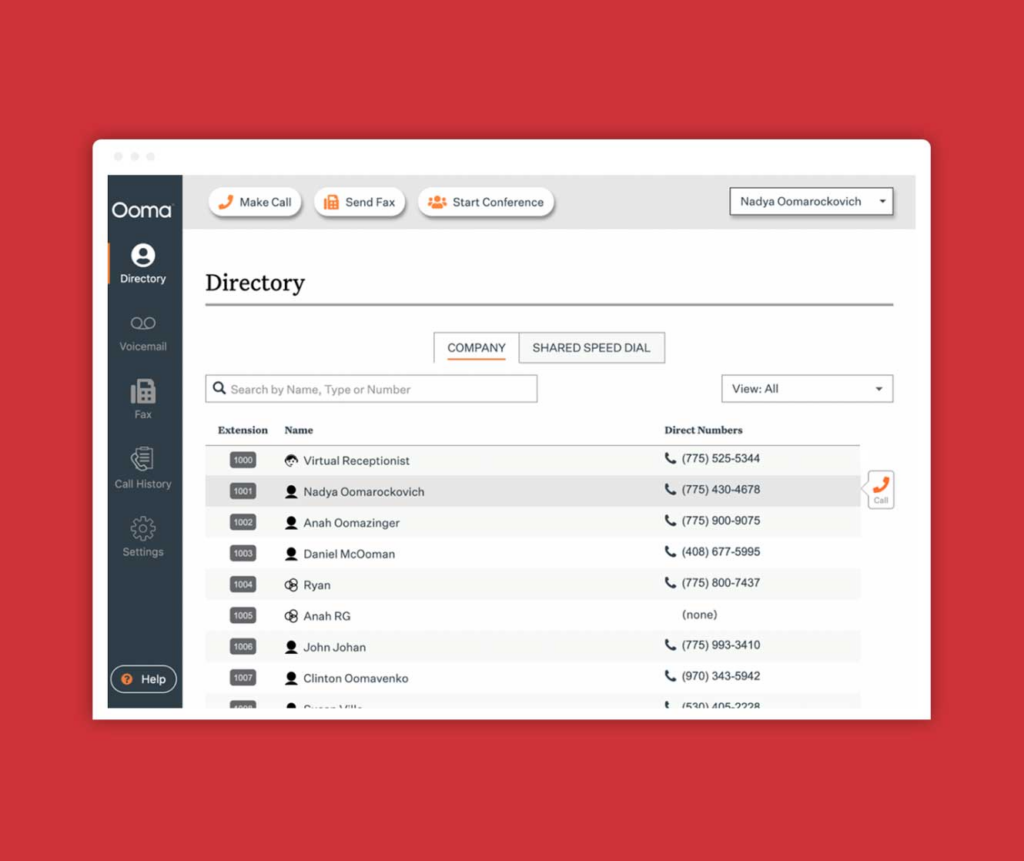
Ooma Office is a popular business phone system with competitive pricing and a range of key features. With options for local phone numbers, virtual receptionists, call recording, and enhanced call blocking, Ooma Office fits the needs of small and medium-sized businesses.
Ooma Office Pricing Plans
Ooma Office covers a variety of business needs with flexible pricing and options built to fit companies of different sizes and requirements. The table below outlines the latest pricing structures and options available for Ooma Office as of 2024.
| Plan | Monthly Cost per User | Setup Fee | Included Features | Additional Services |
|---|---|---|---|---|
| Ooma Office Basic | $19.95 | $0 | Unlimited Calling in U.S./Canada, Virtual Receptionist, Voicemail | Call Recording, Desktop App |
| Ooma Office Pro | $24.95 | $0 | Everything in Basic, Plus Video Conferencing, Desktop and Mobile App, Enhanced Call Blocking | CRM Integration, Hot Desking |
| Ooma Office Pro Plus | $29.95 | $0 | Everything in Pro, Plus Voicemail Transcription, Call Queuing | Toll-Free Numbers, International Calling Rates |
| Enterprise Plans | Custom | Custom | Custom Solutions Tailored to Business Needs; Dedicated Support | Custom Feature Development, Enhanced Security Options |
Comparing the tiers helps businesses pick the most cost-effective plan for their operations, since each level is priced for a different set of requirements. The tiered structure scales, so companies can start on a lower plan and upgrade as they grow without switching providers. The feature sets at each level give businesses the tools they need for day-to-day communication and collaboration, and the higher tiers add capabilities like video conferencing, voicemail transcription, and call queuing.
Every plan carries a $0 setup fee, which reflects Ooma’s focus on affordable access and keeps the upfront cost low for a new business. The plan differences show that the company treats each business’s needs as distinct, since one size rarely fits every communication requirement, and the range from the Basic plan to custom enterprise solutions gives buyers room to match the plan to their size and budget.
Ooma Office Features
Ooma Office comes with a broad set of features aimed at businesses that want strong communication tools. These help simplify operations and support teamwork.
- Customizable Virtual Receptionist: Direct callers to the right department with a virtual receptionist. You can set up personalized greetings and menus to make your business look professional and organized.
- Extension Dialing: Reach team members quickly using short dial codes. This simplifies internal communication and saves time.
- On-Hold Music or Messages: Keep customers engaged while they wait by playing music or messages specific to your business, which improves the call experience.
- Mobile App Integration: Access Ooma Office from anywhere through the mobile app. It turns your smartphone into part of your office phone system, so you stay connected on the go.
- Video Conferencing Capabilities: Meet face-to-face with colleagues and clients using Ooma’s built-in video conferencing, which cuts the need for separate meeting software.
- Enhanced Call Blocking: Protect your business from unwanted calls with advanced call blocking that keeps focus on important communications.
- Digital Faxing Services: Send and receive faxes without a traditional fax machine, using cloud-based phone systems that save space and resources.
Pros & Cons
The feature list sets up a look at Ooma Office’s strengths and weaknesses. The table below outlines the pros and cons, showing what makes it an appealing option for businesses along with drawbacks to consider.
| Pros of Ooma Office | Cons of Ooma Office |
|---|---|
| User-friendly interface simplifies operation | Limited customization for complex business needs |
| Competitive pricing offers cost-effective solutions | Some advanced features may require additional cost |
| Virtual Receptionist improves customer service | Dependent on internet connection, leading to potential service disruptions |
| Comprehensive mobile app extends versatility | Initial setup might be challenging for some users |
| CRM integration supports business processes | International calling rates vary and could add to expenses |
| Video conferencing supports modern workspace demands | Customer support experiences may differ |
| Digital faxing removes need for physical machines | May lack some industry-specific features |
Each business should weigh these advantages against the limitations to choose the right phone system. The next section takes a closer look at the individual features of Ooma Office to show how they line up with your business goals.
Detailed Look at Ooma Office Features
Here is a closer look at the main features of Ooma Office, including the virtual receptionist, call recording, enhanced call blocking, video conferencing, and voicemail forwarding and transcription.
Ooma Virtual Receptionist
Ooma’s Virtual Receptionist manages incoming calls and routes them to the right extensions or people in your organization. Callers are greeted with a professional, customizable automated message, so the calling experience stays smooth for customers and clients.
By directing calls on preset criteria, such as time of day or caller ID, the Virtual Receptionist improves call handling and overall efficiency. Calls reach the right person faster, and staff spend less time transferring callers between departments.
With Ooma’s Virtual Receptionist, businesses create a strong first impression while simplifying call management. Users also have full control over customization options like personalized greetings and call routing rules to match their business.
Ooma Call Recording – Phone Service
Another useful feature is Ooma Call Recording. With it, businesses can record and store calls for later reference and quality control.
This adds a layer of security by keeping accurate records of communications and helping with compliance with legal requirements. Reviewing conversations can also help train new employees or improve customer service, and stored recordings give a clear reference when there is a question about what was said on a call.
Businesses find real value in Ooma’s call recording, since it lets them monitor customer satisfaction, meet regulatory requirements, resolve disputes, and train staff more efficiently.
Ooma Enhanced Call Blocking for Small Business
Ooma Office also offers enhanced call-blocking. With this feature, businesses can manage unwanted calls and guard against potential security risks.
The system lets users block specific numbers or entire area codes, which cuts disruptions and keeps the office communication environment secure. Blocking repeat spam and robocalls also frees staff to focus on calls from real customers.
Beyond basic call blocking, Ooma Office lets users set custom call-handling rules based on specific criteria. This flexibility gives businesses full control over incoming calls and lets them tailor settings to their own preferences and requirements.
Ooma Video Conferencing
Ooma’s video conferencing service supports clear communication. With high-definition video and clear audio, Ooma Video Conferencing brings remote teams together.
The feature allows face-to-face interactions that mimic in-person meetings, which supports collaboration and productivity for teams that are spread across locations or working remotely.
The platform offers easy screen-sharing, so presenters can share their screens with participants in real time. Ooma Video Conferencing also supports virtual whiteboarding for brainstorming and interactive discussions, which keeps meetings productive without extra tools.
Ooma Voicemail Forwarding and Transcription
Ooma’s voicemail forwarding and transcription feature helps make sure no important message is missed. It automatically transcribes voicemails into text, so you can read messages without listening to them.
The feature also lets users forward voicemails to an email address, so they can access messages from anywhere at any time. That is useful for teams that travel or work away from the office, since a missed call still lands in the inbox as readable text.
With Ooma’s voicemail forwarding and transcription, businesses can simplify communication and stay responsive to clients and partners. This tool improves productivity by making voicemail easy to manage, which supports better customer service and smoother operations.
Ooma Office User Experience
Here is a look at the Ooma Office user experience, including its desktop and mobile apps, CRM integration, hot desking, and digital faxing. These elements make the business phone system more efficient and productive.
Desktop and Mobile Apps
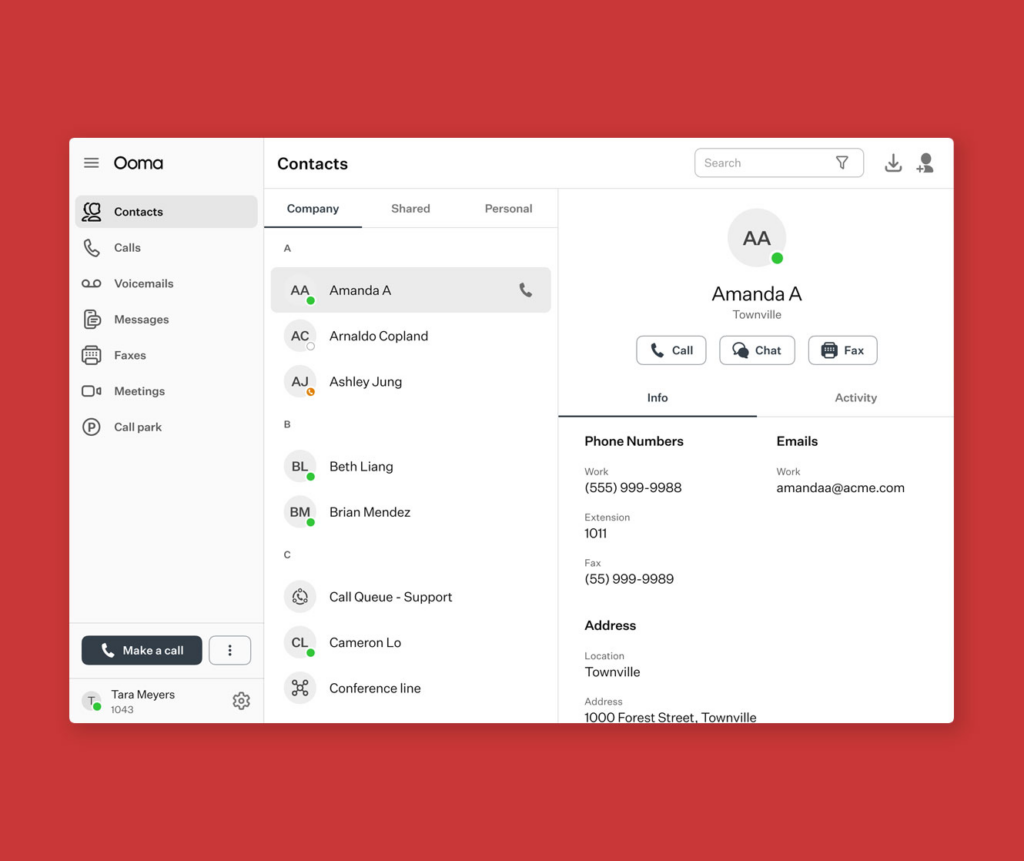
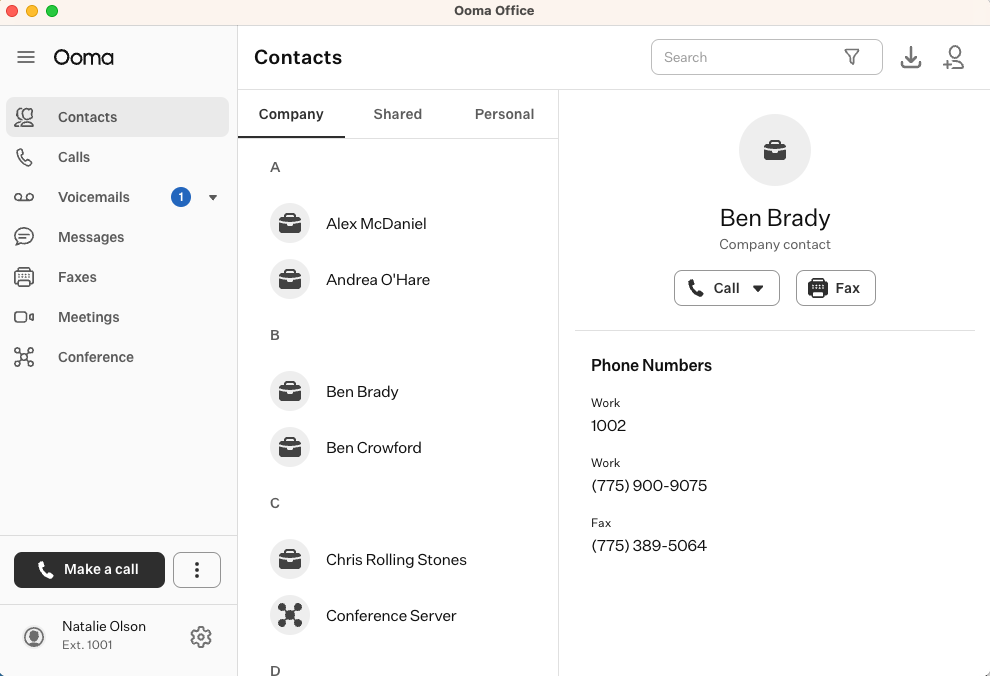
Ooma Office offers a smooth user experience through its desktop and mobile apps, so you stay connected wherever you are. With clear interfaces and strong features, the apps give easy access to core phone system functions such as call management, voicemail retrieval, and conferencing.
Users can make and receive calls with their business numbers from computers or smartphones, which keeps employees reachable on the go and lets them keep personal numbers private while still using the company line.
The desktop and mobile apps also support CRM integration, so users can sync contacts and customer information across platforms. Hot desking adds flexibility in workspace arrangements, allowing smooth transitions between shared workspaces without hurting productivity.
CRM Integration
Ooma Office connects with popular CRM systems, which simplifies customer relationship management for businesses. By linking Ooma Office with your CRM platform, you can keep customer information and call logs in one place for a full view of interactions.
The integration enables automatic caller ID recognition, which shows associated customer data on incoming calls. With this visibility, teams can deliver personalized service and see customer history without switching between applications, so a rep can greet a caller by name and pick up where the last conversation left off.
Linking Ooma Office with your CRM also allows easy call logging and note-taking directly within the CRM interface. This keeps key details from conversations captured and stored alongside the relevant customer records.
Hot Desking
Turn on hot desking to increase flexibility and productivity. Employees can use any available desk or workspace, which supports collaboration and efficient use of space. With Ooma Office, employees log in at any phone and their extension settings move with them, so communication stays consistent wherever they work.
This feature suits companies with remote workers or fluctuating office usage, and it works well for teams that rotate between shifts or shared spaces. Hot desking simplifies operations and supports a dynamic work environment without tying an extension to a single physical desk.
Support mobility and adaptability by adding hot desking to your office. Encourage teamwork while making better use of resources. Improve workspace efficiency with the flexibility of hot desking on Ooma Office’s user-friendly platform.
Digital Faxing
Digital faxing simplifies document transmission. With Ooma Office, virtual faxing lets users send and receive faxes through email rather than a traditional machine.
The feature gives businesses the flexibility to handle important documents without physical limits, which supports smooth operations and collaboration. It also takes a more eco-friendly approach by cutting paper waste.
Virtual faxing also improves security with encrypted transmission of sensitive information, which protects data from unauthorized access or interception. As businesses put more weight on digital transformation and remote work, the convenience and security of digital fax make it an important tool for modern communication needs in 2024.
Additional Ooma Office Services
Ooma Office also offers extra services such as toll-free numbers and international calling, which let businesses widen their reach and serve a larger audience. These features add communication options and give businesses more flexibility when operating on a global scale.
Toll-Free Number
A toll-free number is an important tool for businesses, since it lets customers reach them at no cost. It improves customer accessibility and conveys a professional image.
With Ooma Office, you can set up a toll-free number to widen your reach and provide good customer service. It also helps a small business look larger and more established to customers in other regions.
A toll-free number can attract more potential customers because it removes long-distance charges for callers. It shows that you value customer convenience and are willing to make it easier for them to get in touch.
International Calling
International calling with Ooma Office connects you to clients and partners worldwide. Users can make clear calls to international numbers, which supports global business operations.
With competitive rates and reliable connections, Ooma Office makes communication across borders easier and supports collaboration and wider market reach.
Ooma’s international calling keeps communication with overseas contacts clear and steady. This lets businesses engage a broader audience and pursue growth opportunities in diverse global markets.
Comparing Ooma Office with the Latest Business Phone Systems
When comparing Ooma Office with the latest business phone systems for 2024, weigh factors such as pricing options, virtual receptionist capabilities, conferencing features, and SMS vendor comparison.
Top alternatives to Ooma Office include Nextiva, GoToConnect, Dialpad, Vonage, and RingCentral. Each one is covered in more detail below so you can compare them against Ooma Office point by point.
Top Alternatives to Ooma Office for 2026
Looking for alternatives to Ooma Office for your business phone system? Consider the latest top contenders:
- Nextiva: Known for its unified communication solutions and customer service, Nextiva offers features including virtual fax, local phone numbers, and VoIP phone systems.
- GoToConnect: With strong conferencing features and reliable cloud-based phone systems, GoToConnect is a popular choice for businesses that need scalable communication.
- Dialpad: This alternative stands out for its user-friendly interface and CRM integration, which suits businesses that want to simplify their workflows.
- Vonage: With a broad set of virtual phone system features such as extension dialing, music on hold, and SMS vendor comparison tools, Vonage is a strong contender in the market.
- RingCentral: Known for its hosted PBX phone systems and virtual phone system options, RingCentral is a trusted name in business telephony, especially for reliable office phone systems.
Nextiva
Among alternatives to Ooma Office for 2024, Nextiva is a strong option. Its set of communication solutions covers the needs of modern businesses, from small teams to larger companies that need more channels in one place.
From VoIP phone systems and unified communications to cloud-based phone systems and virtual receptionist services, Nextiva provides an efficient platform for small and large enterprises alike.
Nextiva’s capabilities extend to local phone numbers, virtual faxing, conferencing features, extension dialing, music on hold, and SMS vendor comparisons. The user-friendly interface keeps navigation simple while supporting solid office telephony.
GoToConnect
GoToConnect is a full business phone system with advanced features for communication. It offers local and toll-free numbers, voicemail transcriptions, call recording, video conferencing, and integration with CRM platforms.
With desktop and mobile apps, GoToConnect keeps users connected on the go. The platform also supports hot desking, so employees can share workstations while keeping individual user profiles.
GoToConnect also provides digital faxing and international calling for global business operations. Its scalability suits small businesses as well as larger enterprises that want unified communications.
Dialpad
Another top alternative for business phone systems in 2024 is Dialpad. With a user-friendly interface and strong features, Dialpad offers a cloud-based communication platform.
The system integrates with customer relationship management (CRM) tools, so call activity and contact records stay connected in one place.
Dialpad’s artificial intelligence (AI) capabilities improve call quality and productivity. Its real-time transcriptions of voicemails make follow-ups quick and help capture information during calls, which makes it a solid option for businesses that want simpler communication.
Vonage
Vonage, a well-established player in business phone systems, offers features that suit small to mid-sized businesses. Its cloud-based phone systems provide local phone numbers, extension dialing, and virtual fax.
Vonage also includes strong conferencing features and an efficient virtual receptionist, which give businesses simpler communication and help route incoming calls without extra staff.
Vonage’s unified communications platform brings various communication channels into one solution. This connects devices and locations while supporting VoIP phone systems for cost-effective international calling.
RingCentral
RingCentral is a cloud-based phone system with a wide range of features such as virtual fax, local phone numbers, and extension dialing. Its unified communications platform connects businesses across various communication channels.
RingCentral also provides PBX phone systems and digital faxing for small businesses and large enterprises alike. Its virtual receptionist manages incoming calls, while the conferencing features support collaboration among team members regardless of location.
In 2024, RingCentral became a top choice in business telephony for its scalable and reliable hosted phone systems built to meet the needs of modern enterprises, whether a company is adding a few lines or rolling out phone service across many sites.
Conclusion
Ooma Office offers competitive pricing and a range of key features for business phone systems in 2024. Compared with the alternatives like Nextiva, GoToConnect, Dialpad, Vonage, and RingCentral, businesses can weigh the options against their specific needs.
Weighing the practical benefits and user experiences matters when making decisions about cloud-based phone systems for modern business communication. The right choice comes down to how each plan’s pricing, features, and support match the way your team actually works.
(Image credit: Ooma Office)

- Independent picks for exactly what you just read about
- Matched to your team size & needs
- Vendors don't pay for placement
Step 1 of 4
How big is your team?
We tailor recommendations to companies your size.















Related Articles

Project Management
10 Best Online Collaboration Tools for Remote Teams in 2026
Continue reading →

Team Messaging
15 Best Slack Alternatives in 2026 for Affordable Team Communication
Continue reading →

Team Messaging
How Communication Channels Are Evolving with Technology 2026
Continue reading →

Team Messaging
What is Communication Technology? 5 Communication Technology Examples
Continue reading →