
Managing tasks and projects by hand across a busy week is hard to keep straight, and it is easy to lose track of what needs to happen next. According to reports, over 10,000 CEOs and professionals have turned to Motion App Software for a solution.
This article covers the benefits of putting this AI-powered tool to work, from better scheduling and organization to smoother project management. Here is a closer look at how it works and where it helps.
Key Takeaways
- The software offers scheduling and organization features that help users manage tasks and projects. Its AI-powered tools automate scheduling and prioritize tasks by importance and deadline.
- With automated task and project management, the software removes manual scheduling and prioritization. It assigns work to teams, measures productivity, and builds custom schedules to keep work moving.
- Real-time progress tracking lets users monitor task and project status as it unfolds. This supports communication among team members, improves accountability, and helps spot bottlenecks early.
- The software provides collaboration tools for teamwork and communication. Team members can share files and updates, assign tasks, and track progress in real time throughout the project lifecycle.
What is Motion App Software?
Motion App Software is a capable tool used for task and project management. It brings together several strengths, including artificial intelligence, accessibility, and broad compatibility across devices.
Overview
The software has earned a place among task and project management tools. Used by over 10,000 professionals, including CEOs, it has proven its worth by helping users improve their focus and get more done.
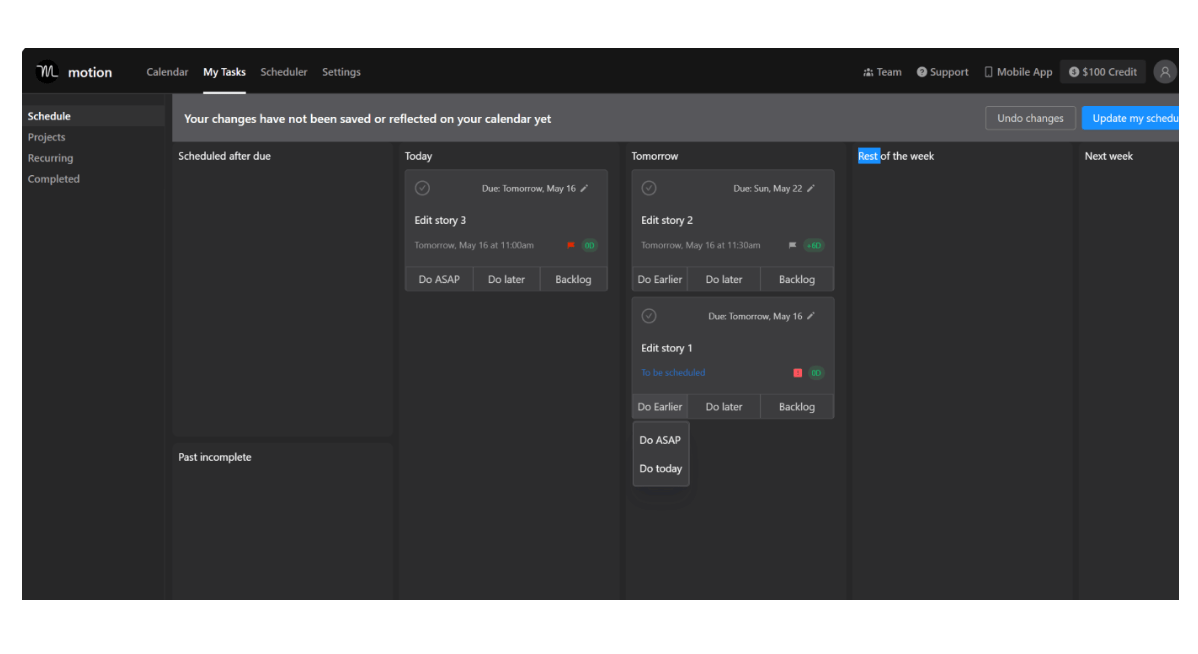
The software’s AI handles important jobs such as resolving calendar conflicts, prioritizing various duties, and scheduling meetings. One notable point is that users can create a task and then leave it alone, while the software takes over and manages it for them.
These automated features free up time for more substantial work requirements. On top of that, Motion offers an effective scheduling tool valued at $12 per month for existing Calendly users.
Users can also rely on the extensive time-tracking utilities inside the app to monitor their progress on specific tasks and see where their hours actually go.
Features
Adding Motion App Software into daily operations brings a wide set of features that support and simplify task and project management.
| Feature | Description |
|---|---|
| AI-powered productivity | Enhances project scheduling and organization by predicting and prioritizing tasks. |
| Calendar Integration | Merges with existing calendars, resolves conflicts, and schedules events seamlessly. |
| Task Scheduling | Automates workday scheduling, allowing focus on tasks. |
| Project Division | Breaks down complex assignments into manageable tasks. |
| Task Tracking | Enables logging hours spent on specific tasks with time-tracking capabilities. |
| Mobile Application Development | Ensures accessibility across various devices. |
| Bug-free software | Provides a robust build with minimal software bugs for fewer disruptions. |
| Workflow Automation | Streamlines routine procedures. |
| Resource Allocation | Enables easy allocation of resources to various projects or tasks. |
Artificial intelligence
Artificial intelligence drives Motion App software for task and project management. It sits behind many of the app’s most useful features. The AI plans projects, adjusts work schedules for different teams, and measures productivity levels along the way.
Motion App changes how conventional scheduling is done through its use of artificial intelligence. Professionals no longer have to prioritize tasks by hand or resolve calendar conflicts on their own; the AI handles these jobs itself, without extra input, and frees up more time for users to focus on other important parts of their careers or business.
Because artificial intelligence plays such a central role in improving Motion App’s overall productivity, the tool offers a forward-looking option for people who need strong support with task and project management.
Accessibility and compatibility
Motion App Software is built to work with a wide range of devices and operating systems. Whether you use a desktop computer, laptop, tablet, or smartphone, you can access the software and manage your tasks and projects on the go.
With its cloud-based setup, Motion App syncs your data across multiple devices so you never miss an update or a deadline. The software also integrates with popular calendar apps like Calendly for easier event management.
No matter which device or platform you prefer to work on, Motion App helps you stay organized and productive wherever you happen to be.
Benefits of Using Motion App Software for Task Management
Schedule and organize tasks with the help of Motion App Software so that no deadline slips through and work stays on track from start to finish.
Efficient scheduling and organization
Motion App Software offers scheduling and organization features that make it easier to manage tasks and projects. With its clear interface, users can create schedules, set deadlines, and allocate resources so that every task is properly organized.
The software’s AI-powered productivity tools automate the scheduling process, taking into account factors such as task importance and how close a deadline is. This helps users prioritize their work and makes sure that tasks are completed in a timely manner.
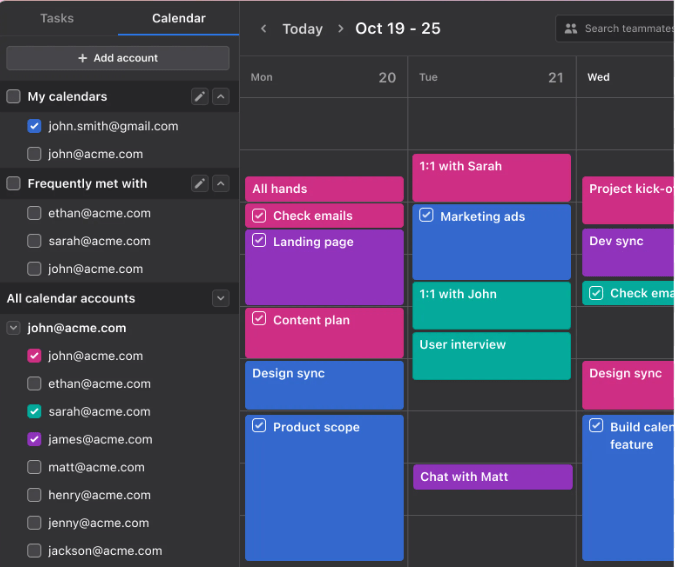
Motion App also provides calendar integration, so users can schedule tasks around meetings and events that have fixed times. With these scheduling and organization features, users can stay on top of their workload and get more done.
Automated task and project management
Motion App Software handles task and project management through its automated features. With this tool, users no longer have to schedule and prioritize their work by hand.
The software takes care of these jobs on its own, letting professionals focus on the more important parts of their work. Motion App’s AI system also plans projects by assigning work to teams, measuring productivity, and creating custom schedules for each of them.
Its ability to automate tasks and projects makes it an invaluable asset for CEOs and professionals who are seeking more efficiency and productivity in their daily workflow.
Real-time progress tracking
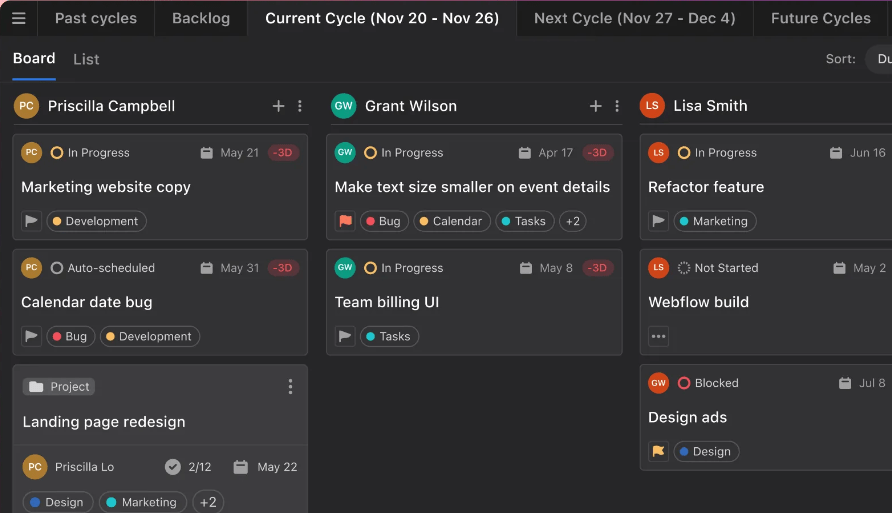
Motion App Software offers real-time progress tracking, so users can monitor the status of tasks and projects as they unfold. With this feature, you stay updated on project milestones, deadlines, and overall progress without delays.
This gives you a clear view of how projects are moving in terms of timeframes and completion rates. With access to real-time data, you can make informed decisions about resource allocation and task prioritization, and spot potential bottlenecks before they turn into major problems.
Real-time progress tracking supports communication among team members by giving visibility into individual contributions and overall project performance. The feature improves productivity and keeps everyone accountable and on track toward achieving project goals.
Collaboration tools
Motion App Software offers a set of collaboration tools for teamwork and communication. With these tools, team members can share files, updates, and feedback in real time so everyone stays on the same page.
The software also includes features like task assignments and progress tracking, so teams can work together and stay organized throughout the project lifecycle. By providing a central platform for collaboration, Motion App Software keeps teamwork and communication among team members in one place.
Benefits of Using Motion App Software for Project Management
Motion App Software provides several benefits for project management, including the ability to handle complex projects, better communication and team coordination, automated scheduling and prioritization, and detailed project reports.
Ability to handle complex projects
Motion App Software has advanced features that let it handle complex projects. The AI-powered app plans projects, measures productivity, and builds custom schedules that fit the needs of each project.
With Motion App, users can easily divide projects into manageable tasks, allocate resources where they are needed, and track progress in real time. This keeps even the most intricate projects organized and running smoothly, which leads to successful outcomes.
Improved communication and team coordination
Motion App Software supports task and project management, and it also improves communication and team coordination. With its collaboration tools, teams can talk, share updates, and stay on the same page throughout a project.
This cuts down on back-and-forth emails and meetings to get everyone up to speed. Motion App also provides real-time progress tracking, so team members can see the status of tasks and projects at any moment.
The result is more transparency and better coordination among team members, which leads to more efficient workflows and successful project outcomes across the team.
Automated scheduling and prioritization
Motion App Software offers automated scheduling and prioritization, which makes task and project management easier. The AI-powered system assigns priority to tasks based on importance and deadline.
It also schedules tasks around fixed meetings and events, so everything is organized for better productivity. With this automated scheduling and prioritization, users can stay on top of their workload without spending time managing their schedules by hand.
This process lets professionals focus on what matters most, completing tasks and meeting project deadlines. The AI in Motion App also helps team productivity by assigning work, measuring progress, and building schedules for each team member based on their availability and skillset.
Detailed project reports
Motion App Software can generate detailed project reports that give users useful insight into their projects. These reports offer a full overview of a project’s progress, which supports better decisions and analysis.
With information such as task completion rates, time spent on each task, and team performance metrics, users can track project milestones and find areas that need attention.
These detailed reports give a clear picture of a project’s status and help teams stay on top of their tasks and work efficiently.
Conclusion
Using Motion App Software for task and project management brings a good number of benefits. Its efficient scheduling and organization features help tasks get done, and its automated task and project management support smooth progress tracking and collaboration.
Motion App also gives users the ability to handle complex projects while improving communication and team coordination across the group. Taken together, Motion App Software is a capable tool that supports productivity and keeps workflow moving for professionals across many industries.
Frequently Asked Questions
How can motion app software help with task and project management?
Motion app software can help with task and project management through features such as task organization, deadline tracking, progress monitoring, and collaboration tools.
Is motion app software suitable for both small and large projects?
Yes, motion app software is designed to be scalable and adaptable, which makes it suitable for managing both small and large projects.
Can motion app software improve team communication during projects?
Yes, motion app software often includes features like real-time messaging, file sharing, and comment threads that improve team communication throughout the project lifecycle.
What are some benefits of using motion app software for task and project management?
Motion app software can help increase productivity, improve organization, simplify workflow processes, support collaboration among team members, and provide better visibility into project progress.
Can I access my tasks and projects on different devices with motion app software?
Yes, most motion app software works across various devices such as smartphones, tablets, laptops, or desktop computers, letting you access your tasks and projects from anywhere at any time.

- Independent picks for exactly what you just read about
- Matched to your team size & needs
- Vendors don't pay for placement
Step 1 of 4
How big is your team?
We tailor recommendations to companies your size.















Related Articles
Applicant Tracking Software
monday.com for HR and Recruiting (2026): Hiring Pipelines, Onboarding and When You Need an ATS
Continue reading →
Project Management
monday.com for Remote Teams (2026): Async Updates, Dashboards and Slack, Zoom and Teams Setup
Continue reading →
Project Management
monday.com for Nonprofits (2026): Programs, Grants, Volunteers and Donor Tracking
Continue reading →
Project Management
monday.com for Construction (2026): What It Covers and Where Procore or Buildertrend Fit Better
Continue reading →