

Are you grappling with how long it takes to build a website? The process can range from a few hours to several weeks, depending on various factors. This blog post will provide insight into the timeline of building a website, whether DIY or professional.
Read on to crack the code and speed up your web development journey!
Key Takeaways
- The time it takes to build a website can vary from a few hours to several weeks, depending on factors like whether you choose to do it yourself or hire a professional.
- Factors like the type of website (static or dynamic), available resources, and whether you use a website builder or code from scratch also affect the development time.
- DIY websites can be cost-effective but may take longer due to learning and experimenting, while hiring professionals saves time and ensures high-quality work.
- Static websites are built using HTML and CSS, suitable for simple informational sites. Dynamic websites use server-side technologies like PHP or JavaScript for interactive features and frequent updates.
- Access to the right resources like a clear vision for your site, content preparation, reliable internet connection, suitable device, and using tools/technologies can speed up the development process.
- Website builders offer pre – designed templates that can be customized; coding from scratch offers more flexibility but requires programming knowledge. Consider your skill level, budget, and desired functionality before deciding between them.
- Timeline for DIY website development includes concept development, website builder selection,content preparation/layout design customization,testing/publishing
- Timeline for Professional Development involves goal setting/research,finding developer,outlining requirements/design mockups,the actual development process/final review
Factors Affecting Website Development Time
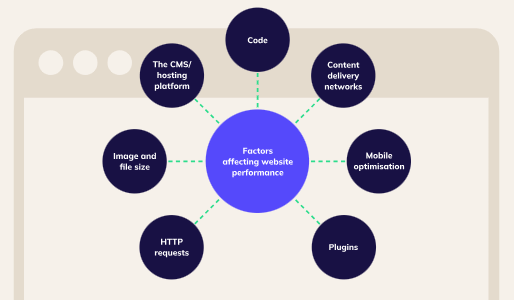
The time it takes to build a website can vary depending on various factors, such as whether you choose to do it yourself or hire a professional, the type of website you want (static or dynamic), the resources available to you, and whether you opt for a website builder or code from scratch.
DIY vs. hiring a professional
Choosing to build your website by yourself can be cost-effective, particularly if you have a tight budget. In contrast, hiring a professional might seem like an expensive option but it saves time and gives a polished result.
DIY projects often require some degree of learning and experimenting that may take longer than anticipated. Professionals, on the other hand, bring their experience to the table which ensures high-quality work without common pitfalls or mistakes.
They understand best practices in design and SEO strategies which could drive more traffic to your site and increase overall visibility online. It’s important weigh out these factors when deciding between DIY or hiring professionals for your website development project.
Type of website (static vs. dynamic)
Static and dynamic websites are two types of websites that vary in terms of functionality and content management. A static website is built using HTML and CSS, where the content remains fixed without any changes unless manually edited.
These websites are suitable for simple informational sites that don’t require frequent updates. On the other hand, dynamic websites use server-side technologies like PHP or JavaScript to generate pages on the fly.
This allows for more interactive features such as e-commerce functionality, user logins, and content management systems (CMS). Dynamic websites can be easily updated and customized. This makes them ideal for businesses or individuals who need a more flexible online presence.
In summary, the decision between a static or dynamic website depends on your specific needs and preferences. If you have a small business with minimal updates required, a static website could suffice.
Available resources
To speed up the website development process, it’s important to have access to the right resources. This includes having a clear vision for your website and its goals, as well as any necessary content such as images, videos, and written copy.
Additionally, having a reliable internet connection and a suitable device for designing and testing your website is essential. It can also be helpful to use available tools and technologies such as website builders or content management systems like WordPress.
By utilizing these resources effectively, you can simplify the development timeline and create a successful website in less time.
Choosing a website builder vs. coding from scratch
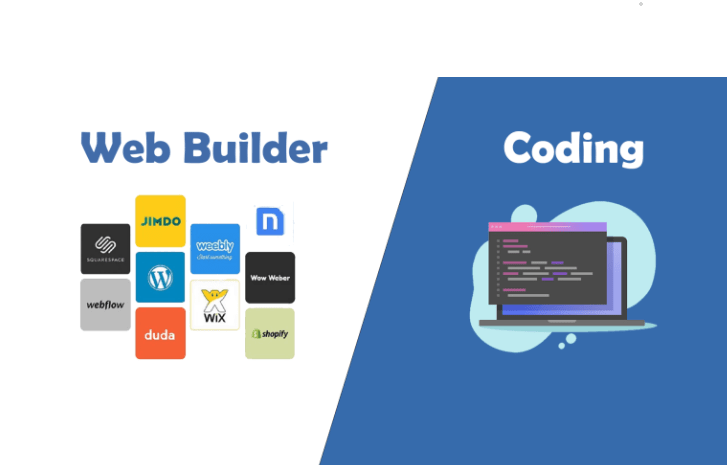
Many individuals and businesses face the decision of whether to use a website builder or code their website from scratch. Opting for a website builder can significantly reduce development time, as these platforms provide pre-designed templates that can be customized to fit your needs.
On the other hand, coding from scratch offers more flexibility and control over every aspect of the website but requires advanced programming knowledge and expertise. It’s important to weigh the pros and cons of each option based on your skill level, budget, and desired functionality before making a decision.
Timeline for DIY Website Development
The timeline for DIY website development includes concept development, website builder selection, content preparation, layout design, customization, testing and publishing. Find out how long each step takes and get started on building your own website today!
Concept development
During the concept development stage of website creation, you will define the purpose and goals of your site. This involves determining your target audience, understanding their needs, and brainstorming ideas for content and design.
You may also conduct research to gather inspiration from other websites in your industry. By clearly defining your concept at this early stage, you will have a solid foundation upon which to build your website.
Website builder selection
Choosing the right website builder is a essential step in the website development process. It’s important to consider factors such as ease of use, available templates and designs, customization options, integration with other tools and platforms, SEO capabilities, and customer support.
By carefully evaluating different website builders, you can find one that aligns with your specific needs and goals for your website. This will help simplify the development process and ensure that you have a easy-to-use and visually appealing website that effectively represents your brand or business online.
Content preparation
Content preparation is a essential step in building a website. This involves gathering and organizing all the text, images, videos, and other media that will be used on your site. It’s important to have high-quality content that reflects your brand and engages your audience.
During this stage, you’ll need to create or collect written copy for each page of your website, as well as any blog posts or articles you want to include. You’ll also need to gather relevant images and videos that support your content.
By taking the time to properly prepare your content before moving forward with the website development process, you can ensure a smoother workflow and create a more polished final product.
Website layout design
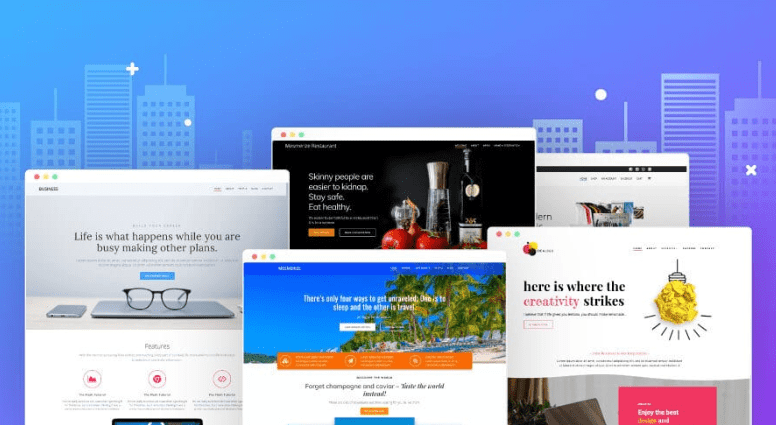
The website layout design is central in the overall user experience. It involves arranging elements such as text, images, and navigation menus to create an aesthetically pleasing and intuitive interface.
A well-designed layout ensures that visitors can easily find what they are looking for and navigate through the website smoothly. Key considerations in website layout design include choosing a visually appealing color scheme, selecting appropriate fonts, organizing content in a logical manner, and ensuring responsiveness across different devices.
By focusing on these aspects during the design phase, you can create a website that is both visually appealing and easy-to-use.”.
Customization
Customization is central in website development. This allows businesses to create a unique online presence tailored to their specific needs. Whether you’re building a website yourself or working with a professional, customization is an essential step in the process.
It involves personalizing various aspects of your site, such as the layout, color scheme, fonts, and images. By customizing these elements, you can align your website with your branding guidelines and create a visually appealing and cohesive look for your business.
Additionally, customization allows you to incorporate specific features and functionalities that are important for your target audience and business goals. With customization options available on popular platforms like WordPress or through coding from scratch, you have the flexibility to make your website truly one-of-a-kind.
Testing and publishing
After the website has been built, it is important to thoroughly test its functionality and usability. This includes checking links, forms, and interactive features to ensure they work properly.
Additionally, testing should be done across different devices and browsers to ensure compatibility. Once the testing phase is complete, the website can be published for the public to access and use.
This involves uploading files to a web server or publishing platform so that they can be accessed via a domain name. Regular maintenance and updates will also be necessary after publishing to keep the website running smoothly.
Timeline for Professional Website Development
In professional website development, the timeline typically involves goal setting and research, finding a developer, outlining requirements, designing mockups, the development process, and a final review.
Goal setting and research
Setting clear goals and conducting thorough research are essential steps in the website development process. Before starting any project, it is important to define specific objectives for your website, such as increasing online sales or improving brand visibility.
This will help guide the design and functionality of your site. Additionally, conducting research on your target audience and competitors can provide useful detail that inform decisions about content, design elements, and user experience.
By setting goals and conducting research upfront, you lay a solid foundation for the rest of the website development process.
Finding a developer
Finding a developer for your website is an important step in the professional website development process. Start by setting clear goals and conducting thorough research to identify potential developers who align with your project requirements.
Look for developers with relevant experience and a portfolio showcasing their skills. Connect with them through professional networks, online platforms, or referrals from trusted sources.
During the selection process, outline your project requirements clearly and ask for recommendations or proposals from the developers. Consider factors like communication skills, responsiveness, and budget when making your final decision.
Outlining requirements
To build a successful website, it is important to outline your requirements before diving into the development process. This involves identifying your goals and objectives for the website, as well as determining what features and functionality you need.
By clearly defining your requirements from the start, you can ensure that your website meets your specific needs and provides an optimal user experience. This step helps guide developers in creating a customized solution that aligns with your vision and ensures efficient development without unnecessary revisions or delays.
Designing mockups

Designing mockups is a essential step in the website development process. During this stage, designers create visual representations of the website’s layout and structure. Mockups serve as blueprints that outline the placement of elements such as headers, menus, content sections, and images.
Designers use various design tools to bring the website concept to life, ensuring that it aligns with the client’s vision and brand identity. The mockup phase allows for revisions and feedback before moving on to the actual development stage.
By designing mockups beforehand, developers can save time by having a clear roadmap for implementation, resulting in an efficient website construction process.
Development process
The development process for building a website involves several key steps. After setting goals and conducting research, you’ll need to find a developer who can bring your vision to life.
This includes outlining the requirements for your website and designing mockups to ensure the layout meets your needs. The actual development process will then take place, where the coding is done and all the features are added.
Finally, there will be a final review stage before launching the completed website.
Final review
During the final review stage of website development, it is essential to thoroughly test all aspects of the site to ensure its functionality and usability. This includes checking for broken links, testing forms and interactive elements, and verifying that all content is displayed correctly across different devices and browsers.
It is also important to conduct a review of the website’s performance. This makes sure it loads quickly and efficiently. Any necessary adjustments or fixes should be made before moving forward with publishing the site.
The final review ensures that your website is ready for launch and provides visitors with a smooth browsing experience.
Tips for Efficient Website Development
To ensure efficient website development, it is important to have clear project planning, utilize responsive design, use version control for easier collaboration, optimize performance for faster loading times, consider security measures to protect user data, and take a user-centric approach throughout the development process.
Clear project planning
Clear project planning is essential for efficient website development. It involves defining the goals and objectives of the website, identifying target audience needs, and outlining project requirements.
By establishing a clear timeline, assigning tasks and responsibilities, and setting realistic milestones, project planning helps keep everyone on track and ensures that all aspects of the website are addressed in a timely manner.
With clear project planning, potential bottlenecks can be identified early on and solutions can be devised to overcome them. This enables smoother collaboration among team members and minimizes delays during the website development process.
Responsive design
Responsive design is essential for ensuring that your website looks and functions well across different devices. By using responsive design techniques, you can make sure that your site adapts to the screen size and resolution of smartphones, tablets, and desktop computers.
This means that users will have a smooth experience no matter what device they are using to access your website. With more people accessing the internet from mobile devices than ever before, responsive design is essential for reaching a wider audience and providing them with a easy-to-use browsing experience.
Utilizing version control
Utilizing version control is essential for efficient website development. Version control systems allow you to track changes made to your website’s code and easily revert back to previous versions if needed.
By implementing version control, you can collaborate with team members smoothly. This ensures that everyone is working on the latest version of the code. This helps prevent conflicts and makes it easier to merge changes together smoothly.
Additionally, version control allows for better organization and documentation of your codebase. This makes it easier to understand and maintain in the long run. Whether you are working on a small project or a large-scale website, utilizing version control will simplify your development process and enhance productivity.
Version control also plays a significant role in managing different branches of development. It allows developers to create separate branches for bug fixes or new features without disrupting the main codebase.
This way, changes can be tested independently before being merged into the main branch. This reduces errors and reduces downtime during deployment. With version control systems like Git being widely used in the industry today, incorporating it into your website development workflow is essential for effective collaboration, enhanced organization, and smoother deployment processes overall.
Performance optimization
To ensure your website runs smoothly and efficiently, it’s essential to prioritize performance optimization. By optimizing your website’s performance, you can enhance its loading speed, responsiveness, and overall user experience.
This involves minimizing file sizes, using caching techniques, optimizing images and videos, reducing server response time, as well as removing any unnecessary plugins or scripts.
Additionally, implementing a content delivery network (CDN) and utilizing browser caching can further improve your site’s performance by delivering cached versions of your content to users’ browsers.
Security considerations
Protecting the security of your website is essential for safeguarding your data and ensuring a positive user experience. Implementing strong security measures can help prevent unauthorized access, data breaches, and other cyber threats.
To enhance the security of your website, consider using secure hosting providers, regularly updating software and plugins, using strong passwords, enabling SSL certificates for encryption, implementing firewalls and intrusion detection systems (IDS), conducting regular backups, and staying informed about the latest security best practices.
By prioritizing security considerations during website development, you can create a safe online environment for both yourself and your visitors.
User-centric approach
To ensure a successful website development process, it is vital to adopt a user-centric approach. This means putting the needs and preferences of your target audience at the forefront of every decision you make during the creation and design phases.
By understanding your users’ goals, expectations, and behaviors, you can tailor your website’s layout, content, and features to provide an exceptional experience that meets their specific requirements.
Taking this approach will result in a more engaging and easy-to-use website and increase customer satisfaction and drive conversions.
Conclusion
The timeline for building a website depends on your approach and resources. A DIY site can launch in weeks if you have design skills and can dedicate time to it. Hiring a professional typically takes longer because of discovery, iterative development, and testing phases, but results in a more polished outcome.
Whichever path you take, success comes from clear planning upfront. Prioritize responsive design so your site works on mobile and desktop, implement security measures to protect user data, and set realistic milestones. These steps reduce rework and keep your project on track.
FAQs
What is the average website development duration?
The time to create a website from scratch can vary, but the average website development duration often ranges from several weeks to a few months.
How long does it take to build a WordPress website?
Building a WordPress website timeline largely depends on your familiarity with the platform, but it typically takes significantly less time compared to building a site with coding.
Does launching a site without basic coding knowledge extend the website creation duration?
Website development timeframe without coding is actually shorter when you use platforms like Wix or Squarespace because they offer pre-made templates and easy-to-use design tools.
When hiring an agency, how long should I expect my small business website construction to last?
When building a small business website with an agency, the time required for design and deployment usually spans between six weeks and three months depending on complexity.
Does creating an eCommerce site using HTML prolong my Website development timeline?
Yes! The length of time for developing complex sites such as eCommerce using HTML might increase due to additional features like payment gateways that need more careful integration.
Do freelance developers offering WordPress services speed up my launch?
Freelancers trained in WordPress could indeed shorten your overall building process if they are proficient; however, their workload may also affect timelines.

- Independent picks for exactly what you just read about
- Matched to your team size & needs
- Vendors don't pay for placement
Step 1 of 4
How big is your team?
We tailor recommendations to companies your size.















Related Articles
AI Software
AI Accounts Payable Software in 2026: How AI Invoice Processing Works and 8 Tools Compared
Continue reading →

Expert Interviews
SaaS Talks with Carole Winqwist, CMO at GitGuardian – Inside Their Unique Marketing Strategy
Continue reading →

Buyers guide
How to choose the best subscription management software for 2026
Continue reading →

Finance & Billing Software
Best Invoice Home Software for Freelancers & Businesses 2026
Continue reading →