
Keeping field services organized is hard without the right software. A good Field Service Management tool improves scheduling, employee tracking, and customer management. It gives dispatchers, technicians, and office staff one shared view of every job. This article covers free tools such as Connecteam and Loc8 that handle those jobs well and help service teams run more smoothly, so you can compare them and pick the one that fits your work.
Key Takeaways
- Housecall Pro is an easy-to-use free tool for managing field services, with features like scheduling, dispatching, and payment processing.
- KickServ is another top pick for free field service management software, with features such as technician accountability tracking and better billing accuracy.
- Connecteam is a strong free option that digitizes processes like task management and real-time communication.
Understanding Field Service Management Software
Field Service Management Software is a digital tool that helps businesses run and improve their field service operations, from scheduling and dispatching jobs to managing customer interactions and handling billing.
What it is
Field service management software is built for businesses that manage workers in the field. It is an integrated system that makes job scheduling, dispatching, and task tracking more efficient.
These tools are designed for industries like plumbing, HVAC, electrical services, and other home services. They offer features such as real-time updates from the ground, inventory tracking, invoicing, and mobile access for technicians on the go.
Some also offer customer relationship management features to support your customer service work.

How it works
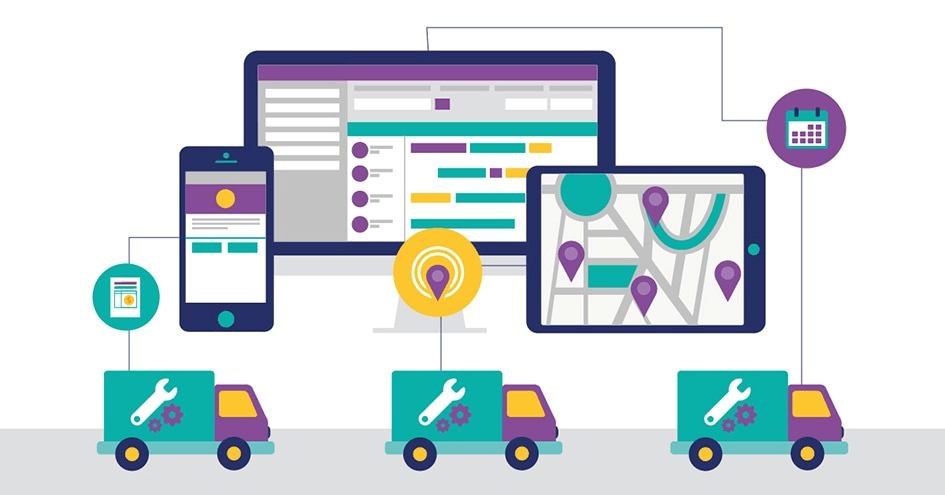
Field service management software changes the way companies run field work. Here is how it works:
| Step | Process |
|---|---|
| 1 | Gathers all job-related data, including customer information, task details, and time required for each assignment. |
| 2 | Uses algorithms to handle scheduling and dispatching of jobs, removing manual calculations and guesswork. |
| 3 | Lets users track real-time progress through the program interface, updating immediately for any changes in schedule or scope of work. |
| 4 | Keeps technicians connected with the main office through the field service app, sharing updates about job completion or issues encountered. |
| 5 | Manages payment by issuing invoices to customers and tracking payments received. |
Why it’s important
Efficient field service management matters for businesses that want to deliver good service. Companies without a solid system often deal with disorganization, wasted time, and lower profit.
Field service management software improves how companies oversee off-site workers by putting the right resources in the right place at the right time.
A good tool balances scheduling and dispatching while lifting productivity, which supports customer satisfaction. It also holds technicians accountable and simplifies invoicing, giving you back time.
Using free tools for managing field services helps your business keep operations steady even with many moving parts to track.

Features to Look for in Free Field Service Management Software
When looking for free field service management software, consider features such as scheduling and dispatching, productivity gains, customer experience improvements, technician accountability, and accurate billing and invoicing.
Scheduling and dispatching capabilities
Field service management software with scheduling and dispatching is central to efficient operations. These tools simplify how tasks get assigned to technicians in the field so jobs finish on time.
With real-time updates and automated routing, businesses can tighten their schedules and cut delays. Clients can be told estimated arrival times and can track technician progress, which raises satisfaction.
Managers also get one place to watch job statuses and adjust as needed. If a job runs long or a technician calls in sick, they can reassign the work without a string of phone calls. In short, scheduling and dispatching help businesses get more done while delivering good service.
Productivity enhancements
To get more done in field services, pick software with productivity features. These include automated scheduling and dispatching, real-time task updates, and route optimization.
Simplifying these steps saves time and makes sure technicians are assigned to jobs efficiently. Digital job management platforms with built-in communication tools also let teams work together without manual coordination.
With these features in place, businesses can make better use of their resources and improve day-to-day operations.
Free field service management software often adds mobile apps for on-the-go access to job details and customer information. Technicians can update job statuses in real time and capture data directly from the field using their phones or tablets.
By cutting paperwork and manual record-keeping, companies reduce administrative work and give their teams tools that make the day simpler. Notes, photos, and job details stay in one place instead of on loose paper forms that get lost or entered twice.
Better productivity helps internal operations and improves customer satisfaction too. With more efficient workflows, companies can respond faster and deliver accurate service, both of which add to a positive customer experience.
Customer experience improvements
A better customer experience matters for any business, and free field service management software can help. These tools offer real-time communication between customers and technicians, automated alerts and notifications that keep customers informed about appointment status, and centralized customer information for quick access during service calls.
With these features in place, businesses can provide more efficient and personalized service, which leads to higher customer satisfaction. Customers know when a technician is on the way, and staff can pull up a customer’s history before the call starts.
Technician accountability
Technician accountability is a key part of field service management. It makes technicians responsible for their work and keeps duties on track. With the right software, businesses can track and monitor technician performance, including job completion rates and response times.
This lets managers spot where improvement is needed and give feedback or training to raise performance. A clear record of who did what, and when, also settles questions about a job after it is finished. Systems that support accountability help businesses keep a high standard of service and customer satisfaction.
Billing and invoicing accuracy
Accurate billing and invoicing matters for any field service business. It makes sure you are paid correctly for the work you do. Free field service management software such as Connecteam, Loc8, and ServiceM8 includes billing features that generate accurate invoices based on the services rendered and materials used.
These tools let you track hours worked, add expenses, and apply any taxes or discounts. Because the invoice draws on the same job data your technicians enter, you avoid re-keying numbers by hand. Using them simplifies your billing process and cuts errors, so your invoices stay precise and professional.

Top 10 Free Tools for Managing Field Services in 2026
Here are our top picks for free tools to help you manage field services in 2023:
Housecall Pro
Housecall Pro is an easy-to-use field service management software that suits a service business. With Housecall Pro, you can schedule and dispatch jobs, manage customers, and simplify payment processing.
It also offers asset tracking, route optimization, and real-time communication to help you run field operations. Route optimization plans the order of stops so technicians spend less time driving between jobs. Housecall Pro is intuitive and easy to use, so it works for businesses of all sizes.
KickServ
One of the top picks for free field service management software is KickServ. KickServ offers a set of features to help businesses manage their technicians in the field.
With KickServ, you can schedule and dispatch jobs, track technician accountability, and improve billing and invoicing accuracy. This easy-to-use software also adds productivity and customer experience features.
Along with its free version, KickServ offers paid plans with more features for businesses that need advanced functionality.
Connecteam
Connecteam is a strong free tool for managing field services. It offers features that make it easy to schedule and dispatch jobs, track technician accountability, and improve the customer experience.
With Connecteam, businesses can digitize processes such as task management, payment management, and real-time communication. The software also provides mobile apps for employees, so they have the information they need while on the go.
Connecteam also offers a free trial period so users can test its features before moving to a paid version.
MobiWork
MobiWork is a top pick for free field service management software in 2023. With an easy interface and strong features, MobiWork helps businesses run their field operations.
The software offers scheduling and dispatching, so businesses can assign jobs to technicians with ease. It also provides real-time communication between the office and technicians in the field, which keeps work coordinated.
MobiWork also includes asset tracking and route optimization to raise productivity and reduce costs. With the MobiWork mobile app, technicians can access job details, update work statuses, capture customer signatures, and more while on-site, improving efficiency and technician accountability. Because updates sync back to the office, a manager can see a job is done without waiting for the technician to return.
Fieldwire
Fieldwire is a capable field service management software with a set of features to help businesses run their operations. With Fieldwire, you can schedule and dispatch jobs, track task progress in real time, and manage your team’s workflow.
The software also provides asset tracking, route optimization, and data collection in the field. Fieldwire is known for its clear interface and mobile app, which make it easy for technicians to access job details and reach the office remotely.
Whether you are a small business or a large enterprise, Fieldwire can be a useful tool for managing your field services. Teams that work on construction and repair sites often use it to keep plans, tasks, and photos tied to the right job.
Synchroteam
Synchroteam is another good option for managing field services. This software offers task management, dispatching, and real-time communication.
With Synchroteam, businesses can schedule jobs, track their technicians’ locations, and communicate with their team. It also offers invoicing and billing accuracy for efficient payment management.
Synchroteam is a capable tool that can simplify field service operations and raise productivity for businesses in many industries. Location tracking helps dispatchers send the nearest available technician to the next job.
UpKeep Technologies
UpKeep Technologies is another top pick for free field service management software. It offers an easy platform that helps businesses run their field operations. With UpKeep, you can schedule and dispatch jobs to your technicians, keeping them on track and productive.
The software also provides real-time communication, so teams can work together well. UpKeep Technologies adds features like asset tracking and work order management to improve the overall efficiency of your field services.
This easy-to-use tool is a good option for businesses that want to improve service management without spending much. Work order management keeps each request from open to close, so nothing gets missed between the office and the field.
AI Field Management
AI Field Management is a software solution that uses artificial intelligence to improve field service operations. With its features, businesses can automate scheduling and dispatching, which supports efficient resource allocation and timely job completion.
The AI-powered system also enables real-time communication between managers and technicians, improving teamwork and cutting response times. AI Field Management also offers route optimization, asset tracking, and data analytics to raise productivity and customer satisfaction.
By using artificial intelligence, this software improves field service management and makes managing field operations more efficient.
Odoo
Odoo is another good option for free field service management software. It offers a full set of features to help businesses run their field operations. With Odoo, you can schedule and dispatch jobs to your technicians, track their progress in real time, and optimize routes for efficiency.
The software also includes tools for customer management, payment processing, and task management. Odoo is an open-source solution, so it can be customized to fit the needs of your business, and it connects with other Odoo apps if you already use them for sales or inventory.
Odoo provides an easy interface and strong functionality to run your field service operations.
Contractor+
Contractor+ is a top free tool for managing field services in 2023. It offers a set of features to help businesses run their operations and improve technician accountability.
With Contractor+, you can schedule and dispatch jobs, track productivity, improve the customer experience, ensure billing accuracy, and more. This easy-to-use software is built to simplify service management tasks and boost efficiency for small businesses. It aims to give a small crew the same organized workflow that larger companies rely on.
How to Choose the Right Free Field Service Management Software for Your Business
When choosing the right free field service management software for your business, consider factors such as feature set, ease of use, integration capabilities, customer support, and data security and compliance.
Feature set
The feature set of a free field service management software is a key consideration when choosing the right tool. These features shape how well you can manage your field services and improve performance.
Key features to look for include scheduling and dispatching, which let you assign jobs to technicians and track their progress in real time. Productivity features also matter, such as tools that simplify task management and automate steps.
Software with customer experience features supports better communication with clients, while technician accountability features help make sure work is done on time and to a high standard.
Accurate billing and invoicing is also essential for efficient payment management.
To pick the best free field service management software, weigh its feature set carefully. Look for scheduling and dispatching, productivity tools like task management automation, customer experience features for better client communication, technician accountability tools to monitor work quality, and accurate billing and invoicing for smooth payment management.
User-friendliness
Ease of use is a key factor when choosing free field service management software. The software should have a clear, easy-to-navigate interface that needs little training.
It should also give clear instructions and prompts, so technicians can schedule jobs, track progress, and find the information they need while in the field.
Free tools like Connecteam, Loc8, and Fergus are known for their easy interfaces, which keep operations smooth for service businesses of all sizes.
Integration capabilities
Integration capabilities are an important factor when choosing free field service management software. Being able to connect with the other tools and systems you use can improve efficiency and productivity.
Look for software that integrates with common platforms such as CRM systems, accounting software, and communication tools. This lets you simplify processes, share information across platforms, and cut manual data entry.
With strong integration capabilities, you can consolidate your workflows and keep information moving through your organization. For example, a completed job can pass its billing details straight to your accounting tool instead of being copied by hand.
Customer support
If you ever run into an issue or need help while using field service management software, reliable customer support is essential. The top free tools for managing field services in 2023 understand this and provide good customer support.
For example, Connecteam offers live chat support and email assistance to address concerns or questions during your use of their software. Loc8 provides a knowledge base with tutorials and guides, plus email support for users who need help.
Fergus offers phone support during business hours so customers get timely responses. ServiceM8 provides 24/7 live chat support through its website, so help is available around the clock when you need it most.
Data security and compliance
Data security and compliance are critical when choosing a field service management software. Keeping customer information safe and protecting sensitive data is essential for any business.
Choose a tool that provides strong data encryption, secure storage, and regular backups to prevent unauthorized access or loss of information. Also look for software that complies with industry regulations such as GDPR or HIPAA, so your business stays compliant with data protection laws.
By making data security and compliance a priority in your choice of field service management software, you protect your customers’ trust and reduce risk to your business. It is worth checking how a free plan stores data and who can access it before you move real customer records into it.
Conclusion
These top free field service management tools offer a range of features to help businesses run their field operations. From scheduling and dispatching jobs to customer management and payment solutions, these options are built to simplify processes and improve productivity.
Whether you are a small business or a larger enterprise, trying these free tools can bring real benefits to your field services. Start with the one that matches your core need, whether that is scheduling, invoicing, or keeping technicians connected, and add more as your team grows.
Frequently Asked Questions
Are these free tools for managing field services really free?
Yes, all the tools listed in our top picks are completely free to use for managing field services.
How do these free tools help in managing field services?
These free tools provide features such as scheduling and dispatching, tracking work orders, communicating with technicians, and generating reports, which help improve efficiency in managing field services.
Can I customize these free tools according to my specific needs?
Some of the free tools may offer customization options depending on the provider. It is best to check their website or contact their support team to ask about customization options.
Do I need any technical expertise to use these free tools effectively?
Most of these free tools are built to be easy to use and need little to no technical expertise. They typically have intuitive interfaces and provide step-by-step instructions for setup and use.
Are there any limitations or restrictions when using these free tools?
While these tools are available at no cost, some may limit functionality or cap the number of users or projects allowed under their free plan. Review each tool’s terms and conditions for any specific restrictions before adding them to your workflow.
Compare alternatives to the tools in this post

- Independent picks for exactly what you just read about
- Matched to your team size & needs
- Vendors don't pay for placement
Step 1 of 4
How big is your team?
We tailor recommendations to companies your size.















Related Articles
Applicant Tracking Software
monday.com for HR and Recruiting (2026): Hiring Pipelines, Onboarding and When You Need an ATS
Continue reading →
Project Management
monday.com for Remote Teams (2026): Async Updates, Dashboards and Slack, Zoom and Teams Setup
Continue reading →
Project Management
monday.com for Nonprofits (2026): Programs, Grants, Volunteers and Donor Tracking
Continue reading →
Project Management
monday.com for Construction (2026): What It Covers and Where Procore or Buildertrend Fit Better
Continue reading →