
Slow rendering times and rigid editing constraints hold up a lot of video projects, and both problems tend to get worse as files grow longer. Flixier was built to cut down on both, which is what makes it worth a closer look for anyone tired of waiting on exports and fighting with heavy desktop software.
This post covers how Flixier handles online video editing with its advanced tools and cloud storage options, from real-time collaboration to fast rendering and the features that support day-to-day editing work.
Key Takeaways
- Flixier is a fast online video editor focused on speed, efficiency, and ease of use.
- The software supports real time collaboration on video editing projects, so a team can edit together and communicate as they go.
- Flixier includes motion graphics and stock footage, Greenscreen tools, and a timeline with transitions.
Powerful Online Video Editing with Flixier
Flixier is a fast online video editor that lets users collaborate in real time and open their projects from any device.
Fastest online video editor
Flixier ranks among the quickest online video editors available. The platform is built for speed, efficiency, and ease of use, so high-performance editing runs right in the browser.
With fast video processing, you do not wait long to render or export a video; it is almost instant. That saves time and keeps editing smooth while you create quality content without interruption, which matters most when you are exporting the same project several times during a review cycle.
The software also lets users edit videos directly from MacBooks with no extra downloads or installations. Everything runs in the browser, so there is nothing to set up before you start, and that keeps video creation and editing simple even on a machine that was never meant for heavy editing.
Collaborate in real-time
The software makes real-time collaboration on video editing projects straightforward. A whole team can work at once, each person opening and changing the same assets from wherever they are.
That keeps everyone in the loop and makes it easier to deliver a consistent edit, since there is only one shared version of the project rather than several copies passed around by file transfer.
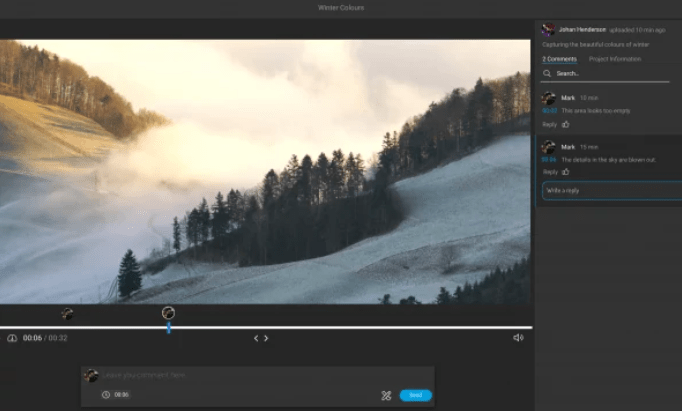
Editing at the same time helps with more than speed; it also improves communication. We use the commenting feature for precise feedback, which cuts out long email threads and waiting for sign-off on changes.
This way, workflow gets faster and projects finish sooner than before, because the notes stay attached to the exact moment in the video they refer to rather than being described from memory in a separate message.
Accessible on any device
The software is not tied to traditional desktop editing tools. You can edit from any location on any device, and this online video editor supports iOS and Android equally well.
With this cross-platform compatibility, you can keep working wherever you are. If an idea comes up away from your computer, you can pull out a smartphone or tablet and start right away.
Moving between devices stays smooth, so your workflow does not get interrupted when you switch from a phone to a laptop and back. Because the project lives in the cloud, you pick up right where you left off, and that is what makes the editing so versatile.
Key Features of Flixier
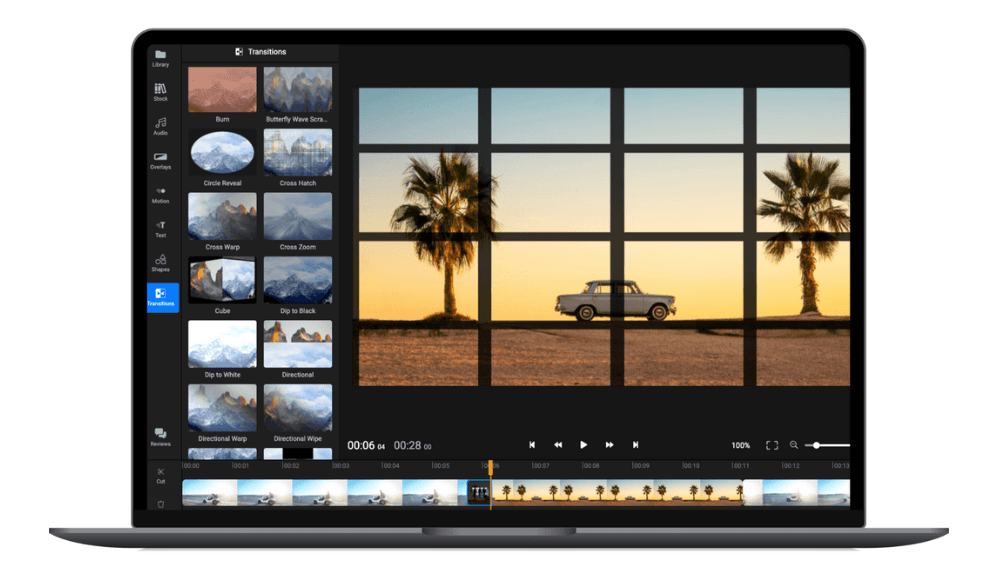
The software offers several key features that set it apart as an advanced online video editor and storage platform.
Motion graphics and stock footage
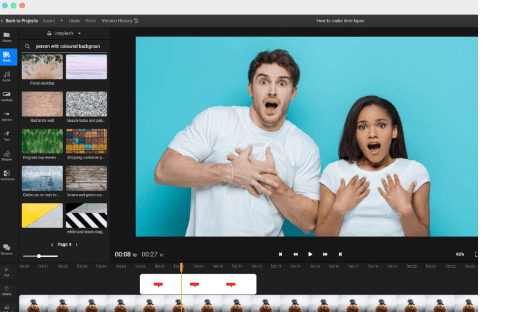
The software includes a large collection of motion graphics and stock footage for your videos. In a few clicks, users can browse Flixier’s library and add high-quality clips to a project.
Whether you need strong visuals or professional animations, the library covers it, and you can search it without leaving the editor. The range of options helps you make videos that hold an audience’s attention and saves you from sourcing footage from a separate service.
You can also add animated titles and custom motion graphics to bring an idea to life. Dynamic motion graphics and stock footage give you more than static images can.
Greenscreen capabilities
The software has capable Greenscreen tools that make professional-looking videos easy. Its Green Screen removal tool takes the green background out of your footage with no extra downloads or installations.
This lets you make chroma key videos and swap the green screen for any background or visual effect you want. The Effects menu in Flixier has a Green Screen option where you pick the color of your green screen and get clean results.
Beginner or experienced, users find Flixier’s Greenscreen tools easy to use and effective at producing strong visual effects in a video, so you do not need a dedicated compositing program to place a subject over a new backdrop.
Powerful timeline and transitions
The timeline in the software makes editing simple. With a clear interface and detailed editing options, you can arrange and organize your clips into the sequence you want.
Adding transitions is simple too, since you apply them right on the timeline. Whether you need a soft fade or a bolder effect, Flixier’s transition options cover it.
Editing videos stays easy with Flixier’s timeline and transitions at hand, since the same panel handles both arranging clips and styling the cuts between them.
Benefits of Using Flixier for Video Editing
Flixier for video editing brings several benefits, including much faster editing, lower cost than a dedicated editing computer, and easy collaboration and feedback.
Here is how Flixier can change your video editing process. Read on for the details.
Dramatically speeds up the editing process
As an online video editor, Flixier can speed up editing by a wide margin. Its fast rendering processes and exports videos quickly.
That means less time waiting for edits to finish and more time on the content itself. On a short video or a feature-length film, Flixier’s editing tools help keep your workflow moving and your productivity up.
Long rendering times give way to fast, time-saving video editing with Flixier, and that shorter wait adds up across every project you export in a week.
Cost-effective alternative to dedicated editing computers
The video editing software costs less than a dedicated editing computer. It gives an affordable way to edit video without buying expensive hardware. With Flixier you can edit efficiently and use professional-grade features for a fraction of the cost.
That makes it a practical, economical choice for individuals and businesses that want high-quality content on a budget. Instead of the high price of a dedicated editing computer, Flixier serves as an accessible editing tool.
Compared with buying a dedicated video editing computer, Flixier is 100 times cheaper. It offers the tools and capabilities you need without high system requirements, so it works for a wide range of users, from a solo creator on an older laptop to a small business that does not want to buy specialized workstations.
Easy collaboration and feedback
Collaborating on video projects is simple with Flixier’s collaboration and feedback features. Whether you work with a team or gather input from clients, Flixier lets you collaborate in real time.
The platform supports clear communication and a productive workflow through an effective feedback loop. With easy file sharing, comments, and shared edits, working with others is straightforward.
Using Flixier for video editing keeps the process organized and everyone on the same page, so feedback lands in the project itself instead of scattering across chat threads and email.
Flixier for Teams and Businesses

Collaborate on video projects with clients and remote teams for a smooth workflow and clear communication throughout editing.
Collaborate on video projects with clients and remote teams
Collaborating on video projects with clients and remote teams is easier with the software. With its online video editor, you can work together in real time, give feedback at the same time, and make changes without waiting on rendering.
Sharing media files and projects is straightforward, which supports efficient project management and teamwork. With clients or remote teammates, the software keeps editing efficient from anywhere, anytime, so distance and time zones stop being a reason to slow a project down.
Quick video turnaround time
The software has a quick video turnaround time, which makes it a strong choice when you need videos edited and ready fast. With renders under 1 minute and the final video rendered in under 3 minutes, you can count on projects finishing quickly.
That saves time and gets your videos to your audience faster than before. On a tight deadline or a routine production process, Flixier’s fast rendering means you do not wait long for the final product.
You get faster video merging in place of long wait times with Flixier.
The software also lets users merge videos online with no limit on file length. However long your individual files are, Flixier can combine them into one piece.
You do not have to worry about whether footage fits together; Flixier handles it. Whether you make a short promotional video or edit longer content like interviews or tutorials, Flixier covers it with efficient video rendering, and the lack of a length cap means you can keep adding clips without running into a wall.
Professional editing tools for high-quality content creation
I use Flixier for professional editing tools that help create high-quality content. With its features and clear interface, I can edit my videos to a fine finish.
The platform’s editing tools improve visuals and audio for a professional result. Motion graphics, stock footage, or greenscreen tools, Flixier has what I need to make my videos stand out.
The real-time collaboration feature also makes feedback easy and supports creative teamwork in video editing. Overall, Flixier suits anyone who wants strong content without hassle.
For professional-quality content, Flixier delivers. This online video editor gives efficient, capable editing tools that produce high-definition visuals and audio for my projects.
Whatever the size or complexity of a project, the software makes it easy to produce strong videos with its range of features. From the timeline and transitions to quick turnaround, the platform raises the level of your content creation, and it keeps those tools in one place so you are not switching between separate apps to finish a single video.
Conclusion
Flixier is a capable online video editor and storage platform with fast rendering and collaborative features. With its clear interface and practical tools, users can create, export, and share high-quality videos.
Professional or aspiring filmmaker, Flixier gives you the editing capabilities to bring your vision to life.
FAQs
Can I access Flixier on any device?
Yes, you can access Flixier on any device with an internet connection, including computers, laptops, tablets, and smartphones.
Is Flixier suitable for professional video editing?
Yes, Flixier is suitable for professional video editing with its advanced features like multi-track editing, real-time collaboration, and support for high-resolution videos.
How much storage does Flixier provide for my videos?
Flixier provides unlimited cloud storage for your videos so you can securely store and access them whenever you need.
Can I edit my videos offline using Flixier?
No, as an online video editor and storage platform, you need to be connected to the internet to use Flixier’s editing tools and access your files.
What are some of the advanced features offered by Flixier?
Flixer offers a range of advanced features such as chroma keying (green screen), motion tracking, audio mixing/editing/equalizing capabilities,and integration with popular third-party platforms like YouTube or Google Drive.

- Independent picks for exactly what you just read about
- Matched to your team size & needs
- Vendors don't pay for placement
Step 1 of 4
How big is your team?
We tailor recommendations to companies your size.















Related Articles
Accounting Software
How To Choose The Best Procure-to-Pay Software For 2026
Continue reading →

Accounting Software
Best QuickBooks Alternatives in 2026: Top Accounting Software Options
Continue reading →

Accounting Software
How To Choose The Best Interior Design Software For 2026
Continue reading →
Accounting Software
Free Design Tools: Say Goodbye to Boring Invitations in 2026
Continue reading →