

Running a busy flight school or club schedule is a hard job, with lessons, aircraft, and instructor availability all changing through the day. Flight Schedule Pro gives these organizations one set of management tools to handle bookings, aircraft, and instructors in the same place rather than across separate spreadsheets and systems.
This post explains how the software handles complex tasks and improves efficiency at every level, from scheduling and payments to training records and reporting. Read on for a clearer path toward your operations management goals.
Key Takeaways
- Flight Schedule Pro handles complex scheduling for flight schools, clubs, and universities, so it is easy to manage lessons, track maintenance, and coordinate instructors.
- The software runs on multiple devices, including smartphones, tablets, laptops, and desktop computers; pilots can check aircraft availability in real time to avoid double bookings.
- The platform speeds up billing with faster online payments and keeps complete records that support training compliance with aviation authorities.
- Beyond scheduling and payments, Flight Schedule Pro provides reporting tools that show operational patterns such as aircraft usage or fuel consumption.
- The company has earned an INC 5000 Fastest Growing Companies listing and is used by more than a thousand airspace operators worldwide.
Understanding Flight Schedule Pro
Flight Schedule Pro lets flight schools and flying clubs manage aircraft scheduling in a few clicks. Lessons, maintenance tracking, and instructor availability all sit in one place instead of across separate systems.
The platform replaces scattered booking systems with a single process that saves time and cuts down on errors, so staff spend less effort reconciling conflicting bookings.
Pilots can check in for flights from a smartphone or tablet, even while on the move between the office and the ramp. The system applies real-time updates, so aircraft are ready when needed and double bookings are avoided before they cause a problem.
From desktops to an iPhone X, access across devices keeps everyone informed, whether they are at a workstation or in the field, and keeps operations moving.
Key Features of Flight Schedule Pro
Simplified Scheduling and Appointments
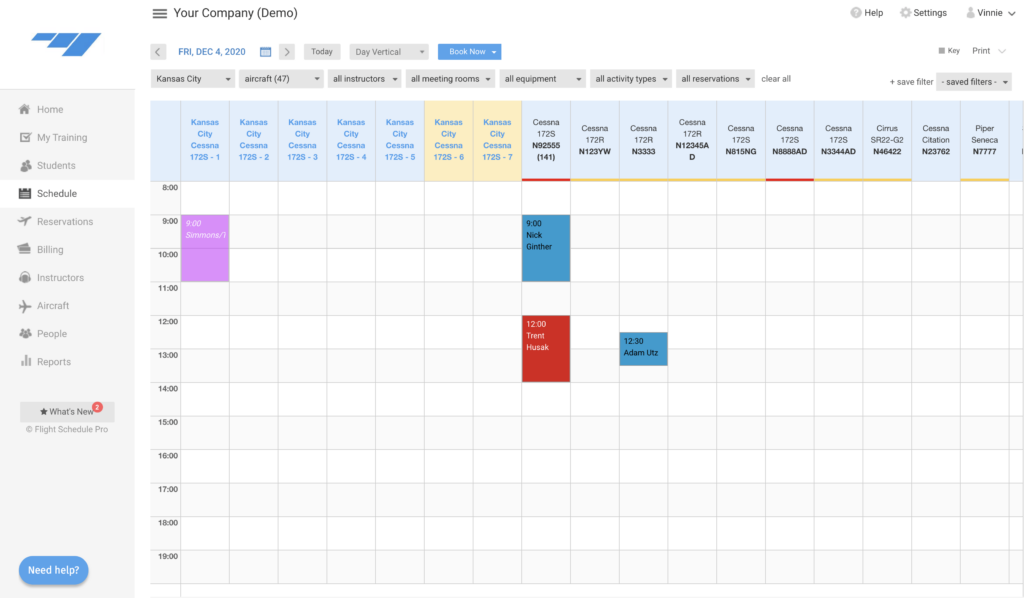
Flight Schedule Pro makes managing multiple flight schedules straightforward. Its clear design lets you create and adjust appointments with a click-and-drag motion.
This saves time and provides real-time updates, so pilots and staff always know their flying sessions or aircraft maintenance bookings without checking with an office first. The automation reduces conflicts and double bookings and keeps aircraft, instructors, and facilities used efficiently through the day.
Because the software works on laptops and smartphones, scheduling can be handled on the go. Flight instructors and students can view open slots, book new flights, or reschedule existing ones with a few taps.
That flexibility matters in general aviation, where plans change quickly because of weather or other factors. Flight Schedule Pro lets everyone involved keep up with those changes without fighting complex legacy systems or manual processes.
Faster Online Payments
Alongside scheduling, Flight Schedule Pro adds faster online payments. The system processes transactions through a secure point-of-sale interface built into the software.
That cuts the time flight schools and clubs wait to get paid, with no more waiting for checks to clear or fixing cash-handling errors after the fact. Payments tied to the schedule also make it easier to keep invoicing accurate.
Ease of use matters, and this management platform delivers it. With smartphone support, instructors and students can make and receive payments on the go without giving up security or convenience.
The point is to get back to flying sooner instead of getting stuck on financial admin.
Enhanced Training Records and Compliance
Flight Schedule Pro strengthens record-keeping and compliance monitoring, keeping training records accurate, current, and easy to reach. The software records training hours, certifications, and progress for pilots and instructors.
With a clear interface and smartphone access, it makes managing essential documents easier while meeting regulatory requirements from aviation authorities.
Flight Schedule Pro also fits flight schools, universities, flying clubs, and general aviation operators, each with its own reporting and compliance needs. It stores training records in one secure digital platform reachable across devices, which keeps data management consistent no matter who updates a record or where they work from.
That lets organizations keep complete training histories while staying in line with industry standards.
Efficient Aircraft Management
Flight Schedule Pro provides tools for efficient aircraft management that help you organize operations and get more from your resources. You can schedule and track flights, manage maintenance records, and monitor student progress in one platform.
With multiple payment methods for invoicing and payments, you can drop manual steps and keep the process simple.
The platform handles 131+ flights per day in general aviation, which makes it a dependable tool for aircraft management even at higher volumes. Whether you run a flight school or a flying club, Flight Schedule Pro offers the digital tools to work more efficiently while keeping training records compliant with the same system that runs your bookings.
The software is built to handle complex procedures, which makes it useful for any aviation organization working at a fast pace.
Collection and Sharing of Operational Insights
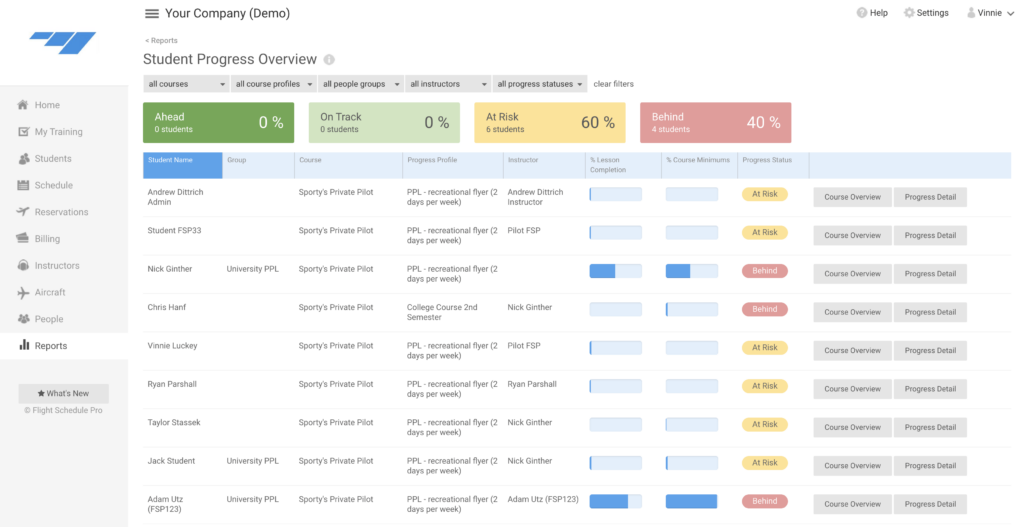
Flight Schedule Pro collects and shares operational data, so aviation staff can make informed decisions. Real-time figures on aircraft usage, maintenance schedules, and pilot performance are captured and analyzed inside the software.
That supports advance maintenance planning, better resource allocation, and improved day-to-day efficiency in general aviation, since problems show up in the data before they ground an aircraft. The interface also lets users share these figures with the people who need them, which supports teamwork and clearer decisions across the organization instead of siloed reports.
Aviation organizations can use Flight Schedule Pro to get practical operational data that drives steady improvement over time. By tracking scheduling patterns, fuel consumption rates, and flight durations through the software’s reporting tools, operators can spot trends and areas to improve, such as aircraft that sit idle or slots that fill up faster than others.
A data-driven approach supports decisions that improve safety while using resources well.
Flight Schedule Pro: A Trusted Tool in General Aviation
Used by over 13 operators, 112 aircraft, and 178 instructors in general aviation, Flight Schedule Pro has become a reliable tool in the sector. The software handles a rate of 131+ flights per day in this industry.
It also offers a free 30-day trial, so new users can test its features before committing to a plan. The company’s recognition includes a spot among the INC 5000 Fastest Growing Companies and a place among the fastest-growing companies in Kansas City in the Ingrams Report, which points to steady adoption in the sector.
The system is built to help flight training centers work more efficiently while keeping service quality high, so growth does not mean more manual admin. Clear features make daily operations run more smoothly and raise overall productivity across scheduling, billing, and record-keeping.
Maximizing Efficiency with Flight Schedule Pro
With Flight Schedule Pro, users can organize operations, cut administrative work, manage resources better, and strengthen training and compliance, all of which affect their business or organization.
The sections below cover the practical benefits of using the software in day-to-day flight operations.
Streamlined Operations
Flight Schedule Pro improves the efficiency of scheduling, payment processing, and resource management. Its clear interface and automated features let users coordinate flight schedules and take work off staff.
It also simplifies aircraft management by keeping training records and operational data in one place. That removes manual steps and legacy systems while keeping work in line with industry standards.
The platform is a useful tool for aviation organizations that want to get more from their operations without adding staff or juggling several separate systems.
Reduced Administrative Burden
Flight Schedule Pro cuts administrative work by automating and simplifying tasks, saving time and effort. The interface lets users manage scheduling, track student progress, oversee aircraft maintenance, and handle payments in one place.
That shortens the administrative process considerably.
Flight Schedule Pro also provides reporting tools that show operational data and performance metrics for better decisions. This automation improves efficiency and supports compliance with regulatory requirements.
By reducing manual paperwork and coordination between separate tools, the software lets aviation staff focus on core operations, such as training and flight safety, while keeping administrative accuracy high.
Improved Resource Management
Flight Schedule Pro’s resource management gives you a clear way to organize aircraft, instructors, and facilities. With real-time data on hand, you can assign resources based on demand, availability, and maintenance schedules.
That helps you use assets fully while cutting downtime and operational waste, so aircraft and instructors are not sitting idle when there is demand. The system also tracks aircraft maintenance requirements, which supports advance maintenance scheduling for better safety and compliance with aviation regulations.
Flight Schedule Pro also provides reporting tools for a close look at resource usage patterns. With that analysis, operators can make informed decisions to improve overall resource allocation.
Enhanced Training and Compliance
Flight Schedule Pro provides training and compliance features that keep training records organized and meet regulatory rules. The interface makes it easy to track student progress, instructor qualifications, and aircraft maintenance logs.
By keeping all training documentation in one secure location, institutions can show compliance during audits or inspections without pulling records from several places. The platform also automates reminders for upcoming certifications and expirations, so staff and students stay current with their training before a deadline passes.
Instructors get a library of lesson plans and syllabi they can adjust for specific learning objectives. This helps keep instruction consistent across instructors while still leaving room for personalization.
Check more Benefits of Hotschedules: Employee Scheduling App
Accessing Flight Schedule Pro Across Devices
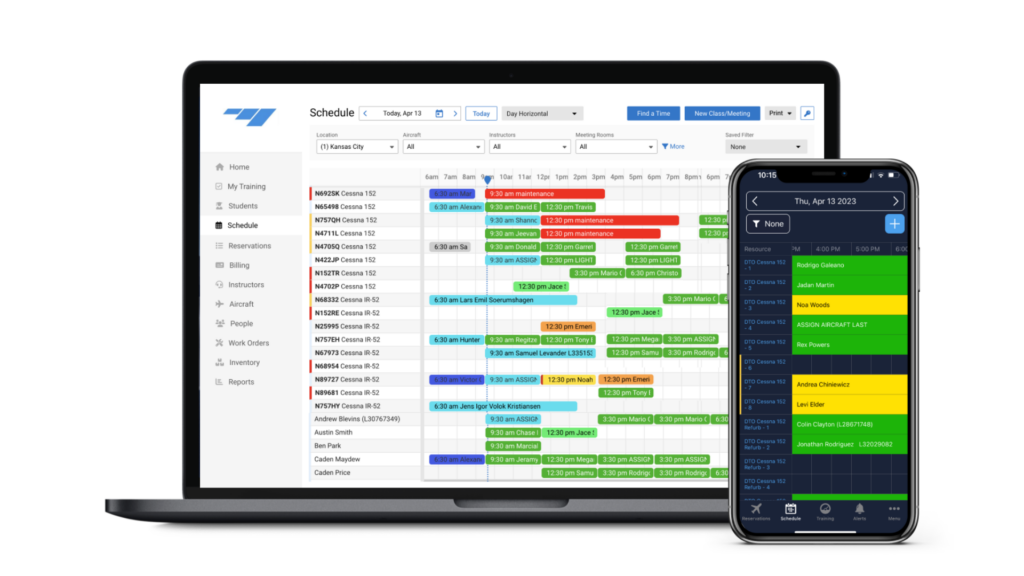
Flight Schedule Pro works across multiple devices for added convenience and flexibility. In a web browser or the iOS app, users can manage flight schedules, appointments, and training records from anywhere.
The native iOS app is built for iPhone, iPad, iPod touch, and Mac, so it works with your preferred device.
With access across platforms and devices, you can stay on top of aviation management tasks without being tied to one location. That flexibility lets you organize resources and run operations on the move or at your desk.
Next, look at how the software meets the specific needs of universities, flight schools, and flying clubs, each of which uses scheduling and training records in a slightly different way.
Addressing Specific Needs with Flight Schedule Pro
Whether you run a university, a flight school, or a flying club, Flight Schedule Pro has tailored solutions to meet your needs and improve efficiency. The sections below cover how the software helps each type of organization.
Universities
Flight Schedule Pro offers tailored solutions for universities, with one platform that supports greater efficiency. The software handles administrative tasks such as aircraft scheduling and training management, which simplifies processes and improves resource allocation.
With Flight Schedule Pro’s digital tools for billing, maintenance tracking, and compliance management, universities can strengthen their operations while keeping Part 141 compliance in order.
The platform is used by over 1,000 flight schools and universities, which shows how widely it is adopted in academic settings. Its interface makes it easy to move between devices, so university staff can manage appointments and schedules from a smartphone or any other digital device.
By adding Flight Schedule Pro to their operations, universities can use its features to improve their aviation programs and handle daily administrative tasks in one system, which raises productivity across the department and reduces time spent on paperwork.
Flight Schools
Flight schools can improve their operations with Flight Schedule Pro, tidying up scheduling, cutting administrative work, and managing resources better. The software removes manual processes specific to flight schools and offers resources for onboarding, compliance, and further reading through eBooks & downloads.
Over 1,000 flight schools use this software to meet their needs by keeping scheduling and appointments in one place and providing operational data.
Universities that offer flight training programs can also use Flight Schedule Pro to manage appointments across devices. The software supports compliance tracking for Part 141 requirements as well.
Flying Clubs
Flight Schedule Pro is built for the needs of flying clubs, with resources for organized operations. The software removes manual processes and outdated systems, so flying clubs can manage aircraft, schedules, and member records easily.
With over 13 flying club operators using Flight Schedule Pro and 131+ general aviation flights handled per day, the platform has become an essential tool in the industry.
Flying clubs can use the operational data that Flight Schedule Pro collects and shares to see how aircraft and members use the fleet. That supports better resource management and training records suited to a flying club’s needs, from scheduling shared aircraft to keeping member records in order.
Flight Schedule Pro: A Global Leader
Flight Schedule Pro has established itself as a global leader in flight training management software. With over 13 operators, 112 aircraft, and 178 instructors using the platform to manage more than 131 flights per day in general aviation, it has become a reliable option for scheduling and organized operations.
Named one of the INC 5000 Fastest Growing Companies and ranked among the fastest-growing companies in Kansas City by the Ingrams Report, Flight Schedule Pro keeps building tools for aviation.
The software’s work in supporting pilots and schools makes it a key player in improving operational efficiency across the industry, from single-aircraft clubs to larger training centers. A clear interface plus features such as online payments, complete training record management, and operational analytics keep Flight Schedule Pro among the leading flight management tools worldwide, and give operators one place to run scheduling, billing, and compliance together.
Flight Schedule Pro Pricing and Alternatives
After its standing as a global leader, the next question is pricing and the alternatives on the market. This comparison shows the investment involved and lays out options for buyers who are weighing other solutions before they decide.
| Software | Pricing Overview | Primary Features | Target User Base |
|---|---|---|---|
| Flight Schedule Pro | Customized pricing based on user needs with a free 30-day trial. | Aircraft scheduling, training management, billing, maintenance tracking. | Flight schools, universities, training centers, flying clubs. |
| ForeFlight | Subscription tiers: Basic, Pro, and Performance. | Flight planning, weather, logging, document management. | Individual pilots, professional flight crews. |
| Airplan Manager | Tiered pricing based on fleet size and required features. | Scheduling, dispatch, maintenance tracking, reporting. | Corporate flight departments, charter operators. |
| Leon Software | Flexible pricing, customized per operator size and needs. | Flight scheduling, crew management, sales, operations. | Airlines, charter companies, cargo operators. |
| Schedaero | Subscription based with various levels depending on size and usage. | Charter quoting, trip management, crew duty logging. | Charter operators, corporate flight departments. |
This table shows how Flight Schedule Pro compares on pricing and features against its competitors, across a broad range of aviation entities, from individual pilots to charter operators and airlines.
Getting Started with Flight Schedule Pro
Download the Flight Schedule Pro app, manage appointments and scheduling, and move through the interface to improve efficiency in your aviation operations. The steps below cover how to get set up.
Downloading the App
Getting Flight Schedule Pro is quick. Open the App Store on your iOS device and search for “Flight Schedule Pro.” Tap the download button and follow the prompts to finish the installation.
After installing the app, log in with your credentials or create a new account if you are a first-time user. You can then reach your schedules, manage appointments, and use its features from your phone or tablet without needing a desktop.
The mobile iOS app gives on-the-go access, so you can stay connected and organized wherever you are. With integrations with other apps and developer APIs for customization, Flight Schedule Pro provides a consistent user experience set up for specific operational needs in aviation.
Managing Appointments and Scheduling
Flight Schedule Pro makes managing appointments and scheduling easier. Users can create, change, and cancel appointments through the interface. The calendar view shows open time slots quickly, which cuts scheduling conflicts and speeds up booking.
| Features | Description |
|---|---|
| Instant Appointment Creation | With Flight Schedule Pro, users can swiftly schedule appointments by selecting the desired date and time, along with any applicable resources or instructors. |
| Automated Reminders | The software sends automated reminders to both staff and clients, reducing no-shows and last-minute cancellations. |
| Real-Time Availability | Users can instantly check the availability of aircraft, instructors, or facilities, ensuring efficient allocation of resources. |
| Seamless Modifications | Flight Schedule Pro facilitates easy rescheduling or modification of appointments, allowing for adaptability in a dynamic operational environment. |
| Multi-User Access | The platform supports multiple user access levels, allowing appropriate individuals to manage their own schedules while preserving overall operational control. |
| Billing Integration | Users can effortlessly tie appointment details into billing processes, ensuring accurate invoicing and financial tracking. |
| Resource Optimization | The software provides insights into resource utilization trends, enabling informed decisions for maximizing operational efficiency. |
| Compliance Tracking | Flight Schedule Pro enables the tracking of regulatory compliance requirements related to scheduling and appointments, providing peace of mind in meeting industry standards. |
Navigating the User Interface
The Flight Schedule Pro interface is clear and easy to use. Here is how to move through it:
| Features | Description |
|---|---|
| Clear Dashboard | Upon logging in, users are greeted with a streamlined dashboard that offers a comprehensive overview of upcoming appointments, aircraft availability, and training schedules. |
| Efficient Scheduling | The software’s intuitive calendar feature allows for quick and easy scheduling of flights, instructor availability, and maintenance tasks with just a few clicks. |
| Customizable Views | Users can customize their interface by selecting different views to display flight schedules, instructor availability, or aircraft maintenance in a way that suits their preferences. |
| Instant Notifications | The user interface provides real-time notifications for new bookings, schedule changes, or important reminders, ensuring that users stay informed at all times. |
| Seamless Communication | Integrated messaging features allow for efficient communication between instructors, students, and staff members directly within the platform. |
| Resource Management | The interface provides detailed insights into aircraft utilization, allowing for effective resource management and optimization of fleet efficiency. |
| Training Records Accessibility | With the user-friendly interface, accessing and updating training records becomes an effortless task, ensuring compliance and accurate record-keeping. |
| Mobile Compatibility | Users can seamlessly access the Flight Schedule Pro user interface across various devices, including desktops, tablets, and smartphones for added convenience. |
Conclusion
Flight Schedule Pro changes how operations are managed by putting scheduling, payments, and records in one system. It simplifies scheduling and helps you use aircraft and instructors well. The software cuts administrative work and supports training, which improves compliance during audits and inspections.
It runs on all devices and offers tailored solutions for a range of needs in the aviation industry, from universities to flight schools and flying clubs. Flight Schedule Pro sets a strong standard for flight management worldwide.
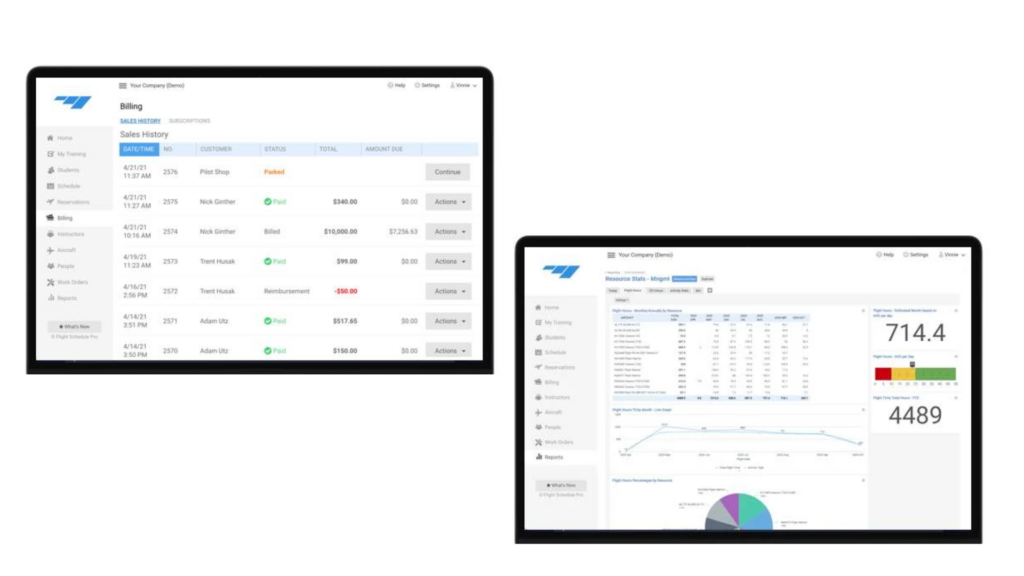
(Image Credit: Flight Schedule Pro official website)
Data Security and Access Control
A flight-school scheduling platform holds material that is sensitive in two different ways: student training records that carry regulatory weight, and personal data belonging to pilots and instructors. Those two obligations do not always sit with the same person, and it is worth knowing which of your staff owns each before an audit asks.
Four things are worth confirming with any provider in this category rather than assuming. Whether data is encrypted both in transit and at rest, since providers frequently advertise the first and stay quiet about the second. Whether permissions are role-based, so an instructor sees their own students rather than the whole roster. What the retention policy is for training records after a student leaves, which is a records-keeping question before it is a privacy one. And where the data is physically hosted, which matters as soon as you operate across borders.
Ask for the answers in writing during evaluation. Scheduling software tends to be bought on usability and renewed on inertia, and the security terms are far easier to negotiate before the first invoice than after three years of training history has accumulated inside the system.
Frequently Asked Questions
What is Flight Schedule Pro?
Flight Schedule Pro is management software built to improve efficiency in flight operations, including pilot scheduling and aircraft maintenance tracking.
How does Flight Schedule Pro enhance booking management for airlines?
It handles the booking process through its booking management system, keeping reservations organized and efficient for customers.
Can Flight Schedule Pro help in maintaining aircraft more effectively?
Yes. The software includes features that track aircraft maintenance in detail, which helps support safety and compliance with aviation standards.
Does the software integrate well with other systems used by airlines?
Yes. Integration is a key part of Flight Schedule Pro, letting it connect with the various systems in an airline’s operational framework.

- Independent picks for exactly what you just read about
- Matched to your team size & needs
- Vendors don't pay for placement
Step 1 of 4
How big is your team?
We tailor recommendations to companies your size.















Related Articles
Applicant Tracking Software
monday.com for HR and Recruiting (2026): Hiring Pipelines, Onboarding and When You Need an ATS
Continue reading →
Project Management
monday.com for Remote Teams (2026): Async Updates, Dashboards and Slack, Zoom and Teams Setup
Continue reading →
Project Management
monday.com for Nonprofits (2026): Programs, Grants, Volunteers and Donor Tracking
Continue reading →
Project Management
monday.com for Construction (2026): What It Covers and Where Procore or Buildertrend Fit Better
Continue reading →