
CubiCasa is smartphone-based software for creating floor plans. You can quickly scan a room with your phone and get an accurate floor plan, complete with measurements and square footage, all delivered within 24 hours.
That is what CubiCasa offers. The tool is gaining traction in fields like architecture and real estate, where precise, reliable layouts are essential to the work.
This tool is efficient, and it also includes features such as LiDAR support for accuracy and speech recognition so you can go hands-free. Apple users get extra perks too: adaptive lighting technology now helps iOS devices capture better scans even in conditions that are not very bright.
And if you want to add some flair to your designs, five new themes let you customize floor plans to suit different tastes.
On cost, CubiCasa stays flexible: a starting price of $9.99, a free trial period, and optional paid enhancements like 3D visuals or detailed home reports.
What helps this software stand apart is the feedback from users, who praise its ease of use and its customer service, giving it a solid 4.9 out of 5 rating.
There are other tools like Brokerkit or AutoCAD on the market that offer similar utilities, but CubiCasa competes well thanks to its own offerings, including constant support options that keep help available whenever it is needed.
CubiCasa can suit businesses big or small that want efficiency without sacrificing quality. Choosing the right tool for your needs comes down to knowing all your options, and this guide lays them out so you can see how the software could fit into your day-to-day work.
Key Takeaways
- CubiCasa turns your smartphone into a tool for creating accurate floor plans with its scanning feature, removing the need for manual measurements and technical drawing skills.
- The app has a flexible pricing structure starting at $9.99, including a free base service and affordable paid add-ons for advanced features like 3D models and detailed GLA reports.
- Technologies such as LiDAR support for precision (although not currently available in CubiCasa) and speech recognition could improve the floor plan creation process.
- User experience is highly rated, with emphasis on user-friendly design and quick turnaround times, and a 4.9/5 satisfaction rating from users.
- While CubiCasa stands out in its field, alternative tools like Canvas X Draw, Houzz Pro, RoomScan Pro, Getfloorplan, Space Designer 3D, and Floor Plan Creator offer varied functions that cater to different professional needs in real estate visualization.
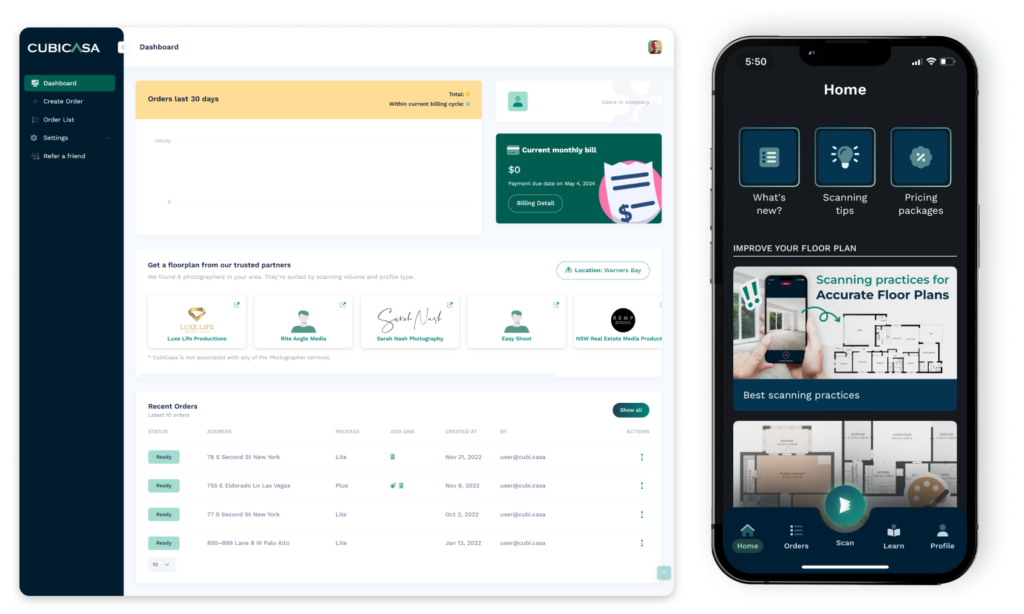
Exploring CubiCasa’s Core Features
CubiCasa combines technology and user-focused design for floor plan creation. Every feature is built to deliver precision and ease, changing how professionals envision spaces and bring them to life.
Intuitive floor plan scanning
Creating a floor plan is straightforward with CubiCasa’s floor plan scanning feature. With just your smartphone, you walk through any home and the app does the rest, turning your movement into an accurate, detailed layout.
Users appreciate how this makes floor planning as easy as taking a stroll through the house, without complex measurements or technical drawing skills.
CubiCasa handles the hard part of floor plan creation by using smart technology to do the heavy lifting. You no longer need to fumble with tape measures or worry about misplacing details; the system captures everything for you.
The result is an efficiently generated, precise 3D visualization of the space that rivals professional CAD software output, but without the steep learning curve or the heavy time investment.
This approach not only saves time but also accounts for every detail in your final design blueprint, so nothing important gets missed along the way.
LiDAR support for precision
LiDAR technology improves the accuracy of spatial measurements with laser scanning, a feature currently outside CubiCasa’s suite of tools. It lets users capture the small details of a space, keeping every measurement precise to the last millimeter.
It is an ideal solution for professionals in surveying technology or geographic information systems (GIS) who depend on detailed, meticulous geospatial data.
Adding LiDAR support to floor plan services would bring remote sensing methods that improve topographic mapping and 3D modeling processes. For those seeking precision in their projects, this level of detail can make a real difference.
Although it is not available within CubiCasa right now, knowing what LiDAR can do helps users compare features across different floor plan creation tools before they buy.
Speech recognition for hands-free operation
Speech recognition technology lets users operate software through voice commands, adjusting a floor plan without lifting a finger, which simplifies their workflow and improves efficiency.
With hands-free control, multitasking becomes simpler, as professionals can dictate commands while doing other tasks at the same time.
Adding automatic speech recognition to floor planning tools like CubiCasa could genuinely change the user experience. Voice-controlled actions give users a more accessible interface, where natural language processing turns spoken words into precise, actionable commands.
Hands-free interaction reduces physical barriers and speeds up the design process, which is a win for productivity in any tech-driven environment.
Adaptive lighting technology for iOS
Adaptive lighting technology for iOS changes how you capture floor plans with CubiCasa 2.0. The intelligent feature detects when spaces are too dark and automatically activates the device’s built-in flash to compensate.
The result is better scanning success even in challenging, poor light conditions, with precise and clear floor plan scans every time you walk a property.
Not only does this iOS feature improve scan accuracy, but it also keeps the app easy to use. Adaptive flash control works quietly in the background, so you can focus on capturing details without worrying about lighting issues.
Smart lighting control like this shows CubiCasa’s focus on practical solutions that simplify everyday tasks and improve the quality of the final output.
Theme options for floor plans
CubiCasa’s latest update adds five new floor plan themes: Elegant, Grayscale, Blueprint, Earth tones, and Wet space. These options give users a range of aesthetic choices to match any interior design vision.
Whether you are after a clean modern look or a more traditional feel, these theme options add depth and character to your property layouts and help them stand apart.
CubiCasa also allows customization through its Exporter API. Designers and architects can adjust every part of their floor plans, from color palettes to architectural drawing styles, to meet specific client needs or branding requirements.
This adds to floor plan visualization by enabling custom themes that reflect specific interior design elements, giving a strong way to present projects to clients.
Pricing Strategy of CubiCasa
CubiCasa’s pricing model is built with flexibility in mind, covering different levels of user needs and budgets. Whether you are a beginner or a professional who needs advanced features, CubiCasa offers options ranging from a no-cost base service to premium add-ons that extend the overall functionality and the experience of using the tool.
Overview of pricing tiers
CubiCasa uses straightforward pricing tiers that cater to diverse needs and budgets. Starting at an accessible $9.99, users can try the platform’s capabilities without a large initial investment, which delivers value for money right from the start of a project.
The tiered pricing strategy includes various subscription plans and a free trial period, so customers can find the right fit for their project demands without any upfront commitment.
Each tier offers a blend of features tailored to improve productivity and user satisfaction, whether you are on the go or working on detailed projects that call for more precision and control over the output.
Beyond affordability, each plan includes strong customer support to assist users at every step of the way, which is a key part of easing technology adoption across sectors. Beyond the base plans, users also have access to paid add-ons that extend functionality further when the work calls for it.
Free base service with paid add-ons
You can get into CubiCasa’s pricing structure without breaking the bank. The free base service lets anyone create professional floor plans simply by scanning a space with a smartphone.
This no-cost option provides accuracy and efficiency for basic needs, and it works well for both beginners and experts in real estate visualization.
For more advanced tools, optional upgrades improve your floor plans. You can add 3D products, detailed GLA reports, or even 3D video renders to your portfolio with ease, depending on what a given project calls for.
Match services to specific project requirements by choosing from paid enhancements starting at an affordable $9.99. Each add-on offers additional value, so there is something extra on hand whenever you are ready to step up your visual presentation.
The Benefits of Using CubiCasa
CubiCasa simplifies the process of creating floor plans and combines advanced technology that helps users achieve professional-grade results with ease. Its features offer a new approach to traditional floor planning tasks, giving real estate professionals and appraisers a capable tool for accurate and efficient property scanning.
Key advantages for users
Get precise room dimensions and total square footage quickly with CubiCasa, so your floor plans stay accurate and spot-on every time. This gain in precision helps remove guesswork and improves overall design accuracy across a project.
Plus, with the promise of a 24-hour turnaround for delivery, users get fast results that do not slow down their projects or their transactions.
Full home analysis is available, and styling support is included to give each plan a polished look. Its ease of use has led to a 4.9/5 user satisfaction rating, which reflects CubiCasa’s quality customer service and reliable performance in delivering floor plan solutions.
Comparison to traditional floor plan methods
CubiCasa changes the way floor plans are created, offering a stark contrast to older, more time-consuming methods. Traditional techniques involved manual measurements and hand sketching that could take hours or even days to finish.
Now, with CubiCasa’s advanced room measurement technology, users capture their space with just a smartphone scan, turning what was once a complex process into efficient floor plan generation.
This method not only saves a significant amount of time but also reduces the chance of human error creeping into the plan.
Professionals in architecture and real estate quickly see the benefits of switching to digital creation tools like CubiCasa. They no longer need to rely on bulky equipment or outsource for detailed drawings; instead, they obtain precise measurements and stylish floor plans within 24 hours.
High user ratings reflect the quick turnaround times and customer support. With affordable pricing starting at $9.99 per scan and options suitable for businesses large and small, this technology helps you keep pace with a changing market.
User Experience: Reviews and Testimonials
Hearing directly from people who have used CubiCasa sheds light on its real-world effectiveness; user testimonials reveal the impact the app has had on simplifying floor plan creation for everyday work.
By engaging with these genuine reviews, potential users can judge how CubiCasa stands up to everyday demands and the diverse needs of different users.
Insights from current CubiCasa users
CubiCasa users praise the platform’s ease of use and precision, and many highlight how much it simplifies the creation of accurate floor plans. Small to mid-sized businesses find that CubiCasa simplifies their workflow, letting them deliver high-quality results swiftly and keep clients happy.
Freelancers and independent contractors also benefit from the software’s efficient processes, cutting down on the time spent measuring spaces manually and moving on to the next job.
Client support receives high marks as well, so every user feels supported throughout their work with CubiCasa. This hands-on assistance complements the tool’s features like LiDAR integration and speech recognition, which further add to the overall user experience.
With a 4.9/5 rating, CubiCasa scores well on customer satisfaction for reliable service and quick turnaround times for virtually all types of real estate professionals.
Top Alternatives to CubiCasa
CubiCasa offers a strong set of features for creating floor plans, but reviewing its top alternatives can help you find the solution that fits your specific needs and creative vision. It also pays to stay informed and see what other tools could add to your project’s potential before you commit.
Canvas X Draw and Houzz Pro
Canvas X Draw stands out for its 2D drawing and Building Information Modeling (BIM) capabilities. It caters to professionals in the real estate industry who need detailed, technical floor plans that are easy to edit and manage.
Its comprehensive toolset simplifies creating complex layouts, which makes it a strong option for those looking to improve their property presentations and win more work.
Houzz Pro offers a dynamic suite of software solutions built specifically for home remodeling and design experts. Users benefit from interactive floor planning tools combined with virtual tour platforms, which give clients an immersive experience of the finished space.
With customer support options that include live chat representatives, Houzz Pro gives users continuous access to assistance and resources for smooth project management from start to finish.
RoomScan Pro and Getfloorplan
RoomScan Pro is a capable alternative for those seeking precision in architectural design and property measurement. It simplifies the creation of floor plans by letting users tap their phones against walls, which makes it a useful tool for real estate professionals and interior designers alike.
From swiftly generating room layouts to working with LiDAR technology on supported devices, RoomScan Pro offers ease of use that rivals that of CubiCasa.
Getfloorplan provides detailed and accurate floor planning tools of its own. With options for virtual tour creation and diverse theme styling, Getfloorplan tailors its service to fit various needs within the space of property management software.
High user ratings back up both alternatives for their part in simplifying floor plan processes at competitive pricing points. Whether you are improving real estate listings or refining interior spaces, these tools help users turn their plans into detailed, comprehensive digital representations.
Space Designer 3D and Floor Plan Creator
Space Designer 3D is a strong alternative to CubiCasa, with detailed architectural visualization tools and an extensive library of furniture and materials to draw from. Its user-friendly interface lets both amateur interior designers and seasoned professionals create intricate 3D home designs with ease.
This virtual floor planner is built for those who envision their projects in dynamic three-dimensional spaces, so every angle of the property layout can be explored and refined.
Floor Plan Creator, on the other hand, focuses on precise building designs through its efficient room layout generator. It stands out for its simplicity, which makes it accessible to users who prefer a more straightforward approach to crafting floor plans.
This app supports both Android and web platforms, broadening its usability across devices for design adjustments on the go or comprehensive remodeling drafts back at your desk.
Choosing the Right Tool for Your Needs
Selecting the right floor plan service is an important, and often critical, decision for professionals who need efficiency and accuracy. With many options available, weigh factors such as feature sets, ease of use, and integration capabilities to make sure the tool fits your specific project requirements and your day-to-day workflow needs.
How to select the best floor plan service
Evaluate your specific needs before deciding on a floor plan service. Consider whether you need 2D plans, 3D models, or detailed GLA Reports for your projects. Check if the software offers a free trial like CubiCasa; this is a good way to test the platform’s capabilities and its fit for your workflow without an upfront investment.
Look at user reviews to judge ease of use, value for money, and quality of customer support, which are all key factors that contribute to a reliable floor plan solution.
Assess the technological features provided by the service that will simplify your work day to day. A good floor plan app should offer clear, intuitive design tools and advanced options such as LiDAR support for accuracy in measurements.
Check compatibility with your devices and operating systems; some services may have added functionality like adaptive lighting technology exclusively on iOS platforms, or theme customization that can significantly help tailor plans to your clients’ expectations.
Conclusion
CubiCasa is a leading name in digital floor planning, with a mix of features and convenience that fits various industries. With competitive pricing, useful features, and a range of alternatives to compare against, this tool gives users what they need to turn physical spaces into detailed, usable plans.
For projects that call for precision and efficiency, CubiCasa offers a strong option for floor plan creation that redefines how the work gets done. Its growing popularity and strong user feedback make it a valuable, dependable tool for professionals across many fields.
Choose CubiCasa for a floor plan experience built around precision and efficiency.
(Image credit: CubiCasa)
Frequently Asked Questions
1. What does CubiCasa do?
CubiCasa is a software that creates digital floor plans of homes quickly and easily.
2. How can I use CubiCasa?
You use CubiCasa by scanning your home with the app, which then generates a detailed floor plan.
3. Is CubiCasa free to try?
Yes, CubiCasa offers a free trial for new users to test its features before purchasing.
4. Does CubiCasa work on all devices?
CubiCasa works on most modern smartphones and tablets with camera capabilities.
5. Are there any good alternatives to CubiCasa?
There are other floor plan software options available, but you should compare their features and prices to find the best fit for you.
Compare alternatives to the tools in this post

- Independent picks for exactly what you just read about
- Matched to your team size & needs
- Vendors don't pay for placement
Step 1 of 4
How big is your team?
We tailor recommendations to companies your size.















Related Articles
AI Software
AI in Real Estate (2026): Use Cases for Brokers, Property Managers and CRE
Continue reading →

CRM Software
Best Real Estate CRM in 2026: 10 CRMs for Agents and Teams Ranked
Continue reading →

Real Estate Software
LandVision 2026: Pricing, Mapping Platform Capabilities, and Property Data Overview
Continue reading →
Finance & Billing Software
kvCORE Platform for Real Estate Brokerages and Teams in 2026
Continue reading →