
Finding a coding-education platform that actually fits your training needs takes real work, and most options fall short in one way or another. Some are built for solo learners and buckle under a full class; others handle scale but leave instructors without the tools to teach well. This post looks at Coding Rooms in detail so you can decide whether it belongs on your shortlist.
Coding Rooms is more than another piece of training software. It is a developer enablement platform built to improve assessment, make training more effective, and help teams transfer knowledge from experienced developers to newer ones. The sections below cover what the platform is, how it works day to day, and the benefits it offers to trainers and their learners.
Key Takeaways
- Coding Rooms is a learning platform built for developer training and enablement.
- It provides a professional-grade development environment with integrated tools and resources for hands-on coding education.
- The platform scales to fit learners at different skill levels, from beginners to working professionals.
- It uses virtual classrooms and instructional technology to make coding lessons interactive.
- A desktop app for Mac and PC makes the platform easier to reach for developer training.
What is Coding Rooms?
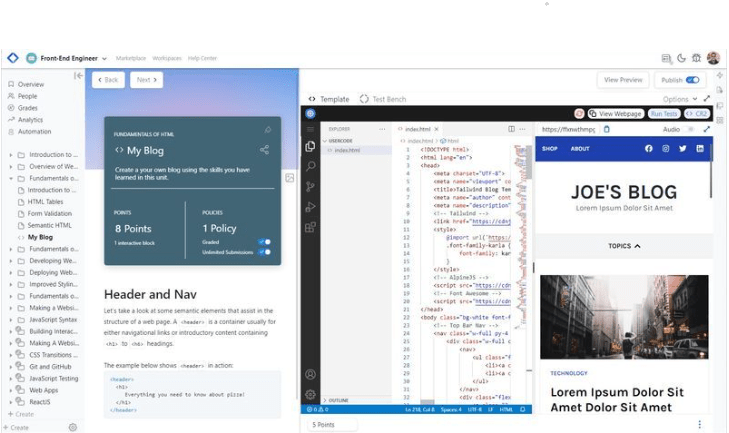
Coding Rooms is an all-in-one learning platform made for developer training and enablement. It combines interactive coding education, virtual learning options, and a desktop app for Mac and PC users.
Purpose and benefits of the platform
Coding Rooms is a developer training and enablement platform aimed at getting more out of the learning experience for people at any stage of their coding journey.
It ships with an online integrated development environment (IDE) at its core. The IDE runs on Linux and supports GUIs, graphics, and sound, which gives learners a professional-grade development environment rather than a stripped-down sandbox.
Because the platform adapts to how it is used, it scales with learners as their needs change, which makes it a flexible fit for many programs. To support that, it pairs virtual learning with instructional technology to deliver interactive coding lessons.
That combination keeps education delivery smooth and helps students grasp harder concepts through real-time practice sessions instead of passive reading. When a learner can write and run code as an idea is being explained, the concept tends to stick better than it would from a lecture alone.
Advanced, all-in-one learning platform
Coding Rooms brings developer training and enablement together in a single platform. As an EdTech startup backed by EXL Inc., the team’s priority is a strong interactive coding education experience.
In practice, that means the platform works for a wide audience, from absolute beginners writing their first lines of code to industry professionals sharpening existing skills.
Scalability matters as programming curricula and tools keep changing, so Coding Rooms is built to grow with learners’ needs and keep pace with new instructional technology for coding education.
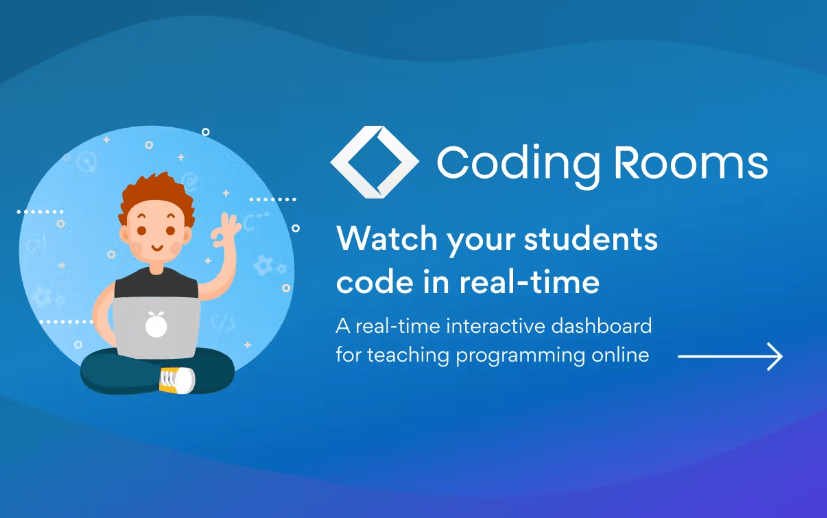
Real-time monitoring and teaching best practices are built into the system, so instructors can watch progress as it happens and learners get the most out of the virtual learning environment. Rather than waiting until an assignment is turned in, an instructor can see where a student is stuck and step in during the session itself.
Scalability for different levels of learners
On Coding Rooms, scalability is central to keeping the environment learner-centered. The platform’s instructional design system lets coding education scale up or down to match learners’ needs and levels without extra setup.
Instructors can teach large groups at once through interactive coding lessons while still holding student attention. “Chunking” helps here: breaking learning material into smaller steps makes it easier to follow, which is valuable in an eLearning setting where students work at their own pace.
The same scaling applies to curriculum built around complex system-architecture topics, so even novice coders can work through the material without feeling overwhelmed. Advanced subjects are introduced in stages, which keeps the difficulty manageable as a class moves from fundamentals toward harder work.
For an educator or trainer using the Learning Management System (LMS), meeting the range of needs across a class becomes less of a chore, since Coding Rooms uses adaptive learning strategies that adjust to learners at different levels.
How Coding Rooms Works
Coding Rooms builds and delivers interactive coding education through a virtual learning platform driven by instructional technology. A desktop app for Mac and PC users rounds out the experience.
Creating and delivering interactive coding education
Building and delivering interactive coding education is the platform’s main job. Instructors can give students engaging, hands-on lessons without stitching together separate tools. Here is how it works:
- A full set of authoring tools and resources lets instructors build interactive coding lessons, including code editors, live coding environments, and shared coding spaces.
- Those lessons can be delivered in different formats, such as live virtual classes or self-paced modules, so learners can study whenever and wherever suits them.
- An integrated assessment system lets instructors track student progress and give personalized feedback, which surfaces the spots where a learner needs more support or practice.
- Embedded chat supports teacher-student interaction, so instructors can answer questions and give guidance in real time.
- Remote classes are supported too, which lets learners in different locations join the same coding program.
Virtual learning and instructional technology

Coding Rooms leans on virtual learning and instructional technology to keep coding education engaging. That includes:
- Interactive virtual classrooms that encourage collaboration and participation among learners.
- Online learning tools that give quick access to educational resources and materials.
- Instructional technology that supports both teaching and learning.
- Remote education, so learners can take coding courses from anywhere.
- Virtual labs and coding environments that mirror real-world programming scenarios.
- Built-in video calling for clear communication between instructors and learners.
Desktop app for Mac and PC
The desktop app for Mac and PC is a core part of Coding Rooms. It lets users build and deliver interactive coding education at every level, and gives learners a customized, focused experience right from their own computers.
The app runs consistently across both operating systems, so Mac and PC users get the same coding experience. That matters for mixed teams, where some developers work on Macs and others on Windows machines but everyone needs to follow the same lessons.
Benefits of Using Coding Rooms
Coding Rooms offers a few clear benefits for developer training and enablement: a greater return on training spend, ready-to-go content and environments, and better assessment, training, and knowledge transfer.
Greater ROI for developer training
Coding Rooms is built to raise the return on investment (ROI) of developer training programs. Because instructors can create and deliver coding lessons at scale on one platform, training runs more efficiently.
Organizations can see that return sooner: learners can move from zero coding knowledge to working on client projects in as little as 8 weeks.
By giving developers the tools they need and cutting down on administrative work, Coding Rooms makes training more efficient, which can translate into a higher ROI. Time an instructor would otherwise spend on setup or grading goes back into actual teaching, and learners reach a productive level faster.
Ready-to-go content and environments
The platform comes with ready-to-go content and environments for developers. With pre-built coding environments and lessons, learners can start hands-on exercises immediately instead of spending time on setup or configuration.
That saves both instructors and students time and makes the first session smoother. The interactive content is also customizable, so educators can shape lessons to their specific goals and keep coding training relevant to their audience.
Optimization of assessment, training, and knowledge transfer
Coding Rooms is strong on assessment, training, and knowledge transfer for developers. Its tools and features support the learning process and help build real skills.
Assessments run quickly and give learners instant feedback. That feedback tells trainers where extra support is needed so they can adjust their instruction to match.
Training programs are easy to tailor to specific goals, whether that means teaching beginners the basics or helping professionals reskill for new roles. Because the same platform covers both ends of that range, a team does not have to switch tools as its people advance. The interactive format encourages active learning, so knowledge gets both picked up and put to use in real code.
Conclusion
Coding Rooms is a learning platform that delivers interactive coding education for beginners and professionals alike. It pairs a professional-grade development environment with ready-to-go content and environments to improve assessment, training, and knowledge transfer.
With real-time monitoring and a focus on sound teaching practices, Coding Rooms is a solid choice for developer training and enablement.
FAQs
What is Coding Rooms?
Coding Rooms is a developer training and enablement platform that provides an interactive coding environment for learning and practicing programming languages.
How can I access Coding Rooms?
You can access Coding Rooms through a web browser on your computer or mobile device by visiting their website and creating an account.
What programming languages are supported on Coding Rooms?
Coding Rooms supports a wide range of programming languages, including popular ones like Python, JavaScript, Java, C++, and HTML/CSS.
Can I collaborate with others on Coding Rooms?
Yes, you can collaborate with other users on Coding Rooms by sharing your coding projects and inviting them to join your workspace for real-time collaboration.
Is there a cost to use the Coding Rooms platform?
While some features may have limitations in the free version, there are different pricing plans available that offer additional benefits such as increased storage capacity and priority support.
Compare alternatives to the tools in this post

- Independent picks for exactly what you just read about
- Matched to your team size & needs
- Vendors don't pay for placement
Step 1 of 4
How big is your team?
We tailor recommendations to companies your size.















Related Articles

Buyers guide
How To Choose The Best Online Learning Platform For 2026
Continue reading →

Education Software
Best LMS Software in 2026: Complete Guide for Every Team Size
Continue reading →
Education Software
Legends of Learning: 2,000+ K-8 Games, Free Teacher Plan
Continue reading →
Education Software
ThinkWave Educator 2026 Review: Gradebook, School Management Software, and Support Overview
Continue reading →