
Picking the right HTML editor for your web design needs isn’t easy — there are hundreds of options, and beginners and seasoned developers alike run into the same problem. This guide walks through 10 free HTML editors for 2023, comparing their features, interfaces, and platform support so you can make an educated decision based on reviews and comparison rather than guesswork.
Key Takeaways
- Notepad++ is a highly recommended free HTML editor for both beginners and advanced users, offering an intuitive interface and advanced programming features.
- Visual Studio Code is a popular text editor that supports multiple programming languages, making it versatile for various coding projects.
- CoffeeCup Free Editor is a reliable choice for web design beginners and experienced coders looking to create and edit HTML code with ease.
- Brackets provides a user-friendly interface with real-time previews, quick editing shortcuts, and support for preprocessors like LESS and SCSS.
- Komodo Edit offers powerful features such as code folding, syntax highlighting, auto-completion, and project management tools for efficient web design.
Best Free HTML Editors for 2026

Here are the top free HTML editors for 2023 for both beginners and advanced users in web design and development: Notepad++, Visual Studio Code, CoffeeCup Free Editor, Brackets, and Komodo Edit.
Notepad++
Notepad++ makes a strong case as one of the best free HTML editors in 2023. Its interface is intuitive and its functionality efficient, and this open-source code editor works well for both web design beginners and professional developers.
Advanced users get extensive programming features like syntax highlighting, auto-completion, and a multi-document tab interface. The software also supports various programming languages beyond HTML, which helps on complex web development projects.
It’s lightweight, so it runs fast without putting much strain on computer resources — a good fit for systems with limited capacity, including older machines that struggle with heavier IDEs. Notepad++ also allows customization that can improve coding efficiency, such as changing the look of the workspace or creating shortcut keys for frequently used operations, which adds up over the course of a long project.
Visual Studio Code
Visual Studio Code is a widely used, powerful text editor for coding, built for web developers at every skill level. It packs in a range of features that suit both beginners and advanced users.
Its interface is user-friendly and its layout customizable, giving you a smooth experience for writing HTML code. It also supports multiple programming languages, so it works across many different coding projects.
Visual Studio Code also has a vast library of extensions you can add to boost functionality and productivity, whether that means linting, live previews, or additional language support. This free HTML editor is available for download on Windows, putting it within reach of a wide audience in the web design community.
CoffeeCup Free Editor
CoffeeCup Free Editor is one of the best free HTML editors available for web design beginners, developers, and advanced users alike. Its user-friendly interface and feature set make it easy to create and edit HTML code.
This editor provides a range of tools that help users build professional websites with ease. It’s compatible with Windows operating systems and offers a free download for anyone looking to sharpen their coding skills without spending money.
Whether you’re new to web development or an experienced coder, CoffeeCup Free Editor holds up well for HTML programming work.
Brackets
Brackets is a popular free HTML editor for both beginners and advanced users in web design. Its user-friendly interface lets you write and edit code while showing real-time previews of your changes.
It offers quick editing shortcuts, live preview, extensions for added functionality, and support for preprocessors such as LESS and SCSS. Whether you’re a professional developer or just starting out in web design, Brackets is a solid choice for writing clean, efficient HTML code.
Komodo Edit
Komodo Edit is a popular HTML editor with a range of features for web design and development. It supports multiple programming languages, so it suits both beginners and advanced users.
Its interface is intuitive and its settings customizable, giving you a smooth coding experience. Expect features like code folding, syntax highlighting, auto-completion, and project management tools that improve your workflow.
This text editor is available as a free download for Windows, Mac, and Linux, so it’s accessible to just about anyone interested in web design and development. Whether you’re building simple HTML pages or working on complex projects, Komodo Edit is capable enough to meet your needs.
Best Premium HTML Editors for 2026
Beyond the free options, several premium HTML editors are available in 2023 with more advanced features and functionality than most free tools include out of the box. Adobe Dreamweaver CC, Froala, and CoffeeCup are among the top choices for professional web designers and developers who want more capable tools and are willing to pay for them.
Adobe Dreamweaver CC
Adobe Dreamweaver CC is a premium HTML editor with advanced features aimed at professional web designers and developers. It provides a WYSIWYG interface, letting users visually design websites without writing code by hand.
Its coding tools also serve advanced users well, offering syntax highlighting, code suggestion, and real-time preview. The software supports both frontend and backend development, making it suitable for building dynamic web applications.
As one of the most widely used web design tools available, Adobe Dreamweaver CC is trusted by professionals for its reliability and versatility in building websites.
Froala
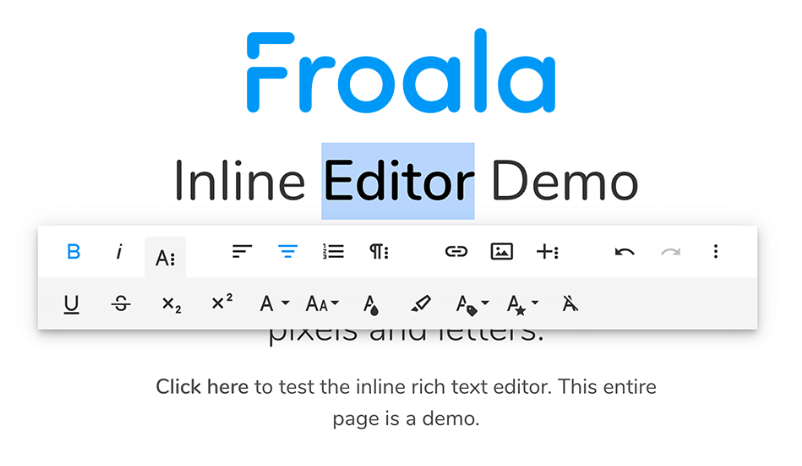
Froala is a premium HTML editor with powerful features for web design and development. It offers a user-friendly interface and an extensive toolset that makes coding easier for beginners and advanced users alike.
With Froala, you can write clean, efficient HTML code, preview your designs in real time, and customize your workspace to your preferences. This editor also supports WYSIWYG editing, letting you visually build web pages without manual coding.
Whether you’re a professional developer or just getting started in web design, Froala is a reliable option thanks to its intuitive interface and comprehensive feature set.
CoffeeCup
CoffeeCup Free Editor is another strong HTML editor, popular among web design beginners and advanced users alike. Its user-friendly interface makes it easy to create and edit HTML code.
Features like color-coding, auto-completion, and syntax highlighting help developers write clean, error-free code. It also includes built-in FTP functionality for uploading and downloading files without leaving the editor.
Whether you’re a professional or just starting out in web design, CoffeeCup Free Editor is a solid choice for building websites without spending money on tooling.
Reasons to Use an HTML Editor
There are several good reasons to use an HTML editor for web design and development. First, an HTML editor lets beginners create and edit websites without needing extensive coding knowledge.
These editors typically provide intuitive interfaces and visual tools that make website design easier for people just starting out.
Second, professional developers benefit from the advanced features HTML editors offer. These tools provide coding options and shortcuts that streamline the development process.
With features like auto-completion, syntax highlighting, and HTML code validation, developers save time and keep their code error-free.
Finally, HTML editors offer flexibility through customization. Users can adjust the interface, configure keyboard shortcuts, and choose from various themes or plugins based on their preferences, tailoring the tool to how they actually work rather than how it ships by default.
That level of customization supports a more efficient workflow tailored to individual needs, whether you’re formatting a quick landing page or maintaining a larger site over time.
In short, whether you’re a beginner or an experienced developer, an HTML editor offers real advantages: ease of use for newcomers, advanced capabilities for professionals, and customizable options for everyone in between.
Conclusion
2023 offers a solid range of free HTML editors for web design beginners, developers, and advanced users. Notepad++, Visual Studio Code, CoffeeCup Free Editor, Brackets, and Komodo Edit are among the top options available, each with its own strengths depending on how you like to work and which platform you’re on.
With these user-friendly tools, you can build professional websites without spending a single cent on software licenses. Explore these free options today and put them to work on your next web development project.
FAQs
What are some free HTML editors available in 2026?
There are numerous free HTML editors in 2023, including popular options like Atom, Sublime, and various open-source text editors.
Can paid versions of these HTML editors offer better features?
Yes, while there are many free code editors available for frontend development, the paid versions typically come with premium options that may enhance your web development tools arsenal.
Are WYSIWYG editors also considered as HTML Editors?
Surely! WYSIWYG (What You See Is What You Get) Editors provide a visual web design interface alongside traditional text-based HTML editing capabilities.
Which is better between Text Editors and WYSIWYG Editors for Frontend development?
Neither is inherently better; it depends on user preference and project needs. Some prefer using pure text-oriented code editors like Atom or Sublime for full control over their coding process, others find convenience in the visualization offered by WYSIWYG web development tools.

- Independent picks for exactly what you just read about
- Matched to your team size & needs
- Vendors don't pay for placement
Step 1 of 4
How big is your team?
We tailor recommendations to companies your size.















Related Articles
AI Software
AI Accounts Payable Software in 2026: How AI Invoice Processing Works and 8 Tools Compared
Continue reading →

Expert Interviews
SaaS Talks with Carole Winqwist, CMO at GitGuardian – Inside Their Unique Marketing Strategy
Continue reading →

Buyers guide
How to choose the best subscription management software for 2026
Continue reading →

Finance & Billing Software
Best Invoice Home Software for Freelancers & Businesses 2026
Continue reading →