
8.0
SpotScore

RedKetchup Review: Is It The Right Photo Editing Software For Your Team?
Best for SMB teams · Mid-market
Free Trial Available
Add to compare
Starts from $5 / year when yearly
Overview
Pricing
Features
Buyer feedback
Alternatives
Media
Security & Compliance
Support
FAQ
Blogs
What is RedKetchup?
RedKetchup - Online Tools is a browser-based platform designed for creators, designers, marketers, and anyone working with digital media who needs fast, reliable tools without installing software. Whether you're resizing a batch of product images, compressing assets for faster web performance, converting image formats, or editing animated GIFs, RedKetchup provides a suite of simple yet powerful tools directly accessible online. It includes image and GIF resizers, format converters, a favicon generator, a Twitter media downloader, an icon editor, and a color picker — all supporting popular file formats like PNG, JPEG, WEBP, HEIC, GIF, ICO, TIFF, BMP, SVG, and MP4. RedKetchup is ideal for individuals and teams working in e-commerce, content creation, development, and marketing who need to quickly optimize media for websites, social platforms, or apps. While it doesn’t rely on third-party integrations like Meta or Google, it complements those platforms by streamlining the preparation of visual assets used across them. Built with usability in mind, RedKetchup makes everyday editing tasks quick, accurate, and accessible right from your browser.
Pricing
Starts from $5 / year when yearly
Free Trial available
Best For
Built for growing teams, from small businesses to mid-market
Security & Compliance
Data residency:Global
RedKetchup Screenshots
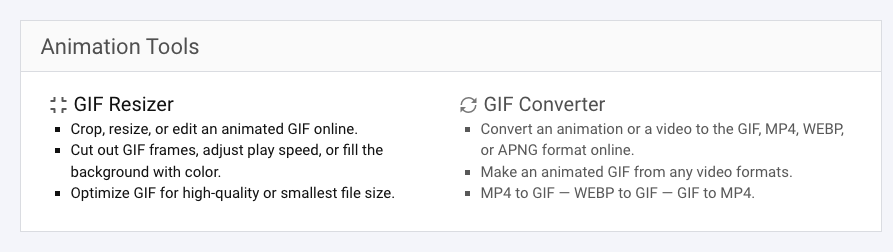
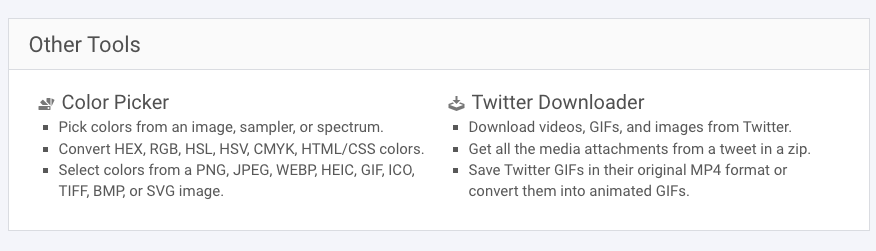
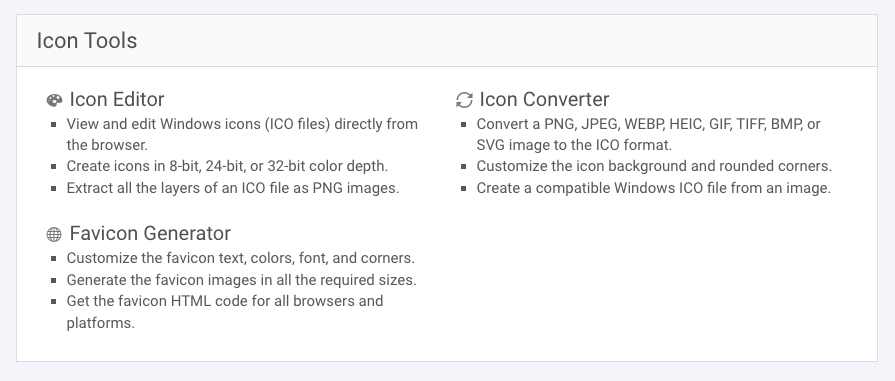
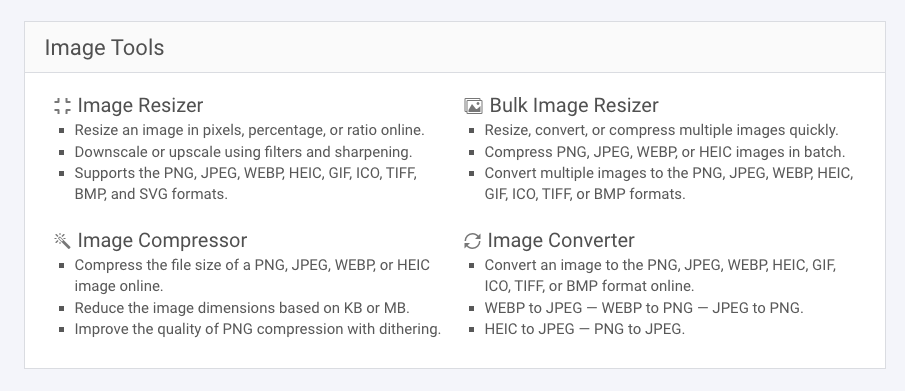
RedKetchup was reviewed internally using user feedback, in-house testing, and market research to assess its performance, reliability, and user experience. Learn how we review products and our evaluation process.

Who should consider RedKetchup
- Use cases
- E-commerce, Marketing, Content Creation
- Team types
- Graphic Designer, Social Media Manager
- Company size
- 1–100 Employees
Why teams choose RedKetchup
Users can work with a diverse set of file types, which is especially beneficial for digital professionals who manage varied assets.
As a fully browser-based suite, RedKetchup eliminates compatibility issues and saves local storage space.
RedKetchup supports bulk resizing, conversion, and compression, which saves time for users managing large image sets.
Is RedKetchup right for you?
What buyers should know before choosing RedKetchup
RedKetchup is a surprisingly powerful online tool I use when I need quick image edits, conversions, or resizing without launching a bulky design suite. What I love most is the browser-based simplicity—it’s fast, intuitive, and requires zero setup.
From bulk image compression to favicon generation, the features are laser-focused on essential tasks that save time. However, I sometimes wish it offered integrations with my cloud storage or allowed real-time team collaboration.
It’s not a replacement for Photoshop or Canva, but for quick, reliable media handling, RedKetchup hits the sweet spot—especially for developers, marketers, and solo content creators like myself.
RedKetchup pros and cons
- RedKetchup pros
Users can work with a diverse set of file types, which is especially beneficial for digital professionals who manage varied assets.
As a fully browser-based suite, RedKetchup eliminates compatibility issues and saves local storage space.
RedKetchup supports bulk resizing, conversion, and compression, which saves time for users managing large image sets.
- RedKetchup cons
RedKetchup doesn’t integrate with design tools like Figma or marketing tools like Canva, which limits cross-platform workflows.
The tool offers basic functionality without advanced editing capabilities such as layer-based design, vector editing, or typography tools.
Ready to try it?
Get started with RedKetchup
Start your free trial — no credit card required.
Still comparing?
See how it stacks up
Compare RedKetchup side-by-side with top Photo Editing Software alternatives.



What is the pricing of RedKetchup?
RedKetchup Pricing Plans
Weighing your options?
Not sure if RedKetchup fits your budget?
RedKetchup reviews and ratings
What buyers like
- Users can work with a diverse set of file types, which is especially beneficial for digital professionals who manage varied assets.
- As a fully browser-based suite, RedKetchup eliminates compatibility issues and saves local storage space.
- RedKetchup supports bulk resizing, conversion, and compression, which saves time for users managing large image sets.
Common complaints
- RedKetchup doesn’t integrate with design tools like Figma or marketing tools like Canva, which limits cross-platform workflows.
- The tool offers basic functionality without advanced editing capabilities such as layer-based design, vector editing, or typography tools.
- Compared to professional design software, RedKetchup provides limited design flexibility and lacks templates or advanced settings for branding consistency.
Be the first to review RedKetchup
You'll help thousands of buyers make a smarter decision.

- See if RedKetchup fits your business
- Real pricing — no sales pressure
- A demo or quick answers, your call
Step 1 of 4
How big is your team?
We tailor recommendations to companies your size.















What are the features of RedKetchup?
Batch editing is a powerful software feature that allows users to make changes to multiple files or data sets at once. It is a time-saving t…
While RedKetchup is primarily a solo-user tool, Collaborative Editing is functionally limited in its current form. Users can share processed…
RedKetchup includes basic effects and filters that let users modify the look and visual appeal of images directly in the browser. Options in…
Enhancement tools are features within software that let users improve and modify their digital creations. One core function is adjusting vis…
RedKetchup’s Text Tool allows users to add customized text to images, making it suitable for creating labels, watermarks, meme-style content…
The Transform Tools available in RedKetchup let users resize, rotate, flip, and crop images directly from their browser interface. These fun…
RedKetchup security and data handling
Key compliance certifications and security features for IT and security teams evaluating RedKetchup.
Certifications

Developer & data
Alternatives to RedKetchup



Why buyers keep looking beyond RedKetchup
RedKetchup does not integrate with cloud storage platforms like Google Drive or Dropbox, which can make file handling less seamless for users working in collaborative environments.
While it supports GIF and MP4 conversions, users looking for robust video editing features may need a more advanced platform.
It lacks collaborative tools for teams, such as shared workspaces or editing history, which are essential for agencies or larger creative teams.
Unlike some modern design and image tools, RedKetchup doesn’t offer AI enhancements like auto-background removal or intelligent resizing suggestions.
The interface, while functional, may feel simplistic or outdated compared to more polished creative tools with intuitive drag-and-drop environments.
Being a lightweight web tool, RedKetchup doesn’t offer extensive customer support or onboarding resources like tutorials, live chat, or guided help found in full-scale SaaS platforms.
RedKetchup Support Options
Frequently Asked Questions About RedKetchup
Common questions buyers ask before choosing RedKetchup.
RedKetchup is a Photo Editing Software. RedKetchup offers Text Tool, Transform tools, Enhancement Tools, Effects and Filters, Collaborative Editing and many more functionalities.
Buyers commonly note the following limitations of RedKetchup: RedKetchup doesn’t integrate with design tools like Figma or marketing tools like Canva, which limits cross-platform workflows.; The tool offers basic functionality without advanced editing capabilities such as layer-based design, vector editing, or typography tools.; Compared to professional design software, RedKetchup provides limited design flexibility and lacks templates or advanced settings for branding consistency..
Some top alternatives to RedKetchup includes Let's Enhance, FotoFlexer, Clipping Magic, Magic Studio and FotoJet.
RedKetchup offers Free Trial, Subscription, One-time license pricing models
The starting price of RedKetchup is $5/year when yearly
Ready to try it?
Get started with RedKetchup
Start your free trial — no credit card required.
About the reviewer
Rajat Gupta is the founder of Spotsaas. Over the past two years, he has reviewed 2,000+ tools across CRM, HR, AI, and finance — applying hands-on product research and a background in commerce and the CFA program to evaluate software through a business and ROI lens. His goal: help teams make software decisions they won't regret.
Disclaimer: This research has been collated from a variety of authoritative sources. We welcome your feedback at [email protected].