

K-Display View Review: Is It The Right General-Purpose CAD Software For Your Team?
Best for SMB teams · Mid-market · Enterprise
Add to compare
 Adidas
 3M
3M BOEING
 HEXCEL
 SAFRAN
Trusted by teams including Adidas
Overview
Pricing
Features
Alternatives
Customers
Media
Support
FAQ
Blogs
What is K-Display View?
K-Display View is a CAD visualization tool designed for non-engineers, providing 3D rotation, shading, slicing, distance measurement, and draft angle analysis without requiring a CAD license. The companion K-Display Convert module lets users export models to neutral CAD formats for cross-platform sharing and collaboration.
Best For
Suited for small teams, SMBs, and enterprise
Platform
Browser Based (Cloud)
Desktop only — no mobile app
K-Display View Screenshots

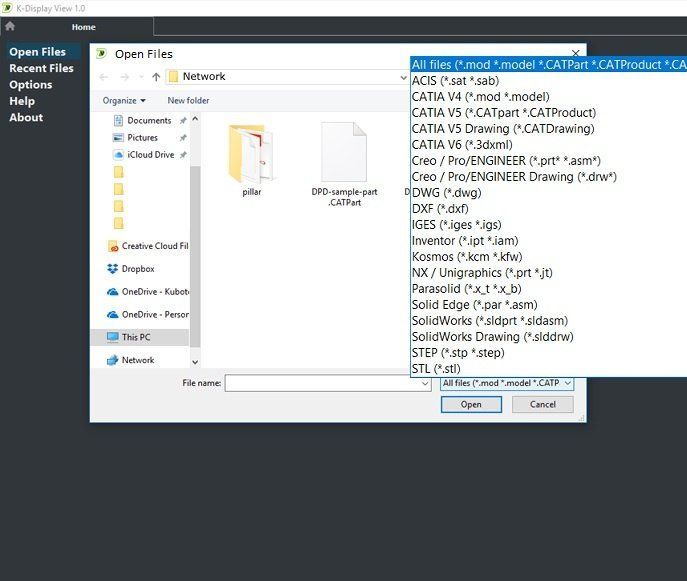
K-Display View was reviewed internally using user feedback, in-house testing, and market research to assess its performance, reliability, and user experience. Learn how we review products and our evaluation process.

Who should consider K-Display View
- Use cases
- Product design review, Manufacturing quality control, Technical documentation review
- Team types
- Non-engineering stakeholders, Product managers
- Company size
- Small Business, Large Enterprises
- Workflow style
- Simple and streamlined
- Setup complexity
- Low
Why teams choose K-Display View
User-friendly interface tailored for non-engineers
Supports dynamic 3D rotation and lifelike shading
Includes precise measurement and draft angle analysis tools
Is K-Display View right for you?
Best for non-engineers needing intuitive CAD model viewing and analysis.
Choose K-Display View if
- You require a simple, user-friendly CAD viewer for product design reviews.
- Your team includes non-engineering stakeholders who need to understand complex models.
- You need precise measurement and draft angle analysis without CAD editing.
Consider alternatives if
- You need advanced CAD editing or design capabilities within the software.
- You require extensive customization, integration, or transparent pricing information.
K-Display View pros and cons
- K-Display View pros
User-friendly interface tailored for non-engineers
Supports dynamic 3D rotation and lifelike shading
Includes precise measurement and draft angle analysis tools
- K-Display View cons
Lack of detailed pricing information
No available user ratings or reviews to validate performance
Ready to try it?
Get started with K-Display View
Connect with the team for a personalised demo.
Still comparing?
See how it stacks up
Compare K-Display View side-by-side with top General-Purpose CAD Software alternatives.



What is the pricing of K-Display View?
Weighing your options?
Not sure if K-Display View fits your budget?
K-Display View reviews and ratings
Buyer sentiment
No user reviews or ratings available to assess buyer sentiment.
Be the first to review K-Display View
You'll help thousands of buyers make a smarter decision.

- See if K-Display View fits your business
- Real pricing — no sales pressure
- A demo or quick answers, your call
Step 1 of 4
How big is your team?
We tailor recommendations to companies your size.















What are the features of K-Display View?
3D, or three-dimensional, refers to an object or environment that has height, width, and depth. It is a term commonly used in the field of t…
Collaboration has received a lot of attention in the marketing world recently. It's taking off in a big way but still has many questions sur…
Data Import-Export is a software feature that plays a key role in improving the functionality and usability of any software. It allows users…
Alternatives to K-Display View




K-Display View Customers
Adidas
3M
BOEING
HEXCEL
SAFRAN

XCENTRIC
K-Display View Support Options
Frequently Asked Questions About K-Display View
Common questions buyers ask before choosing K-Display View.
K-Display View is a General-Purpose CAD Software. K-Display View offers 3D, Data Import-Export and many more functionalities.
K-Display View is a strong fit if: You require a simple, user-friendly CAD viewer for product design reviews.; Your team includes non-engineering stakeholders who need to understand complex models.. Consider alternatives if: You need advanced CAD editing or design capabilities within the software.; You require extensive customization, integration, or transparent pricing information..
Buyers commonly note the following limitations of K-Display View: Lack of detailed pricing information; No available user ratings or reviews to validate performance; Limited to viewing and analysis without editing features.
Some top alternatives to K-Display View includes Tinkercad, CAD Exchanger, Ares Commander, AutoCAD and magicplan.
K-Display View offers Subscription pricing model
The starting price is not disclosed by K-Display View. You can visit K-Display View pricing page to get the latest pricing.
Ready to try it?
Get started with K-Display View
Get connected with the team for a personalised demo.
About the reviewer
Rajat Gupta is the founder of Spotsaas. Over the past two years, he has reviewed 2,000+ tools across CRM, HR, AI, and finance — applying hands-on product research and a background in commerce and the CFA program to evaluate software through a business and ROI lens. His goal: help teams make software decisions they won't regret.
Disclaimer: This research has been collated from a variety of authoritative sources. We welcome your feedback at [email protected].