
8.3
SpotScore

Cloudcraft Review: Is It The Right Cloud Management Platform For Your Team?
Best for SMB teams · Mid-market · Enterprise
Free Trial & Free Plan Available
Cloudcraft offers custom pricing plan
 Cisco
Cisco AWS
AWS Accenture
 Sony
Sony Bose
BoseTrusted by teams including Cisco
Overview
Pricing
Features
Buyer feedback
Alternatives
Customers
Media
Security & Compliance
Support
FAQ
Blogs
Spotsaas Analysis for Cloudcraft
Cloudcraft is a cloud management platform utilized by cloud architects and IT operations teams in small to medium businesses for visualizing cloud infrastructure and managing AWS costs. With a 4.5/5 rating from 197 user reviews, it is broadly validated, indicating strong user satisfaction.
The platform excels with its intuitive interface, making it accessible for both technical and non-technical users to create detailed diagrams. Its integration with AWS for syncing and cost analysis is particularly beneficial for budget planning. However, a limitation exists in its support for custom icon libraries and some AWS services, which can restrict comprehensive representation.
Quick facts about Cloudcraft
What is Cloudcraft?
Cloudcraft is a cloud management platform for IT departments, designed to enable control and understanding of cloud usage across your business. Cloudcraft makes it easy to get started and simple to use. With Cloudcraft, user can manage the entire cloud environment in one place and view a single resource inventory of everything user have created in AWS.
Pricing
Cloudcraft offers custom pricing plan
Free Trial available
Best For
Suited for small teams, SMBs, and enterprise
Security & Compliance
Data residency:Global
Cloudcraft Screenshots

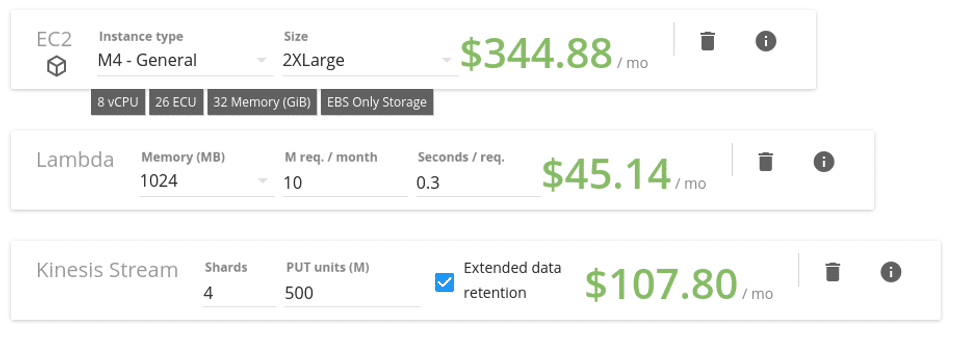
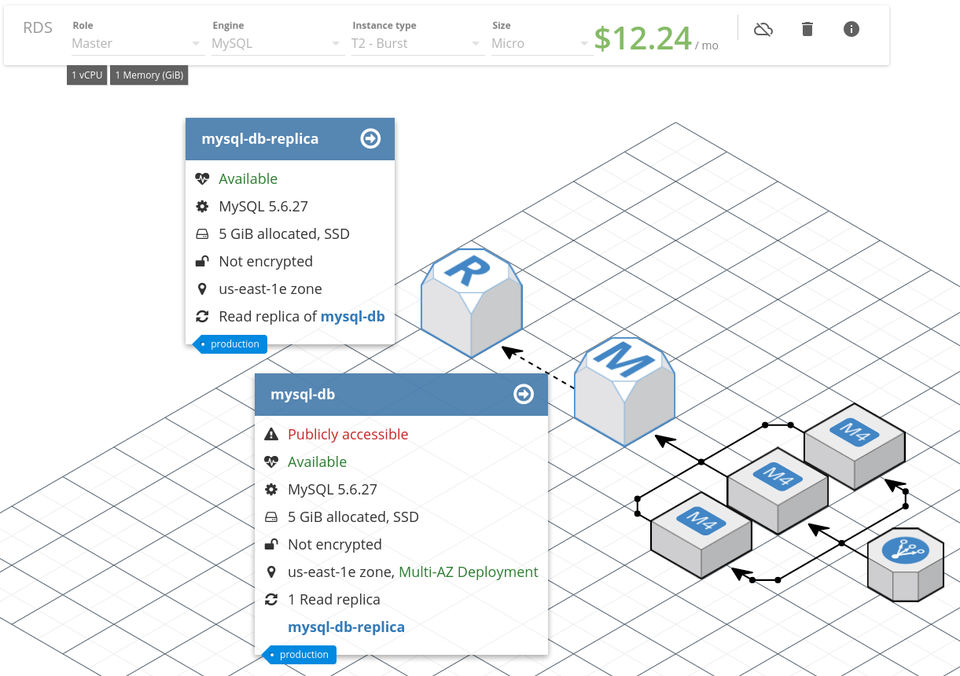
Cloudcraft was reviewed internally using user feedback, in-house testing, and market research to assess its performance, reliability, and user experience. Learn how we review products and our evaluation process.

Who should consider Cloudcraft
- Use cases
- Cloud infrastructure visualization, AWS cost management and budgeting, IT department cloud resource management
- Team types
- Cloud architects, IT operations teams
- Company size
- Small Business, Medium Business
- Workflow style
- Simple and streamlined
- Setup complexity
- Low
Why teams choose Cloudcraft
User-friendly interface enabling easy diagram creation for technical and non-technical users
Integration with AWS for syncing resources and cost analysis
Features like auto-sync, 3D view, and live components enhance diagram accuracy and presentation
Is Cloudcraft right for you?
Best for visualizing and managing AWS cloud infrastructure with cost insights.
Choose Cloudcraft if
- You need an easy-to-use tool for creating accurate AWS cloud diagrams quickly.
- Your team requires real-time AWS integration with automatic resource syncing and cost calculation.
- You want to manage and budget AWS cloud resources centrally within IT departments.
Consider alternatives if
- You require extensive custom icon libraries or full AWS service icon representation.
- You have a limited budget or a large team making pricing a critical concern.
What buyers should know before choosing Cloudcraft
Cloudcraft is a cloud infrastructure diagramming tool built for AWS visualization. It generates diagrams from live AWS environments and includes a cost calculator for budget estimates.
The interface is straightforward, though the tool is AWS-only—it doesn't support other cloud providers like Azure or GCP. Before shortlisting, verify that Cloudcraft covers the AWS services your architecture uses.
Users report gaps in icon availability for newer or niche services, which may require manual workarounds. Check the pricing model carefully: the tool charges per user per month, and costs add up quickly for large teams.
In a demo, confirm that real-time sync works with your AWS account structure and that exported diagrams (PDF, Terraform code) match your documentation standards. The main limitation is scope.
Cloudcraft excels at AWS-specific design but isn't suitable if you need multi-cloud diagramming or on-premises infrastructure visualization. Integration is straightforward—it connects directly to AWS via IAM roles—but you'll need AWS console access to set it up.
If your team works across multiple cloud platforms or uses hybrid infrastructure, this tool will require supplementary diagramming software.
Cloudcraft pros and cons
- Cloudcraft pros
User-friendly interface enabling easy diagram creation for technical and non-technical users
Integration with AWS for syncing resources and cost analysis
Features like auto-sync, 3D view, and live components enhance diagram accuracy and presentation
- Cloudcraft cons
Limited support for custom icon libraries and incomplete AWS service icons
Pricing perceived as high for multiple users, limiting accessibility
Ready to try it?
Get started with Cloudcraft
Start your free trial — no credit card required.
Still comparing?
See how it stacks up
Compare Cloudcraft side-by-side with top Cloud Management Platform alternatives.



What is the pricing of Cloudcraft?
Cloudcraft uses custom pricing — plans are tailored to your team size and needs. Contact them for a quote.
Weighing your options?
Not sure if Cloudcraft fits your budget?
Cloudcraft reviews and ratings
Buyer sentiment
Overall positive sentiment highlights ease of use and AWS integration, tempered by concerns over pricing and icon limitations.
What buyers like
- Ease of use
- AWS integration
- Cost analysis features
Common complaints
- Limited icon library
- Pricing concerns
Are you using Cloudcraft?

- See if Cloudcraft fits your business
- Real pricing — no sales pressure
- A demo or quick answers, your call
Step 1 of 4
How big is your team?
We tailor recommendations to companies your size.















What are the features of Cloudcraft?
API integration is a feature that allows different software systems, platforms, or applications to seamlessly communicate with each other. I…
Automated Deployment is a feature that automates the process of deploying software applications to designated environments, such as developm…
A project budget details the expected revenue, expenses, and profit for your project. Using project budget tracking, you can watch how much…
People can collaborate more easily with the help of collaboration tools. The goal of a collaboration tool is to help a group of two or more…
Managers plan, coordinate, regulate, and lead operations that assure compliance with laws and standards through compliance management. It is…
A service level agreement (SLA) is a written contract between a service provider and a client that specifies the services to be provided and…
A real-time email marketing dashboard displays metrics. This allows individuals to track the effectiveness of an email marketing initiatives…
Inventory tracking is an essential feature that helps businesses keep track of their stock levels and manage their inventory effectively. It…
Multi-cloud management is a software feature that allows users to manage multiple cloud environments from a single platform. It simplifies t…
Multi-factor authentication (MFA) is a security mechanism that verifies a user's identity for a login or other transaction by requiring mult…
Real-time sync is a feature that enables seamless and instantaneous updates across multiple devices and platforms. It ensures that changes m…
Cloudcraft security and data handling
Key compliance certifications and security features for IT and security teams evaluating Cloudcraft.
Developer & data
Alternatives to Cloudcraft



Cloudcraft Customers
Cisco
AWS
Accenture
Sony
Bose

NASA

Autodesk

Nvidia

Genral dynamics

Cox automothive

Salseforce
Cloudcraft Support Options
Frequently Asked Questions About Cloudcraft
Common questions buyers ask before choosing Cloudcraft.
Cloudcraft is a Cloud Management Platform. Cloudcraft offers Dashboard, Collaboration Tools, Contract (SLA Management), Budget Tracking (Job Costing), API Integration and many more functionalities.
Cloudcraft is a strong fit if: You need an easy-to-use tool for creating accurate AWS cloud diagrams quickly.; Your team requires real-time AWS integration with automatic resource syncing and cost calculation.. Consider alternatives if: You require extensive custom icon libraries or full AWS service icon representation.; You have a limited budget or a large team making pricing a critical concern..
Buyers commonly note the following limitations of Cloudcraft: Limited support for custom icon libraries and incomplete AWS service icons; Pricing perceived as high for multiple users, limiting accessibility; Exported PDFs may have formatting issues and 2D map representations could be improved.
Some top alternatives to Cloudcraft includes Cloud Elements, Lucidchart, AutoCloud, Cloudzatic and Advanced Cloud Monitor.
Cloudcraft offers Free Trial, Freemium, Subscription, Quotation Based pricing models
The starting price is not disclosed by Cloudcraft. You can visit Cloudcraft pricing page to get the latest pricing.
Ready to try it?
Get started with Cloudcraft
Start your free trial — no credit card required.
About the reviewer
Rajat Gupta is the founder of Spotsaas. Over the past two years, he has reviewed 2,000+ tools across CRM, HR, AI, and finance — applying hands-on product research and a background in commerce and the CFA program to evaluate software through a business and ROI lens. His goal: help teams make software decisions they won't regret.
Disclaimer: This research has been collated from a variety of authoritative sources. We welcome your feedback at [email protected].