
8.6
SpotScore

ArcGIS 3D Analyst Review: Is It The Right 3D Modeling Software For Your Team?
Best for SMB teams · Mid-market · Enterprise
Free Trial Available
ArcGIS 3D Analyst offers custom pricing plan
Overview
Pricing
Features
Buyer feedback
Alternatives
Media
Support
FAQ
Blogs
Spotsaas Analysis for ArcGIS 3D Analyst
ArcGIS 3D Analyst is a powerful tool used by GIS analysts, environmental scientists, and urban planners for geospatial analysis and mapping. With a rating of 4.3/5 from 50 reviews, it is broadly validated, indicating strong user satisfaction among its target audience.
The software excels in providing comprehensive 3D mapping capabilities, allowing for advanced spatial development in data models. Users find the interface intuitive and user-friendly, which enhances visualization and analysis tasks. However, beginners may find the complexity of features and customizations overwhelming without adequate support.
Quick facts about ArcGIS 3D Analyst
What is ArcGIS 3D Analyst?
3D Analyst is an easy-to-use 3D modeling software for creating spatial information, such as digital elevation models (DEMs) or bathymetry data. Its powerful tools, including a user-friendly terrain-building tool and tools for building 3D buildings and bridges, help to meet the needs of 2D GIS users looking to use a 3D environment. Use 3D Analyst to build accurate surfaces, develop flood inundation models, support landslide risk analyses, and more. Combine these tasks with the time-saving wizards built into ArcGIS 3D Analyst to help user get started performing complex geospatial tasks in no time.
Pricing
ArcGIS 3D Analyst offers custom pricing plan
Free Trial available
Best For
Suited for small teams, SMBs, and enterprise
Platform
Web-based — no mobile app
Installed - Windows
ArcGIS 3D Analyst Screenshots

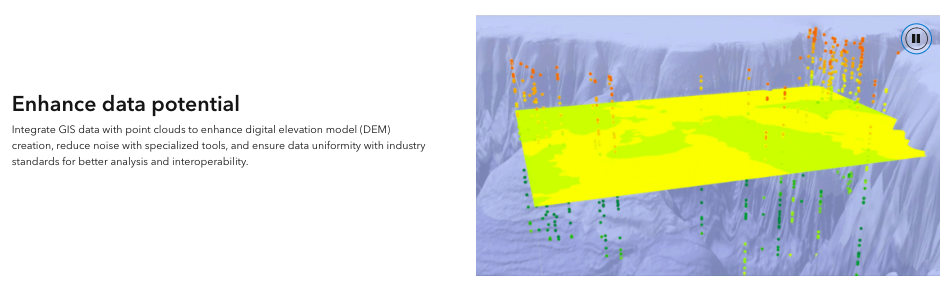
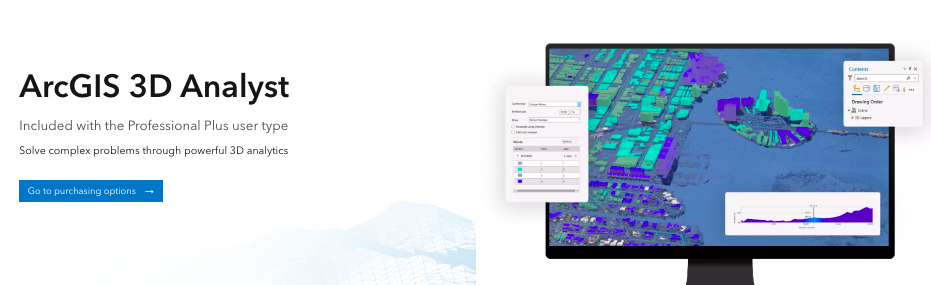
ArcGIS 3D Analyst was reviewed internally using user feedback, in-house testing, and market research to assess its performance, reliability, and user experience. Learn how we review products and our evaluation process.

Who should consider ArcGIS 3D Analyst
- Use cases
- Geospatial analysis and mapping, Environmental risk assessment, Urban planning and infrastructure development
- Team types
- GIS analysts, Environmental scientists
- Company size
- Medium Business, Large Enterprises
- Workflow style
- Flexible and configurable
- Setup complexity
- Medium
Why teams choose ArcGIS 3D Analyst
Comprehensive 3D mapping with advanced spatial data modeling
Intuitive and user-friendly interface for visualization and analysis
Efficient handling of Lidar data and geometric analysis
Is ArcGIS 3D Analyst right for you?
Best for advanced 3D GIS modeling and spatial analysis within ArcGIS ecosystem.
Choose ArcGIS 3D Analyst if
- You need precise 3D terrain and flood inundation modeling tools.
- Your team consists of GIS analysts or urban planners with GIS experience.
- You require robust handling of Lidar data and complex spatial datasets.
Consider alternatives if
- Your team lacks GIS experience and needs a simpler, more beginner-friendly tool.
- You depend heavily on extensive third-party app integrations and marketplace extensions.
What buyers should know before choosing ArcGIS 3D Analyst
ArcGIS 3D Analyst has garnered significant praise in the past year for its comprehensive three-dimensional mapping capabilities, standing out as a top tool in the market. Users appreciate its ability to merge spatial development for data models with impressive graphic representations for 3D mapping.
The tool offers a user-friendly experience and versatile functionalities that cater to a range of analytic tasks, from viewshed analysis to TIN surface development. It enables detailed spatial dynamics evaluation, making it a must-have extension for 3D modeling in ArcGIS.
While some users find the software slightly clunky within ArcMap, the overall consensus remains highly positive. Users find it invaluable for tasks like analyzing slope, creating shapefiles, and manipulating Lidar data efficiently.
With a strong emphasis on visualization and analysis accuracy, ArcGIS 3D Analyst emerges as a powerful and indispensable tool for professionals across various sectors.
ArcGIS 3D Analyst pros and cons
- ArcGIS 3D Analyst pros
Comprehensive 3D mapping with advanced spatial data modeling
Intuitive and user-friendly interface for visualization and analysis
Efficient handling of Lidar data and geometric analysis
- ArcGIS 3D Analyst cons
Steep learning curve for beginners without sufficient support
Limited marketplace apps and connectors restricting advanced functionality
Ready to try it?
Get started with ArcGIS 3D Analyst
Start your free trial — no credit card required.
Still comparing?
See how it stacks up
Compare ArcGIS 3D Analyst side-by-side with top 3D Modeling Software alternatives.


What is the pricing of ArcGIS 3D Analyst?
ArcGIS 3D Analyst uses custom pricing — plans are tailored to your team size and needs. Contact them for a quote.
ArcGIS 3D Analyst Pricing Plans
Weighing your options?
Not sure if ArcGIS 3D Analyst fits your budget?
ArcGIS 3D Analyst reviews and ratings
Buyer sentiment
Overall positive sentiment highlights the software's powerful 3D mapping capabilities and user-friendly interface, tempered by concerns over complexity and limited integrations.
What buyers like
- 3D mapping capabilities
- User interface intuitiveness
- Data analysis functionality
Common complaints
- Feature complexity for beginners
- Limited marketplace extensions
Are you using ArcGIS 3D Analyst?

- See if ArcGIS 3D Analyst fits your business
- Real pricing — no sales pressure
- A demo or quick answers, your call
Step 1 of 4
How big is your team?
We tailor recommendations to companies your size.















What are the features of ArcGIS 3D Analyst?
3D animation is a cutting-edge technology that is used to create dynamic and realistic animations in a three-dimensional space. It involves…
3D printing, also known as additive manufacturing, is a process of creating three-dimensional objects from a computer-aided design (CAD) fil…
3D rendering is a computer graphics process of creating three-dimensional images, animations, and models from a 2D or wireframe representati…
3D Sculpting is a revolutionary software feature that allows users to create and manipulate three-dimensional objects in a digital environme…
A digital library (3D) is a modern technology-based platform that allows users to access and organize a vast collection of digital resources…
Real-time collaboration is a software feature that enables multiple users to work together on a project simultaneously, regardless of their…
Alternatives to ArcGIS 3D Analyst


ArcGIS 3D Analyst Support Options
Frequently Asked Questions About ArcGIS 3D Analyst
Common questions buyers ask before choosing ArcGIS 3D Analyst.
ArcGIS 3D Analyst is a 3D Modeling Software. ArcGIS 3D Analyst offers 3D Animation, Digital Library (3D), 3D Sculpting, 3D Rendering, 3D Printing and many more functionalities.
ArcGIS 3D Analyst is a strong fit if: You need precise 3D terrain and flood inundation modeling tools.; Your team consists of GIS analysts or urban planners with GIS experience.. Consider alternatives if: Your team lacks GIS experience and needs a simpler, more beginner-friendly tool.; You depend heavily on extensive third-party app integrations and marketplace extensions..
Buyers commonly note the following limitations of ArcGIS 3D Analyst: Steep learning curve for beginners without sufficient support; Limited marketplace apps and connectors restricting advanced functionality; Occasional clunkiness in certain environments like ArcMap.
Some top alternatives to ArcGIS 3D Analyst includes SURE Aerial, 3-GIS, 3D Slash, Giraffe and Concept3D.
ArcGIS 3D Analyst offers Free Trial, Quotation Based pricing models
The starting price is not disclosed by ArcGIS 3D Analyst. You can visit ArcGIS 3D Analyst pricing page to get the latest pricing.
Ready to try it?
Get started with ArcGIS 3D Analyst
Start your free trial — no credit card required.
About the reviewer
Rajat Gupta is the founder of Spotsaas. Over the past two years, he has reviewed 2,000+ tools across CRM, HR, AI, and finance — applying hands-on product research and a background in commerce and the CFA program to evaluate software through a business and ROI lens. His goal: help teams make software decisions they won't regret.
Disclaimer: This research has been collated from a variety of authoritative sources. We welcome your feedback at [email protected].