
8.8
SpotScore

Adobe Bridge Review: Is It The Right Digital Asset Management Software For Your Team?
Best for SMB teams · Mid-market · Enterprise
Add to compare
Adobe Bridge offers custom pricing plan
Overview
Pricing
Features
Buyer feedback
Alternatives
Media
Security & Compliance
Support
FAQ
Blogs
Spotsaas Analysis for Adobe Bridge
Adobe Bridge at 4.2/5 from 312 reviews and SpotScore 8.8 is the primary choice for graphic design teams in large enterprises that need file organization tied to the Adobe Creative Cloud ecosystem. The platform handles asset sorting and metadata tagging across design projects, replacing manual file management workflows. Integration with Photoshop, Illustrator, and InDesign reduces context switching for designers managing multiple file formats.
Digital asset management software organizes and retrieves creative files across teams and projects. The primary workflow improvement is reducing time spent searching for assets and managing version control across design applications.
Quick picks:
What is Adobe Bridge?
Adobe Bridge facilitates organizing and managing creative content in a centralized way. It allows users to easily organize, preview, edit, and publish their assets, while maintaining ratings, tags, and keywords. They can use advanced search, collection, and filter tools for easy access. With the help of batch resize feature, large-scale projects can be handled conveniently. It also has Photo Downloader that prioritizes raw images enabling users to make use of the Camera Raw integration for editing them. Plus
Pricing
Adobe Bridge offers custom pricing plan
Best For
Suited for small teams, SMBs, and enterprise
Security & Compliance
Data residency:Global
Platform
Web-based — no mobile app
Installed - Windows
Adobe Bridge Screenshots

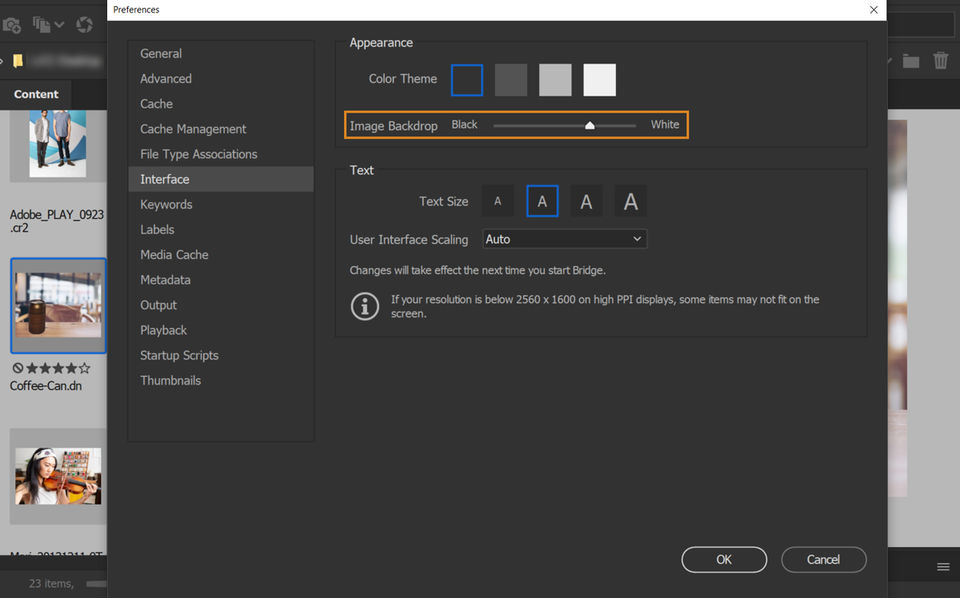
Adobe Bridge was reviewed internally using user feedback, in-house testing, and market research to assess its performance, reliability, and user experience. Learn how we review products and our evaluation process.

Who should consider Adobe Bridge
- Team types
- Large Enterprises, Medium Business
Why teams choose Adobe Bridge
Centralized management of creative assets.
Advanced search tools streamline asset retrieval.
Batch processing saves time on large projects.
Is Adobe Bridge right for you?
What buyers should know before choosing Adobe Bridge
Adobe Bridge and Adobe Creative Cloud have received a mix of positive feedback from users in the past year. The Adobe Bridge stands out as a powerful file organizing tool that streamlines workflow efficiency.
Users appreciate its sophisticated features that allow for seamless file management and organization, enhancing speed and general storage capabilities. Additionally, the ability to link files seamlessly among Adobe apps is a key strength, making it a valuable asset for creative professionals.
On the other hand, Adobe Creative Cloud offers a comprehensive suite of creative software that is essential for graphic designers and content creators. Users value the variety and quality of software available in a single package, as well as the frequent software updates and access to stock resources.
However, some users have criticized the customer service and pricing structure. Overall, Adobe Bridge and Adobe Creative Cloud provide indispensable tools for content creation and management, with Adobe Bridge excelling in file organization and seamless app integration, while Adobe Creative Cloud offers a wide range of powerful software solutions, despite some drawbacks in customer service and pricing.
Adobe Bridge pros and cons
- Adobe Bridge pros
Centralized management of creative assets.
Advanced search tools streamline asset retrieval.
Batch processing saves time on large projects.
- Adobe Bridge cons
Limited integrations outside Adobe products.
May not be user-friendly for non-creatives.
Ready to try it?
Get started with Adobe Bridge
Connect with the team for a personalised demo.
Still comparing?
See how it stacks up
Compare Adobe Bridge side-by-side with top Digital Asset Management Software alternatives.


What is the pricing of Adobe Bridge?
Adobe Bridge uses custom pricing — plans are tailored to your team size and needs. Contact them for a quote.
Adobe Bridge Pricing Plans
Weighing your options?
Not sure if Adobe Bridge fits your budget?
Adobe Bridge reviews and ratings
Buyer sentiment
Buyer sentiment is positive across 355 reviews, with strong overall satisfaction.
What buyers like
- Helps in organizing and sorting files efficiently, improving workflow.
- Integrates various Adobe software and allows easy access and management in one place.
- Provides a wide range of creative tools in a single package, essential for graphic designers.
Common complaints
- Some users find the customer service experience lacking and the pricing model expensive.
- Limited customization options and app selection in the Creative Cloud Marketplace.
- Complexity in utilizing the full range of features, especially for newcomers without proper guidance or support.
Are you using Adobe Bridge?

- See if Adobe Bridge fits your business
- Real pricing — no sales pressure
- A demo or quick answers, your call
Step 1 of 4
How big is your team?
We tailor recommendations to companies your size.















What are the features of Adobe Bridge?
The access control structure is a crucial characteristic that distinguishes a digital asset management system from other storage systems. Yo…
Asset categorization is the systematic division of assets into multiple groups depending on their characteristics, using accounting standard…
Asset Libraries are virtual locations where reusable assets can be created and stored. To organize information for departments, teams, or ev…
Asset sharing is not a new concept; cooperatives are a prime illustration of how communities have traditionally pooled resources and collabo…
To improve attraction, brands are turning to individualized branding tactics. Brands are putting more power in the hands of consumers than e…
The administration of data that describes other data is known as metadata management. Metadata management aims to make it easy for someone o…
Reporting provides complete visibility of the project and a clear grasp of what has to be done to the on-site personnel. The reporting proce…
A search filter is a feature that allows a visitor to narrow down the search results on a product listing page, such as by size, color, pric…
Workflow is a collection of tasks that work together to process a batch of data. A workflow encompasses everything from creating assets to i…
Adobe Bridge security and data handling
Key compliance certifications and security features for IT and security teams evaluating Adobe Bridge.
Developer & data
Alternatives to Adobe Bridge


Adobe Bridge Support Options
Frequently Asked Questions About Adobe Bridge
Common questions buyers ask before choosing Adobe Bridge.
Adobe Bridge is a Digital Asset Management Software. Adobe Bridge offers Workflow Management, Metadata Management, Asset Sharing, Asset Library, Asset Categorization and many more functionalities.
Buyers commonly note the following limitations of Adobe Bridge: Limited integrations outside Adobe products.; May not be user-friendly for non-creatives.; Requires familiarity with Adobe ecosystem..
Some top alternatives to Adobe Bridge includes MyMediabox, Brandfolder, Digizuite, WoodWing Assets and Picturepark.
Adobe Bridge offers Quotation Based pricing model
The starting price is not disclosed by Adobe Bridge. You can visit Adobe Bridge pricing page to get the latest pricing.
Ready to try it?
Get started with Adobe Bridge
Get connected with the team for a personalised demo.
About the reviewer
Rajat Gupta is the founder of Spotsaas. Over the past two years, he has reviewed 2,000+ tools across CRM, HR, AI, and finance — applying hands-on product research and a background in commerce and the CFA program to evaluate software through a business and ROI lens. His goal: help teams make software decisions they won't regret.
Disclaimer: This research has been collated from a variety of authoritative sources. We welcome your feedback at [email protected].