
Vivox vs Flowlab vs Scenario Comparison

Vivox
Starting at Contact for pricing
- Large Enterprises
- Medium Business
Elevate player engagement, retention rates, and cultivate captivating multiplayer environments with Vivox - a cutting-edge voice and text communication platform. Witness firsthand how enabling seamless player interaction…

Flowlab
Starting at $4.91 per month
- Large Enterprises
- Small Business
Step into the world of Flowlab, where game creation meets simplicity. With the tagline "Visual game creator, right in your browser," Flowlab revolutionizes the way users bring their gaming visions to life online. Imagine…

Scenario
Starting at $36 /month
- Large Enterprises
- Medium Business
Scenario is an AI-powered visual content creation platform designed to help creative teams, game studios, agencies, and brands streamline their asset production with consistency and control. Built specifically for artist…
Vivox vs Flowlab vs Scenario — at a glance
| Feature | Vivox | Flowlab | Scenario |
|---|---|---|---|
| Rating | — | — | — |
| Reviews | — | — | — |
| Starting price | Contact for pricing | $4.91 per month | $36 /month |
| Free trial | No | No | No |
| Free version | No | No | No |
| Best for | Large Enterprises, Medium Business, Freelancers / Consultants | Large Enterprises, Small Business, Medium Business | Large Enterprises, Medium Business |
| Category | Game Engine Software | Game Engine Software | Game Engine Software |
| Platforms | Browser Based (Cloud) | Browser Based (Cloud), Installed - Windows | SaaS/Web/Cloud |
| API | — | — | Available |
| Support modes | Online | Online | |
| Certifications | — | — | — |
| Data residency | Global | Global | Global |
Key differences between Vivox and Flowlab
- Pricing: Flowlab starts at $4.91 per month. Vivox pricing is not publicly listed.
- Deployment: Vivox supports Browser Based (Cloud); Flowlab supports Browser Based (Cloud), Installed - Windows.
Compare Vivox vs Flowlab vs Scenario — and walk away knowing which one fits.
Which tool fits your team best
Which is actually cheaper for your team size
Where each product wins, per real buyers
Most Game Engine Software tools look identical on paper. This comparison cuts to the differences that matter — pricing structure, team fit, and what real buyers found after signing up.
Biggest differences
Features
Pricing
Buying details
Security
Buyer feedback
Integrations
Product tour
Other options
Free PDF comparison
Download this Vivox vs Flowlab vs Scenario comparison
Get the full side-by-side as a PDF — these picks plus the top Game Engine Software tools, with verified ratings, pricing and features.
- Side-by-side on pricing, features & ratings
- Plus the category top 10, scored & ranked
- Emailed to you — no on-screen download
No file downloads on screen — we email it to you. One-click unsubscribe anytime.
Biggest differences
Start here before you go deeper into features.
Best for scalable, high-quality voice and text in multiplayer games.
- You develop multiplayer games requiring seamless in-game communication.
- Your team uses major game engines needing easy integration.
- You manage large or mid-sized studios focused on player engagement.
- You are a small indie developer with a limited budget.
- You need communication solutions outside of gaming contexts.
Best for no-code, browser-based game creation by indie and educational users.
- You want to create games visually without any programming knowledge.
- You need a simple, low-setup tool accessible directly in a web browser.
- You are an indie developer, hobbyist, or educator working with small teams.
- You require advanced programming features and deep customization options.
- You need high-performance or AAA-level game engine capabilities for large studios.
Best for custom AI-driven visual asset creation in game and media studios.
- You need to generate unique visual styles using your proprietary assets.
- Your team requires precise editing tools like in-painting and background removal.
- You want seamless integration with Unity, Unreal Engine, and enterprise pipelines.
- Your projects demand animated or video content generation capabilities.
- You require built-in marketing campaign creative performance tracking features.
Vivox: Best for scalable, high-quality voice and text in multiplayer games. Flowlab: Best for no-code, browser-based game creation by indie and educational users.
Description | Elevate player engagement, retention rates, and cultivate captivating multiplayer environments with Vivox - a cutting-edge voice and text communication platform. Witness firsthand how ... Read More about Vivox | Step into the world of Flowlab, where game creation meets simplicity. With the tagline "Visual game creator, right in your browser," Flowlab revolutionizes the way users bring their gaming ... Read More about Flowlab | Scenario is an AI-powered visual content creation platform designed to help creative teams, game studios, agencies, and brands streamline their asset production with consistency and ... Read More about Scenario |
|---|---|---|---|
Entry Level Pricing |
|
|
|
Free Trial Availability |
|
|
|
Best Company Size | 51-500 employees500+ employees | 1-50 employees51-500 employees | Medium BusinessLarge Enterprises |
Get pricing help | Get pricing help | Get pricing help |
Where each option fits best
See where each product is strongest, which teams it fits, and what causes buyers to keep looking — before you commit.
Based on buyer reviews and verified product data collected by Spotsaas.
Key strengths
No key benefits available yet.
No key benefits available yet.
- Style-Consistent Custom AI Models: Users can train AI on their own assets, ensuring visuals match brand or game art styles consistently across all content types.
- Fine-Grained Asset Editing: Robust in‑painting, background removal, and texture/expression tweaks allow precise editing without losing visual coherence.
- Enterprise-Grade Security & Pipeline Integration: Supports secure IP handling and integrates seamlessly with existing art pipelines like Unity, Unreal Engine, and cloud storage systems.
Best fit
No best-fit guidance available yet.
No best-fit guidance available yet.
- 20–500+ Employees
- Game Development, Advertising Agencies, Media & Entertainment, E‑Commerce Brands, Product Design Studios
- Art Directors, Creative Leads, Visual Effects Artists, Marketing Managers, Game Producers
Reasons buyers look elsewhere
No alternatives guidance available yet.
No alternatives guidance available yet.
- Scenario excels at still visuals but lacks comprehensive video generation or editing features, making competitors like RunwayML more appealing to users prioritizing motion.
- While powerful, Scenario’s model training and prompt-enrichment tools demand time and technical know‑how; smaller teams often prefer more streamlined, plug‑and‑play tools like Canva.
- Tailored for enterprise workflows, Scenario’s pricing may be less accessible to SMBs or freelancers who find budget-friendly alternatives more suitable.
Software Demo
Demo |
|---|
Need a second opinion?
Get shortlist help from a software advisor
Share your priorities, budget, and team needs, and we’ll help you narrow the options and understand the tradeoffs before you talk to vendors.

- Independent advice — matched to your business
- Understand the tradeoffs before you talk to vendors
- Free 15-min call with a software advisor.
Step 1 of 4
How big is your team?
We tailor recommendations to companies your size.















How do Vivox, Flowlab and Scenario Compare on Features?
Total Features | 0 Features | 0 Features | 5 Features |
|---|---|---|---|
Unique Features | No features | No features | No unique features |
Get Quote | Get Quote | Get Quote |
Compare Vivox, Flowlab and Scenario on pricing
Review starting price, plan structure, and free-trial access side by side so you can see which option fits your budget and buying process.
Pricing Option | |||
|---|---|---|---|
Starting From |
|
|
|
Pricing Plans |
|
| |
Pricing Page | Pricing information not available |  | 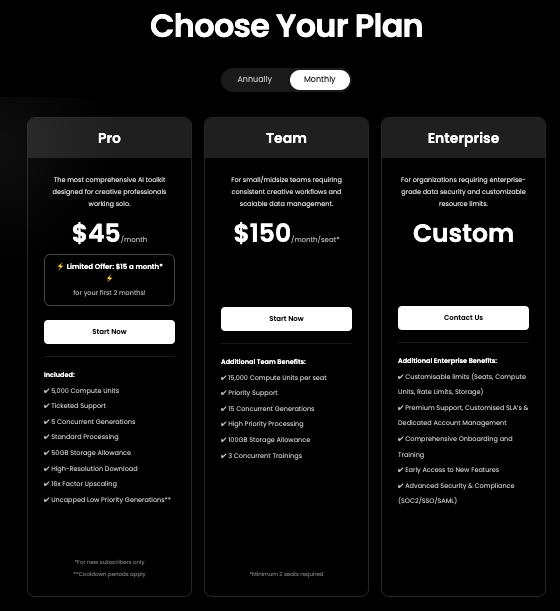 |
Other Details
Organization Types supported |
|
|
|
|---|---|---|---|
Platforms Supported |
|
|
|
Modes of support |
|
|
|
API Support |
|
|
|
Get help choosing | Get help choosing | Get help choosing |
Security & Compliance
Certifications, data handling, and security controls for IT and compliance evaluators.
HIPAA | ✗ No | ✗ No | ✗ No |
|---|---|---|---|
Data Residency | 🌐 Global | 🌐 Global | 🌐 Global |
Vivox vs Flowlab User Reviews & Rating Comparison
Spotsaas Editor’s POV generated by AI | Buyer sentiment Insufficient public user reviews to determine overall sentiment. | Buyer sentiment Overall sentiment is unknown due to lack of available ratings and reviews. What buyers like
Common complaints
| Buyer sentiment Buyers appreciate Scenario’s powerful custom AI model training and precise editing tools but note the steep setup effort and limited support for animation or marketing analytics. What buyers like
Common complaints
|
|---|---|---|---|
Pros and Cons |
|
|
|
Media and Screenshots
Screenshots | No screenshots available. | No screenshots available. | 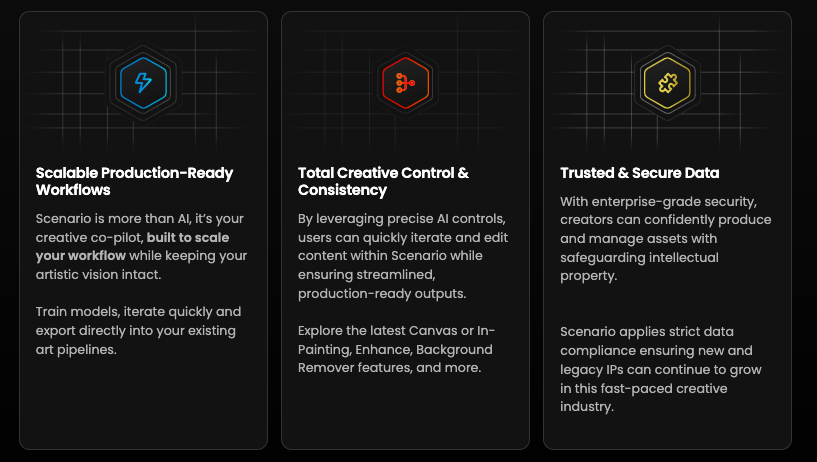 3 Screenshots |
|---|---|---|---|
Videos |  1 Videos |  2 Videos |  1 Videos |
Alternatives
Alternatives |
|---|


Add another option to compare side by side
Search by product name to compare pricing, fit, and buyer feedback in one view.Compare similar software options


Disclaimer: This research has been collated from a variety of authoritative sources. We welcome your feedback at [email protected].
Frequently asked questions
- Which is better, Vivox or Flowlab?
- Vivox and Flowlab are closely matched with equal user ratings of -1.0. The right choice depends on your team size, budget, and specific Game Engine Software needs.
- Do Vivox and Flowlab offer a free trial?
- Neither Vivox nor Flowlab currently lists a free trial.
- What is the starting price of Vivox vs Flowlab?
- Vivox starts at Contact for pricing. Flowlab starts at $4.91 per month.
- What are the top alternatives to Vivox?
- Top alternatives to Vivox include Mod.io, Unity, Unreal Engine, Sprite Fusion, Haddock.
- What are the top alternatives to Flowlab?
- Top alternatives to Flowlab include Haddock, Ludo AI, Unity, Unreal Engine, Sprite Fusion.