
Mailtrap vs Mailinator vs Inbox Pirates Comparison

Mailtrap
Starting at Contact for pricing
- Individuals
- Large Enterprises
Mailtrap is a development tool that emulates real production environments down to the smallest details. It captures incoming emails and allows to analyze them with ease. User can even save specific mails or all outgoing…

Mailinator
Starting at $0 /month
- Free Trial
- Large Enterprises
- Medium Business
Mailinator is the go-to choice for enterprise-grade email & SMS workflow testing. It gives your QA team the power to automatically verify whether these systems are running smoothly. It was first built to offer one-time-u…

Inbox Pirates
Starting at $20.83 /Month
- Free Trial
- Large Enterprises
- Medium Business
Inbox Pirates is a useful, free email preview and testing tool helping marketers and email designers keep track of emails across multiple notifications bars, devices, and screen sizes. With integrations for Google Worksp…
Mailtrap leads on user satisfaction with a 4.1-star rating across 7 reviews.
Mailtrap vs Mailinator vs Inbox Pirates — at a glance
| Feature | Mailtrap | Mailinator | Inbox Pirates |
|---|---|---|---|
| Rating | 4.1 / 5 | — | — |
| Reviews | 7 | — | — |
| Starting price | Contact for pricing | $0 /month | $20.83 /Month |
| Free trial | No | Yes | Yes |
| Free version | No | No | No |
| Best for | Individuals, Large Enterprises, Medium Business | Large Enterprises, Medium Business | Large Enterprises, Medium Business, Small Business |
| Category | Email Testing Tools | Email Testing Tools | Email Testing Tools |
| Integrations | — | 4+ apps | — |
| Platforms | SaaS/Web/Cloud | SaaS/Web/Cloud | SaaS/Web/Cloud |
| API | — | — | — |
| Support modes | Business Hours, Online | — | Online |
| Certifications | GDPR | — | — |
| Data residency | US | US | US |
Key differences between Mailtrap and Mailinator
- Pricing: Mailinator starts at $0 /month. Mailtrap pricing is not publicly listed.
- Free trial: Mailinator offers a free trial; Mailtrap does not.
- Target audience: Mailtrap is built for Individuals and Large Enterprises, while Mailinator targets Large Enterprises and Medium Business.
- Deployment: Mailtrap supports SaaS/Web/Cloud; Mailinator supports SaaS/Web/Cloud.
Compare Mailtrap vs Mailinator vs Inbox Pirates — and walk away knowing which one fits.
Which tool fits your team best
Which is actually cheaper for your team size
Where each product wins, per real buyers
Most Email Testing Tools tools look identical on paper. This comparison cuts to the differences that matter — pricing structure, team fit, and what real buyers found after signing up.
Biggest differences
Features
Pricing
Buying details
Security
Buyer feedback
Integrations
Product tour
Other options
Talk to an expert Talk to an expert | Talk to an expert Talk to an expert |
Free PDF comparison
Download this Mailtrap vs Mailinator vs Inbox Pirates comparison
Get the full side-by-side as a PDF — these picks plus the top Email Testing Tools tools, with verified ratings, pricing and features.
- Side-by-side on pricing, features & ratings
- Plus the category top 10, scored & ranked
- Emailed to you — no on-screen download
No file downloads on screen — we email it to you. One-click unsubscribe anytime.
Biggest differences
Start here before you go deeper into features.
Best for developers testing and analyzing email delivery in dev environments.
- You need to accurately emulate production email environments for testing.
- You want to capture and analyze incoming emails easily during development.
- You require saving specific or all outgoing emails for future reference.
- You need bulk email campaign management or marketing automation features.
- Your organization lacks a dedicated development or QA team for email testing.
Best for automated email and SMS workflow testing with disposable addresses.
- You need rapid, disposable email addresses for scalable QA testing.
- Your team requires API access to automate email testing in CI/CD pipelines.
- You want a flexible, medium-complexity setup for enterprise-grade email verification.
- You need a secure, private email testing solution without public inbox exposure.
- Your use case involves general email communication or small teams without automation.
Best for simple, free email previews across multiple devices and platforms.
- You need a no-cost tool to preview emails on various devices and notification bars.
- Your team uses Google Workspace, MailChimp, or Hubspot and wants seamless integration.
- You prefer a straightforward, low-complexity setup that fits into daily marketing workflows.
- You require advanced email analytics and detailed reporting capabilities.
- Your organization needs enterprise-grade email testing features with extensive customization.
Mailtrap: Best for developers testing and analyzing email delivery in dev environments. Mailinator: Best for automated email and SMS workflow testing with disposable addresses.
Description | Mailtrap is a development tool that emulates real production environments down to the smallest details. It captures incoming emails and allows to analyze them with ease. User can even save ... Read More about Mailtrap | Mailinator is the go-to choice for enterprise-grade email & SMS workflow testing. It gives your QA team the power to automatically verify whether these systems are running smoothly. It was ... Read More about Mailinator | Inbox Pirates is a useful, free email preview and testing tool helping marketers and email designers keep track of emails across multiple notifications bars, devices, and screen sizes. With ... Read More about Inbox Pirates |
|---|---|---|---|
Entry Level Pricing |
|
|
|
Free Trial Availability |
| ||
User RatingsBased on verified Spotsaas reviews | |||
Best Company Size | 1-50 employees51-500 employees | 201–500 employeesLarge Enterprises | Small BusinessMedium Business |
Get pricing help | Get pricing help | Get pricing help |
Where each option fits best
See where each product is strongest, which teams it fits, and what causes buyers to keep looking — before you commit.
Based on buyer reviews and verified product data collected by Spotsaas.
Key strengths
No key benefits available yet.
- Supports scalable testing environments: Development teams can generate large numbers of disposable email addresses during testing. This helps simulate real user scenarios such as mass registrations, onboarding flows, or marketing email distribution tests.
- Automation through API and webhooks: Mailinator provides API access that allows developers to automatically retrieve and validate emails generated by applications. This capability makes it easy to integrate email testing directly into automated testing pipelines and CI/CD workflows.
- Speeds up QA and development cycles: Because Mailinator inboxes are instantly accessible, development teams can quickly verify whether application emails are sent and received correctly. This speeds up debugging and allows teams to identify issues earlier in the development process.
No key benefits available yet.
Best fit
No best-fit guidance available yet.
- 201–500 employees
- Software Development, Information Technology, SaaS, DevOps, Quality Assurance
- Software Developer, QA Engineer, DevOps Engineer, Product Engineer, Test Automation Engineer, Engineering Manager
No best-fit guidance available yet.
Reasons buyers look elsewhere
No alternatives guidance available yet.
- Some development teams want tools that support testing not only email but also SMS, push notifications, and multi-channel messaging systems. In those cases, broader communication testing platforms may be more suitable.
- Larger development teams sometimes require role-based access control, advanced team collaboration tools, and centralized email testing dashboards. Some alternative platforms provide more enterprise-focused workflow management features.
- Public inbox messages on Mailinator may expire after a certain period depending on configuration. Organizations that require long-term email archiving for debugging or audit purposes may explore tools that offer extended storage capabilities.
No alternatives guidance available yet.
Software Demo
Demo |  Mailtrap has not given any software demo yet If you're the owner of this profile, add your demo.Contact us | Inbox Pirates has not given any software demo yet If you're the owner of this profile, add your demo.Contact us |
|---|
Need a second opinion?
Get shortlist help from a software advisor
Share your priorities, budget, and team needs, and we’ll help you narrow the options and understand the tradeoffs before you talk to vendors.

- Independent advice — matched to your business
- Understand the tradeoffs before you talk to vendors
- Free 15-min call with a software advisor.
Step 1 of 4
How big is your team?
We tailor recommendations to companies your size.















How do Mailtrap, Mailinator and Inbox Pirates Compare on Features?
Total Features | 0 Features | 5 Features | 0 Features |
|---|---|---|---|
Unique Features | No features | No unique features | No features |
Get Quote | Get Quote | Get Quote |
Compare Mailtrap, Mailinator and Inbox Pirates on pricing
Review starting price, plan structure, and free-trial access side by side so you can see which option fits your budget and buying process.
Pricing Option | |||
|---|---|---|---|
Starting From |
|
|
|
Pricing Plans |
|
|
|
Pricing Page |  | 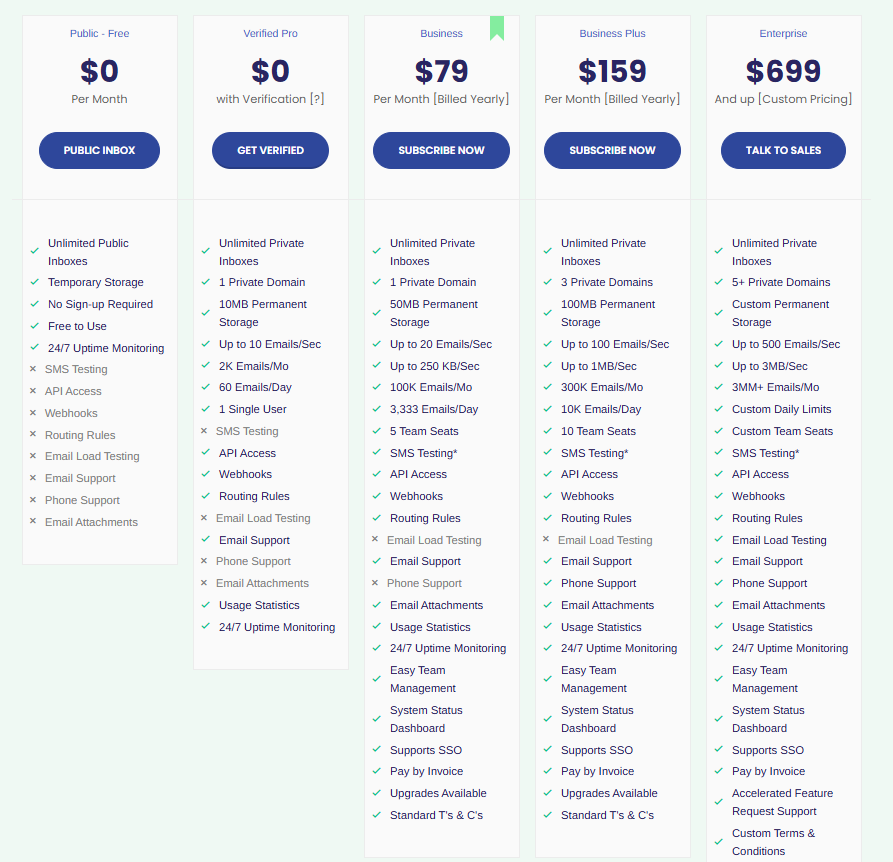 |  |
Other Details
Organization Types supported |
|
|
|
|---|---|---|---|
Platforms Supported |
|
|
|
Modes of support |
|
|
|
API Support |
|
|
|
Get help choosing | Get help choosing | Get help choosing |
Security & Compliance
Certifications, data handling, and security controls for IT and compliance evaluators.
HIPAA | ✗ No | ✗ No | — |
|---|---|---|---|
GDPR | ✓ Yes | — | — |
Single Sign-On (SSO) | ✓ Yes | ✗ No | — |
Multi-Factor Auth (MFA) | ✓ Yes | ✗ No | — |
Data Encryption | ✓ Yes | — | — |
Audit Logs | — | ✗ No | — |
Data Residency | 🇺🇸 US | 🇺🇸 US | 🇺🇸 US |
Mailtrap vs Mailinator User Reviews & Rating Comparison
User Ratings | No reviews available for the product | No reviews available for the product | |
|---|---|---|---|
Rating Distribution | |||
Spotsaas Editor’s POV generated by AI | Buyer sentiment Users generally appreciate Mailtrap's accurate email environment emulation and ease of email analysis, though feedback is limited. What buyers like
Common complaints
| Buyer sentiment Users appreciate Mailinator's ease of use and automation capabilities but express concerns about security and integration complexity. What buyers like
Common complaints
| Buyer sentiment Insufficient user feedback available to determine overall sentiment. What buyers like
Common complaints
|
Pros and Cons |
|
|
|
Positive Reviews | No reviews available for the product | No reviews available for the product | No reviews available for the product |
Integrations
Integration with other apps | No Integration information available. | No Integration information available. |
|---|


/logo_1710444538.5288234.jpg)
List of Customers
Customers | No Customers information available. |  Asana  Quicken  1800contacts | No Customers information available. |
|---|
Media and Screenshots
Screenshots | No screenshots available. |  1 Screenshots | No screenshots available. |
|---|---|---|---|
Videos | No videos available. |  2 Videos | No videos available. |
Alternatives


Add another option to compare side by side
Search by product name to compare pricing, fit, and buyer feedback in one view.Compare similar software options


Disclaimer: This research has been collated from a variety of authoritative sources. We welcome your feedback at [email protected].
Frequently asked questions
- Which is better, Mailtrap or Mailinator?
- Mailtrap edges out the other on user ratings (4.1 vs -1.0). That said, the best pick depends on your use case — use the comparison tables above to evaluate each dimension.
- Do Mailtrap and Mailinator offer a free trial?
- Mailinator offers a free trial. Mailtrap does not.
- What is the starting price of Mailtrap vs Mailinator?
- Mailtrap starts at Contact for pricing. Mailinator starts at $0 /month.
- What are the top alternatives to Mailtrap?
- Top alternatives to Mailtrap include Testi@, Imitate Email, testmail.app, Inbox Pirates, MailSnag.
- What are the top alternatives to Mailinator?
- Top alternatives to Mailinator include SmtpMan, Mailnest, testmail.app, Mailosaur, MOBtexting.