
Invideo AI vs GliaStudio Comparison

Invideo AI
Starting at $20 /month
- Large Enterprises
- Small Business
Invideo AI generates videos from text prompts — enter a description and the tool builds a script, designs scenes, adds voiceovers, and applies visual elements automatically. Users can refine any element through follow-up…

GliaStudio
Starting at Contact for pricing
- Free Trial
- Medium Business
- Small Business
GliaStudio is an AI video production platform for publishers, marketers, and bloggers that automates video creation from existing written or web content. It handles footage sourcing and editing automatically, letting use…
Invideo AI vs GliaStudio — at a glance
| Feature | Invideo AI | GliaStudio |
|---|---|---|
| Rating | — | — |
| Reviews | — | — |
| Starting price | $20 /month | Contact for pricing |
| Free trial | No | Yes |
| Free version | No | No |
| Best for | Large Enterprises, Small Business, Medium Business | Medium Business, Small Business, Individuals |
| Category | AI Video Generator Software | AI Video Generator Software |
| Platforms | Browser Based (Cloud), Mobile - Android, Mobile - iOS | Browser Based (Cloud) |
| API | — | — |
| Support modes | Online | Online |
| Certifications | — | — |
| Data residency | Global | US |
Key differences between Invideo AI and GliaStudio
- Pricing: Invideo AI starts at $20 /month. GliaStudio pricing is not publicly listed.
- Free trial: GliaStudio offers a free trial; Invideo AI does not.
- Target audience: Invideo AI is built for Large Enterprises and Small Business, while GliaStudio targets Medium Business and Small Business.
- Deployment: Invideo AI supports Browser Based (Cloud), Mobile - Android, Mobile - iOS; GliaStudio supports Browser Based (Cloud).
Invideo AI vs GliaStudio — find the better fit before you commit.
Which tool fits your team best
Which is actually cheaper for your team size
Where each product wins, per real buyers
Most AI Video Generator Software tools look identical on paper. This comparison cuts to the differences that matter — pricing structure, team fit, and what real buyers found after signing up.
Biggest differences
Features
Pricing
Buying details
Security
Buyer feedback
Integrations
Product tour
Other options
Talk to an expert Talk to an expert | Talk to an expert Talk to an expert |
Free PDF comparison
Download this Invideo AI vs GliaStudio comparison
Get the full side-by-side as a PDF — these picks plus the top AI Video Generator Software tools, with verified ratings, pricing and features.
- Side-by-side on pricing, features & ratings
- Plus the category top 10, scored & ranked
- Emailed to you — no on-screen download
No file downloads on screen — we email it to you. One-click unsubscribe anytime.
Invideo AI vs GliaStudio: Biggest differences
Start here before you go deeper into features.
Best for simple, collaborative AI-driven video creation with minimal editing skills.
- You need quick, professional videos using AI-generated scripts and templates.
- Your team values real-time collaboration and easy project sharing.
- Your company size is small to mid-sized (50-500 employees) focused on marketing or e-commerce.
- You require advanced, manual video editing capabilities beyond AI templates.
- Your enterprise demands complex, highly customized video production workflows.
Best for streamlined AI-driven video creation with collaboration and analytics.
- You need an easy-to-use platform for automated video production without manual editing.
- Your team values real-time collaboration across locations to enhance workflow efficiency.
- You want integrated analytics to monitor project performance and team productivity.
- You require advanced, highly customizable video editing features for complex workflows.
- You need transparent, fixed pricing details to support clear budgeting decisions.
Invideo AI: Best for simple, collaborative AI-driven video creation with minimal editing skills. GliaStudio: Best for streamlined AI-driven video creation with collaboration and analytics.
Description | Invideo AI generates videos from text prompts — enter a description and the tool builds a script, designs scenes, adds voiceovers, and applies visual elements automatically. Users can ... Read More about Invideo AI | GliaStudio is an AI video production platform for publishers, marketers, and bloggers that automates video creation from existing written or web content. It handles footage sourcing and ... Read More about GliaStudio |
|---|---|---|
Entry Level Pricing |
|
|
Free Trial Availability |
| |
SpotScoreWhat's this? ↗ | 7.5/10 | 7.7/10 |
Best Company Size | 50 to 500 employeesSmall Business | 50 to 500 employeesSmall Business |
Get pricing help | Get pricing help |
Where each option fits best
See where each product is strongest, which teams it fits, and what causes buyers to keep looking — before you commit.
Based on buyer reviews and verified product data collected by Spotsaas.
Key strengths
- Streamlined Video Creation: InVideo AI lets users create professional-grade videos easily, saving time and reducing the need for extensive editing skills. Team members with minimal experience can produce high-quality content quickly.
- AI-Powered Templates: InVideo AI offers a diverse library of customizable templates designed for your brand's unique style. This feature helps your team maintain consistency across all videos, improving brand recognition and engagement.
- Enhanced Collaboration: The platform lets your team work together easily through collaborative features. You and your colleagues can share projects, provide real-time feedback, and work together from anywhere, keeping everyone informed.
- Smooth Collaboration: GliaStudio improves teamwork by allowing real-time collaboration, so your team can work together easily, regardless of location. Sharing ideas and feedback is simple.
- User-Friendly Interface: GliaStudio's intuitive design lets even non-technical users work through it easily. This means less time training and more time on productive tasks—a win for everyone involved.
- Powerful Analytics Tools: Get useful insights into project performance and team productivity with GliaStudio's reliable analytics features. As a manager, you'll have the data you need to make informed decisions.
Best fit
- 50 to 500 employees
- Marketing, E-commerce, Education, Media & Entertainment, and Social Media Management
- Marketing Managers, Content Creators, Social Media Specialists, Video Editors, and Digital Marketers
- 50 to 500 employees
- Marketing Technology, SaaS, Consulting, E-commerce, and Education Technology
- Marketing Managers, Content Creators, Digital Strategists, Product Managers, and UX/UI Designers
Reasons buyers look elsewhere
- Users may seek alternatives to Invideo AI if they require specific features or tools that are not available, such as advanced editing options or unique templates tailored to niche markets.
- Budget constraints can lead users to explore other options, especially if they find similar functionalities at a lower price point or with more flexible pricing plans.
- Some users may prefer platforms that offer a more intuitive user interface, especially if they are beginners or have limited technical skills and need a straightforward editing experience.
- Lacks advanced customization and industry-specific integrations — teams needing tailored workflows often switch to Zapier or Make
- Pricing exceeds budget for small teams — competitors like Airtable or Notion offer comparable features at lower cost
- Limited customer support options — users seeking dedicated assistance or active community forums migrate to platforms with stronger support tiers
Software Demo
Demo |
|---|
Need a second opinion?
Get decision help from a software advisor
Share your priorities, budget, and team needs, and we’ll help you narrow the options and understand the tradeoffs before you talk to vendors.

- Independent advice — matched to your business
- Understand the tradeoffs before you talk to vendors
- Free 15-min call with a software advisor.
Step 1 of 4
How big is your team?
We tailor recommendations to companies your size.















How do Invideo AI and GliaStudio Compare on Features?
Total Features | 8 Features | 10 Features |
|---|---|---|
Unique Features | No unique features | No unique features |
Get Quote | Get Quote |
Compare Invideo AI and GliaStudio on pricing
Review starting price, plan structure, and free-trial access side by side so you can see which option fits your budget and buying process.
Pricing Option | ||
|---|---|---|
Starting From |
|
|
Pricing Plans |
|
|
Pricing Page | 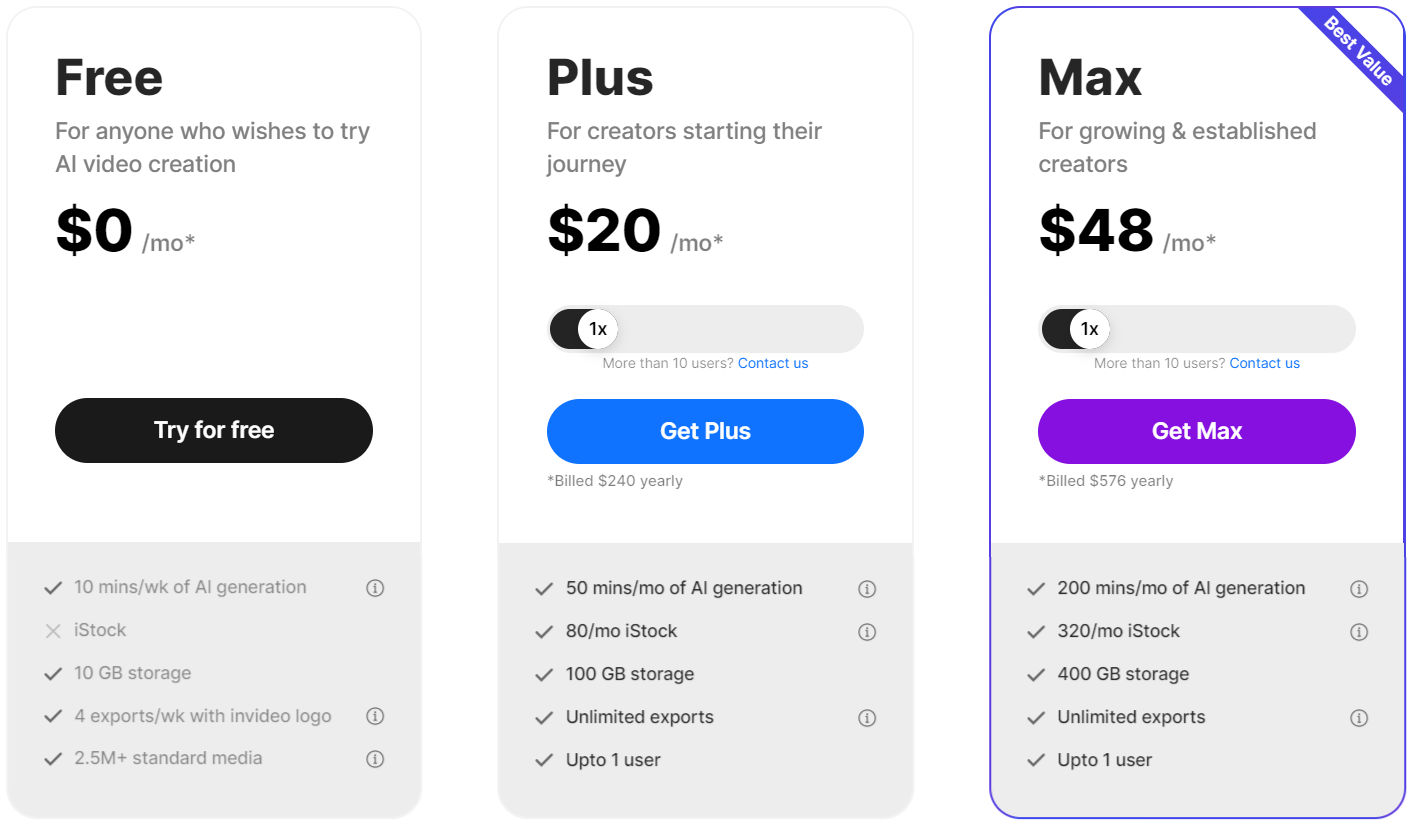 |  |
Invideo AI vs GliaStudio: Other Details
Organization Types supported |
|
|
|---|---|---|
Platforms Supported |
|
|
Modes of support |
|
|
API Support |
|
|
Get help choosing | Get help choosing |
Invideo AI vs GliaStudio Security & Compliance
Certifications, data handling, and security controls for IT and compliance evaluators.
HIPAA | ✗ No | — |
|---|---|---|
Data Residency | 🌐 Global | 🇺🇸 US |
Invideo AI and GliaStudio Customers
Customers | No Customers information available. |  TikTok  kkbox  YOUKU |
|---|
Media and Screenshots
Videos |  1 Videos |  1 Videos |
|---|
Top Alternatives to Invideo AI and GliaStudio in 2026
Alternatives |
|---|
Add another option to compare side by side
Search by product name to compare pricing, fit, and buyer feedback in one view.Compare similar software options


Related Blogs and Articles for Ai Video Generator Software
Disclaimer: This research has been collated from a variety of authoritative sources. We welcome your feedback at [email protected].
Frequently asked questions
- Which is better, Invideo AI or GliaStudio?
- Invideo AI and GliaStudio are closely matched with equal user ratings of -1.0. The right choice depends on your team size, budget, and specific AI Video Generator Software needs.
- Do Invideo AI and GliaStudio offer a free trial?
- GliaStudio offers a free trial. Invideo AI does not.
- What is the starting price of Invideo AI vs GliaStudio?
- Invideo AI starts at $20 /month. GliaStudio starts at Contact for pricing.
- What are the top alternatives to Invideo AI?
- Top alternatives to Invideo AI include Perso, Sadtalker AI, Reface, VidAU, Spikes Studio.
- What are the top alternatives to GliaStudio?
- Top alternatives to GliaStudio include Reface, Studio Neiro, Perso, Sadtalker AI, VidAU.