
Clipping Magic vs YouCam Online Editor Comparison

Clipping Magic
Starting at $1.86 /Month
- Medium Business
- Small Business
Clipping Magic offers a revolutionary way to remove backgrounds from images within minutes. Their tools features and data are so efficient that you can instantly get professional-level outcomes. In addition, users can pe…

YouCam Online Editor
Starting at $3.33 /month
- Individuals
- Freelancers / Consultants
YouCam Online Editor is a browser-based AI image enhancement tool used by marketing teams, content creators, and e-commerce operators who need to upscale, retouch, and transform photos without installing desktop software…
Clipping Magic leads on user satisfaction with a 4.7-star rating across 17 reviews.
Clipping Magic vs YouCam Online Editor — at a glance
| Feature | Clipping Magic | YouCam Online Editor |
|---|---|---|
| Rating | 4.7 / 5 | — |
| Reviews | 17 | — |
| Starting price | $1.86 /Month | $3.33 /month |
| Free trial | No | No |
| Free version | No | No |
| Best for | Medium Business, Small Business | Individuals, Freelancers / Consultants |
| Category | Photo Editing Software | Photo Editing Software |
| Platforms | SaaS/Web/Cloud | SaaS/Web/Cloud |
| API | Available | Available |
| Support modes | Online | Online, Business Hours |
| Certifications | — | — |
| Data residency | — | Global |
Key differences between Clipping Magic and YouCam Online Editor
- Pricing: Clipping Magic starts at $1.86 /Month, while YouCam Online Editor starts at $3.33 /month.
- Target audience: Clipping Magic is built for Medium Business and Small Business, while YouCam Online Editor targets Individuals and Freelancers / Consultants.
- Deployment: Clipping Magic supports SaaS/Web/Cloud; YouCam Online Editor supports SaaS/Web/Cloud.
Clipping Magic vs YouCam Online Editor — find the better fit before you commit.
Which tool fits your team best
Which is actually cheaper for your team size
Where each product wins, per real buyers
Most Photo Editing Software tools look identical on paper. This comparison cuts to the differences that matter — pricing structure, team fit, and what real buyers found after signing up.
Biggest differences
Features
Pricing
Buying details
Security
Buyer feedback
Integrations
Product tour
Other options
Talk to an expert Talk to an expert | Talk to an expert Talk to an expert |
Free PDF comparison
Download this Clipping Magic vs YouCam Online Editor comparison
Get the full side-by-side as a PDF — these picks plus the top Photo Editing Software tools, with verified ratings, pricing and features.
- Side-by-side on pricing, features & ratings
- Plus the category top 10, scored & ranked
- Emailed to you — no on-screen download
No file downloads on screen — we email it to you. One-click unsubscribe anytime.
Clipping Magic vs YouCam Online Editor: Biggest differences
Start here before you go deeper into features.
Medium Business, Small Business
Individuals, Freelancers / Consultants
Clipping Magic typically suits Medium Business and Small Business. YouCam Online Editor tends to fit Individuals and Freelancers / Consultants better. The right choice depends on your team size, workflow, and whether a free trial matters.
Description | Clipping Magic offers a revolutionary way to remove backgrounds from images within minutes. Their tools features and data are so efficient that you can instantly get professional-level ... Read More about Clipping Magic | YouCam Online Editor is a browser-based AI image enhancement tool used by marketing teams, content creators, and e-commerce operators who need to upscale, retouch, and transform photos ... Read More about YouCam Online Editor |
|---|---|---|
Entry Level Pricing |
|
|
Free Trial Availability |
|
|
SpotScoreWhat's this? ↗ | 8.0/10 | Not Available |
User RatingsBased on verified Spotsaas reviews | ||
Best Company Size | — | 51-200 employees |
Get pricing help | Get pricing help |
Where each option fits best
See where each product is strongest, which teams it fits, and what causes buyers to keep looking — before you commit.
Based on buyer reviews and verified product data collected by Spotsaas.
Key strengths
- The platform improves images through an intuitive, browser-based interface. Non-designers can improve images without prior editing experience, bringing AI-powered visual improvement to a wider audience.
- Batch efficiency: Batch editing lets users improve multiple images at once, saving time on repetitive tasks. This works well for e-commerce teams, marketers, and agencies handling large image volumes who need consistent, repeatable improvements at scale.
- Consistent visual results: Built-in templates and preset enhancement styles help maintain a consistent look across images. This matters for brands and creators who need uniform visual quality across campaigns, product catalogs, or social media feeds without adjusting settings repeatedly.
Best fit
- 51-200 employees
- Software / SaaS, Digital Media & Marketing, Photography & Creative Services, E-commerce & Retail, Advertising & Brand Management, Social Media Content Creation, Mobile App Development, Beauty & Fashion Tech
- Content Creator, Social Media Manager, Digital Marketer, Graphic Designer, E-commerce Manager, Creative Director, Product Marketing Manager, UX / UI Designer, Developer (integrating via API)
Reasons buyers look elsewhere
- Creative professionals working offline or with custom plugin needs may prefer desktop applications like Photoshop or Affinity Photo for deeper control and extensibility.
- Marketing teams that want built-in campaign scheduling, social publishing, and analytics alongside image editing might opt for unified social platforms rather than standalone editors.
- Teams that need typography, layout design, vector graphics, and page composition may choose full creative suites like Canva, Adobe Express, or Figma, which include design elements beyond photo enhancements.
Software Demo
Demo |  YouCam Online Editor has not given any software demo yet If you're the owner of this profile, add your demo.Contact us |
|---|
Need a second opinion?
Get decision help from a software advisor
Share your priorities, budget, and team needs, and we’ll help you narrow the options and understand the tradeoffs before you talk to vendors.

- Independent advice — matched to your business
- Understand the tradeoffs before you talk to vendors
- Free 15-min call with a software advisor.
Step 1 of 4
How big is your team?
We tailor recommendations to companies your size.















How do Clipping Magic and YouCam Online Editor Compare on Features?
Total Features | 11 Features | 14 Features |
|---|---|---|
Unique Features | No unique features | No unique features |
Get Quote | Get Quote |
Compare Clipping Magic and YouCam Online Editor on pricing
Review starting price, plan structure, and free-trial access side by side so you can see which option fits your budget and buying process.
Pricing Option | ||
|---|---|---|
Starting From |
|
|
Pricing Plans |
| |
Pricing Page |  | 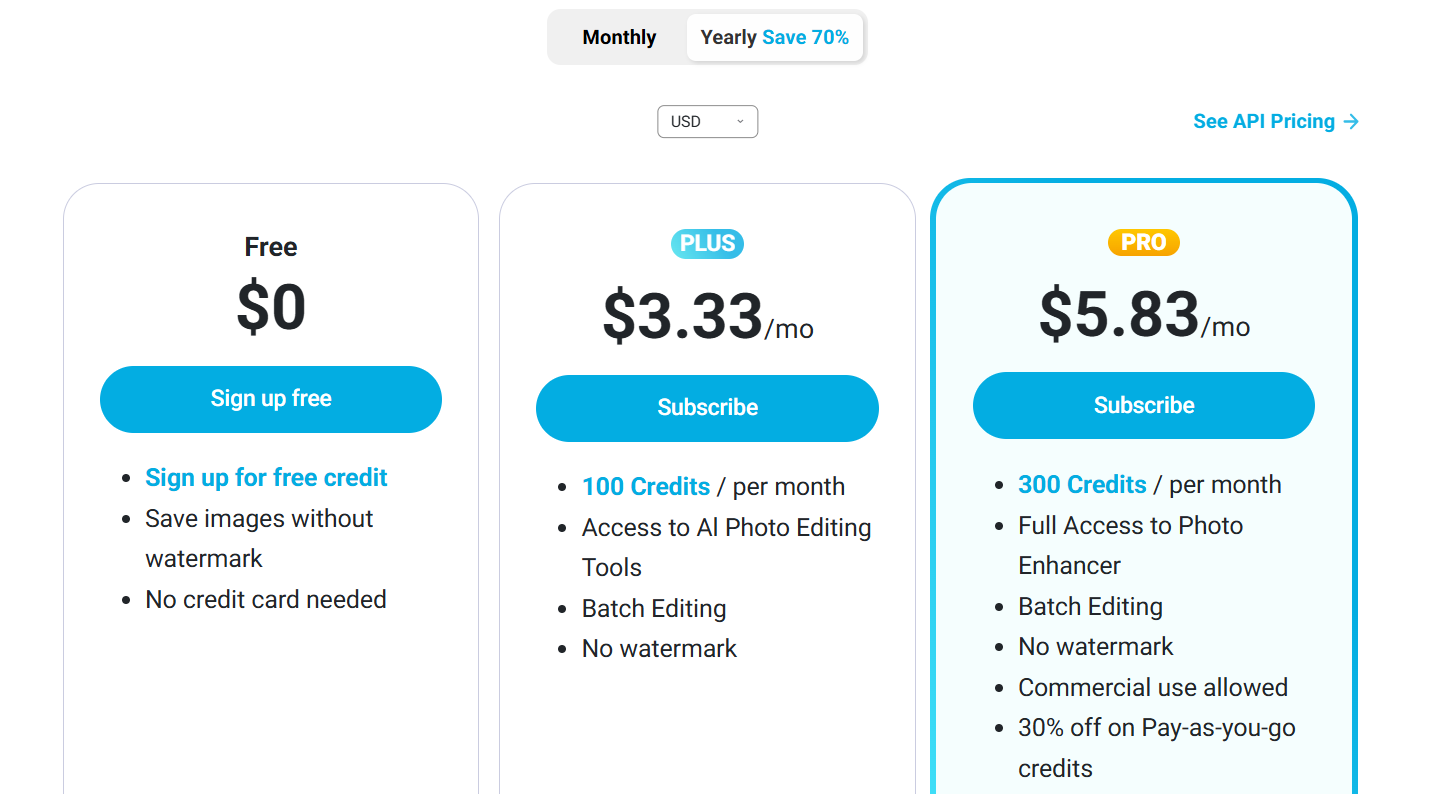 |
Clipping Magic vs YouCam Online Editor: Other Details
Organization Types supported |
|
|
|---|---|---|
Platforms Supported |
|
|
Modes of support |
|
|
API Support |
|
|
Get help choosing | Get help choosing |
Clipping Magic vs YouCam Online Editor Security & Compliance
Certifications, data handling, and security controls for IT and compliance evaluators.
HIPAA | — | ✗ No |
|---|---|---|
Data Residency | — | 🌐 Global |
Clipping Magic User Reviews & Rating Comparison
User Ratings | No reviews available for the product | |
|---|---|---|
Rating Distribution | No reviews available for this product | |
Spotsaas Editor’s POV generated by AI | Buyer sentiment Buyer sentiment is very strong across 17 reviews, with consistently positive feedback. What buyers like
Common complaints
| What buyers like
Common complaints
|
Pros and Cons |
|
|
Positive Reviews | No reviews available for the product | No reviews available for the product |
Media and Screenshots
Screenshots | No screenshots available. |  9 Screenshots |
|---|---|---|
Videos |  1 Videos | No videos available. |
Top Alternatives to Clipping Magic and YouCam Online Editor in 2026
Alternatives |
|---|


Add another option to compare side by side
Search by product name to compare pricing, fit, and buyer feedback in one view.Compare similar software options


Disclaimer: This research has been collated from a variety of authoritative sources. We welcome your feedback at [email protected].
Frequently asked questions
- Which is better, Clipping Magic or YouCam Online Editor?
- Clipping Magic edges out the other on user ratings (4.7 vs -1.0). That said, the best pick depends on your use case, so use the comparison tables above to evaluate each dimension.
- Do Clipping Magic and YouCam Online Editor offer a free trial?
- Neither Clipping Magic nor YouCam Online Editor currently lists a free trial.
- What is the starting price of Clipping Magic vs YouCam Online Editor?
- Clipping Magic starts at $1.86 /Month. YouCam Online Editor starts at $3.33 /month.
- What are the top alternatives to Clipping Magic?
- Top alternatives to Clipping Magic include Fotor, FotoJet, Adobe Photoshop, Photopea, PixTeller.
- What are the top alternatives to YouCam Online Editor?
- Top alternatives to YouCam Online Editor include Adobe Photoshop Express, Clipping Magic, Home Photo Studio, Remini, Apowersoft Watermark Remover.