
Guardio is a Chrome extension that guards your browsing against malware attacks and phishing scams. It works like a bodyguard for your web sessions, blocking dangerous downloads and identity thieves, and it costs $9.99/month for you and four other people.
Machine learning drives the tool, giving you real-time defense against online threats as you click through the internet.
Competition is stiff. Larger players such as McAfee Antivirus Plus score higher on comprehensive security checks, while Guardio concentrates on keeping your browsing safe.
Comparing services shows that some alternatives cover a wider range of viruses that do not arrive through the browser. Guardio still holds its own with features built for online safety, available free or on a premium plan that protects up to five users.
Setup is easy and day-to-day use is straightforward, though some users hit reliability snags along the way. The tool opens your eyes to the pros, such as useful privacy tools, and it is honest about the cons, including occasional glitches that affect reliability.
Knowing how Guardio works can sharpen your cybersecurity awareness, with practical benefits worth exploring. Here is a closer look at how it holds up.
Key Takeaways
- Guardio is a browser extension that provides malware protection, real-time identity theft monitoring, and privacy tools directly within your Chrome browser.
- The free version offers basic security features, and the premium plan adds advanced protections such as real-time identity theft monitoring for $9.99 per month, with savings on an annual subscription.
- Guardio works well in the browser but may not protect against threats outside Chromium-compatible browsers, and it does not scan for pre-existing system malware.
- Users report easy installation and simple navigation, but some have run into issues such as repeated alerts and website flagging glitches.
- Alternatives to consider include McAfee Antivirus Plus and Norton AntiVirus Plus for broader coverage across devices, plus Malwarebytes for Business for enterprise environments.
Understanding Guardio’s Core Features
Guardio gives users a set of strong tools built to shield against cyber threats. Its core features are designed to handle the full range of online hazards, so you can defend yourself before problems start and browse with more peace of mind.
Browser-based Malware and Phishing Protection
Protecting your browsing matters more as cyber threats change with every click. Guardio’s Chrome extension blocks browser-based malware that tries to hijack your system or mine personal data without permission.
It scans and blocks suspicious websites in real time, so you steer clear of hidden dangers on the internet.
Phishing attempts can be subtle and deceptive, tricking users into handing over sensitive information. The tool checks links and warns you about potential phishing scams before any harm is done.
Your digital footprint stays secure while you browse, shop, or manage finances online. Guardio keeps cyber thieves at bay with web security measures built for both individual users and businesses, so the same extension that protects a personal account can also cover a small team that handles sensitive data every day.
Real-time Identity Theft Monitoring
Beyond its browser-based malware and phishing defenses, Guardio adds real-time identity theft monitoring. This feature uses machine learning to scan for unauthorized use of your personal information, adding a layer of security where you need it most.
The moment you are at risk, Guardio alerts you so you can act right away to protect your accounts and your digital life.
Guardio protects your Chromium browser installations and extends the same watch to the online presence of your contacts. Its detailed monitoring is built to catch even the early signs of identity misuse before they grow into larger issues.
With this kind of coverage, users keep their private data protected and monitored around the clock against changing cyber threats. The goal is to flag misuse early, while it is still a small problem, rather than after an account has already been drained or a password has leaked.
Enhanced Privacy Tools
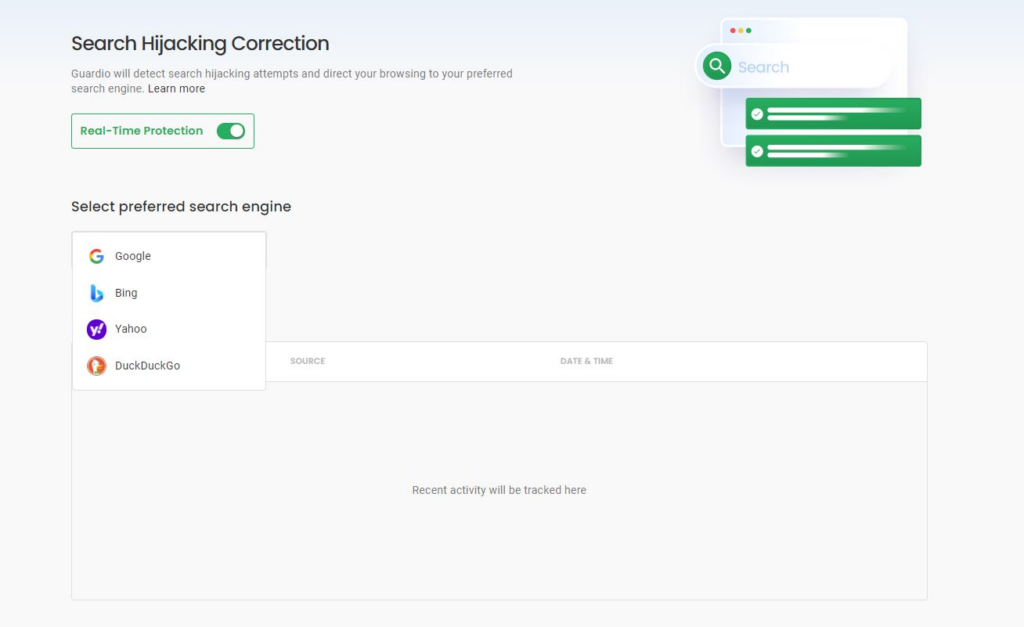
Beyond identity theft monitoring, Guardio adds enhanced privacy tools. These give users control over their personal information and keep their online activity away from prying eyes.
They block intrusive tracking cookies, mask digital footprints, and prevent unwanted access to user data. This helps businesses of all sizes defend against data breaches and keep sensitive information confidential, whether that is a freelancer guarding client files or a larger company protecting customer records.
Guardio’s strong encryption methods protect communications and keep client conversations private and safe from cyber threats. With these capabilities, freelancers and large enterprises alike can trust that their online presence stays secure, and they can focus on growth instead of privacy invasions or data leaks.
Guardio Pricing: A Comprehensive Overview
Guardio keeps pricing simple, and it fits right into your Chrome browser to fend off malware attacks and phishing scams. The premium plan costs $9.99 a month and covers you plus four other people, up to five users in total, under a single subscription. Think of it as an alert bodyguard that blocks dangerous downloads and sneaky identity thieves for a small group at once.
Machine learning powers the real-time protection across every plan, so the defense against online threats stays active as you click through the internet. Because that engine runs as you surf, both free and premium users get live scanning rather than a one-time check.
The market is competitive. Larger players such as McAfee Antivirus Plus score higher on comprehensive security checks, while Guardio puts its focus and its budget into keeping your browsing safe. That trade-off is the core of the pricing decision: pay for full-device coverage elsewhere, or pay less for browser-first protection here.
Some alternatives cover a wider range of viruses that do not arrive through the browser, so the right choice depends on how much of that wider protection you need. Guardio offers a free tier for basic browsing safety and a premium plan built around online safety for up to five users, so a household or a small team can share one plan instead of buying separate licenses.
The tool fits into a daily routine with quick setup and simple navigation, though a few users report reliability snags. The privacy tools are a clear plus, and the occasional glitch in reliability is the main drawback to weigh.
Understanding these trade-offs can guide your decision. The sections below break down the free and premium plans and the value of paying by the year.
Free vs. Premium Plans
Guardio’s free plan lets you try basic browser security at no cost, which suits anyone on a tight budget. It includes the essentials to guard against common online threats, but it might not catch everything.
If you need broader coverage, the premium plan adds advanced protection beyond the basics. This option shields you from sophisticated malware and phishing attempts and adds real-time identity theft monitoring.
Upgrading to premium also clears up the activation glitches some users hit on the free version. For $9.99 a month, subscribers get an expanded set of privacy options designed to limit unauthorized data snoopers.
If a commitment worries you, there is a trial period, so you can test Guardio Premium before you decide.
Choosing a subscription usually comes down to weighing your needs against your budget: do you go with baseline defense or full protection? With competitors like Bitdefender and Norton in the mix, comparison shopping helps you pick security software that fits both your protection needs and your budget. It is worth listing the specific features you actually use, then checking which plan covers them without paying for extras you will not touch.
From there, cost concerns lead into how each plan holds up over a full year. Here is how they stack up over time.
Annual Subscription Value
The monthly plan gives you flexibility, but paying yearly saves money and adds value. At $9.99 per month when billed annually, this plan is designed to cover your whole family or several users at once.
It extends multidevice security to up to five people under one subscription and one steady watch against cyber threats.
The yearly option also simplifies billing and keeps your data protection running without a monthly renewal. This longer-term choice keeps you guarded against phishing, malware, and identity theft throughout the year, all with one straightforward payment. For families or small teams that plan to keep Guardio anyway, paying once a year removes the small monthly admin of renewing and re-checking the bill.
Comparing Guardio to Popular Alternatives
To judge Guardio fairly, it helps to see how it measures up against the big names in antivirus and anti-malware. Comparing its performance to industry leaders shows what it does well and points to where it is the better choice for specific protection needs.
McAfee Antivirus Plus
McAfee Antivirus Plus is a heavyweight in cybersecurity, with strong protection that keeps users safe from online threats. Named an Editors’ Choice antivirus pick, it scans for malware and blocks phishing attempts with a 100% detection score.
It does more than flag risky websites. McAfee’s real-time scanning engine works to block fraudulent content before it can cause harm, watching for dangerous pages as they load rather than only warning you after the fact.
The software is affordable and still covers multiple devices. Whether you secure a personal laptop or a fleet of business devices, McAfee Antivirus Plus provides broad protection across platforms.
It is a practical pick for comprehensive internet security on a budget, and it sets a high bar that pushes Guardio to keep improving. Next is another well-known option: Norton AntiVirus Plus.
Norton AntiVirus Plus
Moving on from McAfee Antivirus Plus, Norton AntiVirus Plus is another heavyweight in online security. It delivers strong malware protection and is known for blocking phishing attacks and guarding users against identity theft.
Norton matches Guardio’s focus on safety and adds flexible pricing options that suit different user needs.
Its technology is good at detecting emerging threats, which helps businesses and individual users stay a step ahead of attackers. It works across web and mobile devices, including Android and iPhone/iPad, so it covers a range of digital environments.
Norton’s track record has made it a go-to choice for businesses that want reliable protection against changing cybersecurity risks. For teams that need coverage on both desktops and phones, that cross-platform reach is a practical reason to consider it over a browser-only tool.
Malwarebytes for Business
Malwarebytes for Business is a strong option for protecting corporate networks. This security solution takes a proactive stance, aiming to stop malicious software before it can disrupt business operations.
Using technologies such as anomaly detection, application hardening, and behavior matching, Malwarebytes helps businesses anticipate potential vulnerabilities rather than just react to known threats.
Businesses of all sizes value it for data security features built for enterprise environments. Its endpoint protection goes past basic virus scanning to defend in real time against sophisticated threats aimed at network security.
Organizations use its layered approach to build a defense that watches over their digital assets around the clock, keeping guard against a steady stream of security challenges. That focus on endpoints and corporate networks is what sets it apart from a consumer tool like Guardio, which stays inside the browser.
Digistore24: Features and Alternatives Comparison
Digistore24 takes a different angle. Unlike Guardio’s browser extension, it is an all-in-one e-commerce platform built to handle online sales and affiliate marketing.
It does not offer direct malware protection or phishing defenses, but it does emphasize data protection and secure payment processing for digital product merchants.
Among the alternatives to Guardio’s security features, McAfee Antivirus Plus and Norton AntiVirus Plus stand out for in-depth internet security.
Malwarebytes for Business takes a firm stance against cyber threats with tools built for enterprise needs. Each option has different features aimed at keeping sensitive information safe from cyber criminals, so every business can find a suitable defense against online vulnerabilities. The point of lining them up is to match the tool to the risk: a browser extension, a full antivirus suite, or an e-commerce platform each solve a different part of the problem.
Guardio’s User Experience and Interface
Guardio’s interface pairs simplicity with capable security. Users get quick installation and easy navigation, so managing protection takes little effort while still keeping strong coverage in place.
Installation and Setup
Getting started with Guardio is quick and straightforward, and it strengthens your browser’s security within minutes. It integrates with Google Chrome, which makes it accessible for businesses worried about cyber threats.
- First, go to the Guardio website and click the “Add to Chrome” button. This sends you to the Chrome Web Store.
- From there, add the extension by clicking “Add to Chrome,” then “Add extension” in the confirmation popup.
- Once installed, create an account or log in if you already have one. You will need to provide an email address and set a secure password.
- After you log in, Guardio runs an initial scan to check for existing threats or vulnerabilities in your browser.
- It then checks every site you visit against its database of known phishing sites and malicious content providers.
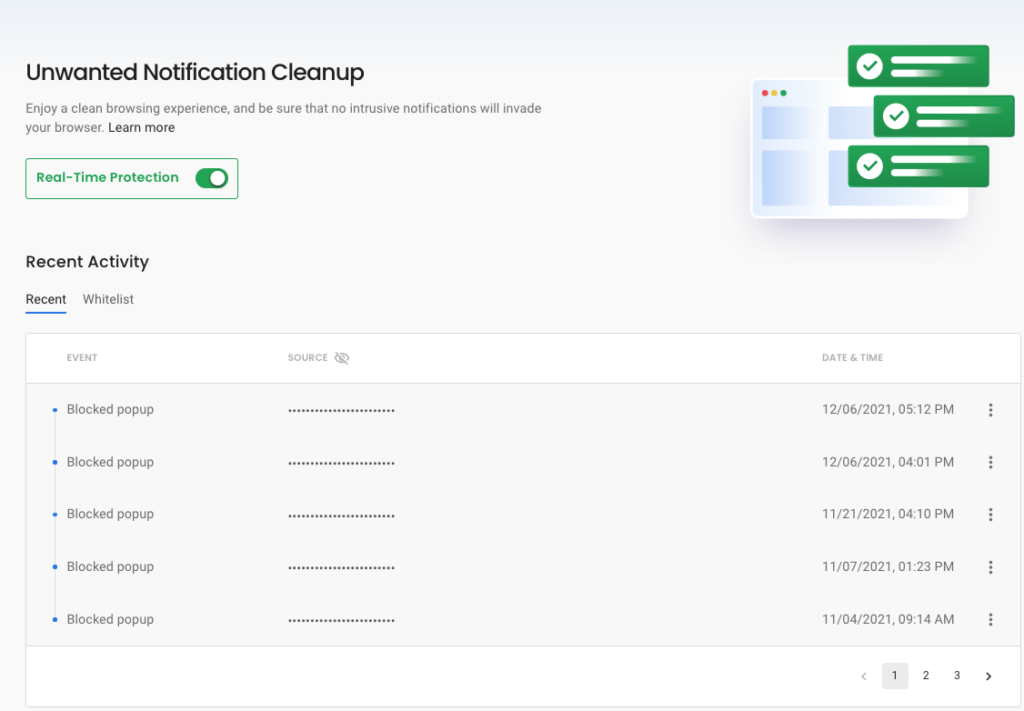
- You can also turn on real-time identity theft monitoring from Guardio’s dashboard to help protect personal information ahead of time.
- If you want to upgrade, subscription options are available in your account settings, where you can choose between premium plans.
Ease of Use and Navigation
Guardio’s Chrome extension is easy to set up and fits into your daily browsing. The in-browser interface is clean and intuitive, so you get protection without the hassle.
You do not need to work through complex settings or configurations; Guardio automates much of its protection with machine learning. As you browse, its system keeps adapting to new threats and holds a high level of security with little input from you.
Some users do report frustration with repeated alerts for website flagging, which can interrupt browsing. That feedback points to an area worth refining so protection does not get in the way of smooth navigation.
Even so, many appreciate the real-time threat detection and the privacy tools that run inside the browser, built for strong defense and simple operation. For users who spend most of their day in Chrome, that in-browser approach means protection sits exactly where the risky clicks happen.
Easy navigation combined with solid protection does a lot for overall satisfaction with Guardio’s service.
Pros and Cons of Using Guardio
Deciding on Guardio means weighing its strengths against its drawbacks, since both shape user satisfaction and how well it protects you. Look at the advantages it offers in online protection alongside any limits that could matter for your specific needs or preferences. The lists below sum up where the extension helps most and where it falls short, so you can judge the fit before you subscribe.
Advantages of Guardio
Guardio stands out for its affordability in the cybersecurity market. It offers strong, easy-to-use online security, so even users who are not tech-savvy can protect themselves from digital threats.
- Low-cost protection: Guardio secures your online activities without a big bill. Users get capable malware protection at a fraction of the cost of other antivirus tools.
- Easy installation: Setting up Guardio takes just a few clicks, so you can start protecting your browsing in minutes. No technical skills are required, which makes it accessible for all users.
- Browser-based solution: Unlike traditional antivirus software, Guardio runs inside your browser. That means it protects you where most online threats happen, keeping your surfing secure without slowing down your computer.
- Real-time monitoring: With Guardio, you are protected around the clock. Its real-time identity theft monitoring alerts you the moment your personal information is at risk.
- Phishing defense: Guardio actively blocks phishing attempts and fraudulent websites that try to steal sensitive information, so your data stays private and secure.
- Privacy tools: Beyond malware protection, Guardio provides tools that improve privacy and cut down tracking across websites, giving you control over who sees your online behavior.
- Regular updates: Cyber threats keep changing, and so does Guardio. Frequent updates keep the latest defenses working for you.
Potential Limitations
Guardio’s security has some limits. Potential users should know them before deciding on their browser security.
- Limited outside protection: Guardio works well in the browser but does not secure against threats outside Chromium-compatible browsers, leaving other applications unprotected.
- No real-time malware scanning: Guardio does not scan for pre-existing threats or monitor real-time malware processes on the device.
- Higher price point: Some find the pricing steep and may get more complete device protection from cheaper alternatives.
- Data leak response options: Unlike some versatile security suites, users cannot hide or archive data leak warnings, which can clutter the interface and cause important alerts to be missed.
- Activation and flagging glitches: Technical issues such as disappearing activation icons or excessive website flagging can disrupt the experience and need attention.
- Narrow protection scope: Because Guardio focuses on browser-based threats, it will not guard against every form of identity theft that can happen through other channels.
Conclusion
Guardio is a solid defense against the dangers that show up in your browser. With real-time monitoring and identity theft protection, it gives peace of mind to anyone spending time online, from casual browsing to shopping and everyday work.
Compare its features and pricing to find the best fit for your cybersecurity needs. Protect your digital life with Guardio and take charge of your internet safety today. This tool can make a real difference in securing your browsing experience.
Weigh the plans and the alternatives above, then pick the option that matches how and where you spend your time online.
(Image credit: Guardio)
Frequently Asked Questions
1. What is Guardio?
Guardio is a security tool that helps protect your computer from harmful software and threats online.
2. How do I install Guardio on my computer?
You can install Guardio in your web browser as an extension from its official website or browser store.
3. What features does Guardio offer?
Guardio offers features like real-time threat detection, browsing protection, and alerts for suspicious websites.
4. What is the cost of using Guardio?
The cost of using Guardio varies depending on the plan you choose; they usually provide both free versions and paid subscriptions with more features.
5. Are there any alternatives to Guardio I can use?
Yes, there are several alternatives to Guardio, including other antivirus programs and security extensions with similar functions.

- Independent picks for exactly what you just read about
- Matched to your team size & needs
- Vendors don't pay for placement
Step 1 of 4
How big is your team?
We tailor recommendations to companies your size.















Related Articles

Cybersecurity
10 Best CrowdStrike Alternatives in 2026 (Ranked for Every Security Team)
Continue reading →

Cybersecurity
Best Cybersecurity Software in 2026: Complete Guide for Every Business Size
Continue reading →
Cybersecurity
Best Identity and Access Management Software (IAM) in 2026
Continue reading →

Buyers guide
How To Choose The Best Security Awareness Training Software For 2026
Continue reading →