
Everything You Need to Know About Krisp Technology: The Ultimate Guide to Noise-Canceling Apps

Background noise during a call can pull any meeting off focus. Krisp is a tool that uses AI to clean up messy audio as you talk, without extra effort on your part. This guide walks through how the app cuts down the noise on your calls and improves your online communication experience.
Read on to see the quieter calls it can give you.
Key Takeaways
- Krisp uses AI to filter out background noise in real time, making calls clearer.
- It works on both desktop and mobile platforms, including Windows, Mac, iOS, and Android.
- Users give Krisp high ratings for its ease of use and effective noise cancellation.
- The technology adapts to various speech patterns and reduces different kinds of noises.
- Krisp is free to use without a credit card and is trusted by companies like Atlassian.
How Krisp Technology Works
Krisp uses AI technology to analyze and filter out background noise from both ends of a call in real time, so the audio stays clear for everyone on the line. This approach to noise cancellation is what makes Krisp a strong choice for improving the quality of online meetings and calls.
The Role of AI in Krisp Noise Cancellation
Artificial intelligence sits at the core of Krisp’s noise-cancellation technology. It uses machine learning algorithms to analyze audio in real time and tell the difference between the human voice and background noise.
The software keeps learning from a large set of recorded sounds, so it can mute almost anything, from barking dogs to clacking keyboards, during a call.
The system reduces unwanted sound and also sharpens voice quality, so conversations come through clearer. Because it adapts to different accents and speech patterns, it keeps communication steady across global teams working remotely or in hybrid setups, wherever people happen to be.
Krisp’s dynamic echo cancellation feature keeps calls professional and free of distractions no matter where you are working or what is going on around you at the time.
Benefits of Using Krisp Technology for Online Meetings and Calls
Krisp turns noise-filled calls into clear, professional-sounding conversations. With a single click, the tool removes background sounds such as barking dogs, clattering keyboards, and the other distractions that tend to derail virtual meetings.

Its speech recognition algorithms make sure every word is captured clearly, which is a real help for remote workers who depend on clear communication to work together well.
Krisp uses AI technology to keep your audio clear in any setting. Whether you are presenting from a busy coffee shop or joining a conference call from an airport lounge, the app keeps the focus on your voice rather than the noise around you.
Atlassian and many other organizations use this award-winning tool to make their meetings more productive, since it keeps speech clear even when there is background sound on the line.
How to Enable Krisp Technology on Different Platforms
Now that you know what this technology brings to your online calls, here is how to get it running. For Windows and Mac users, installing Krisp is as simple as downloading the desktop app from the website and following the usual software installation steps.
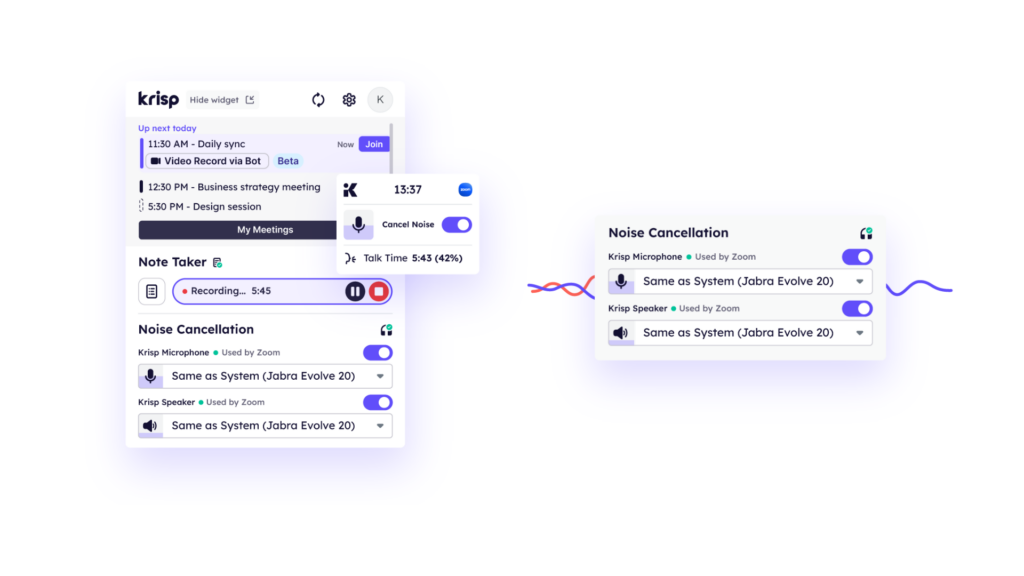
Once it is installed, open the audio settings in whichever communication app you use, such as Zoom, and select Krisp as your microphone and speaker to start blocking unwanted noise.
On mobile devices, turning on the platform works a little differently depending on whether you are using iOS or Android. For most apps that support noise cancellation on mobile, open the app’s settings for audio management; there you can usually find a noise suppression option where Krisp can be switched on.
Regular updates keep Krisp compatible with different operating systems, so the tool runs smoothly in almost any setting where clear voice chat is essential to the conversation.
Streamlining Communication and Collaboration in Healthcare with RxVantage
User Reviews and Feedback on Krisp Technology
Users rate Krisp Technology 4.9 out of 5 stars, pointing to how easy it is to use and the quality of the support they get. Reviewers regularly praise the background noise cancellation feature, which gives them a distraction-free environment for professional video calls and meetings.
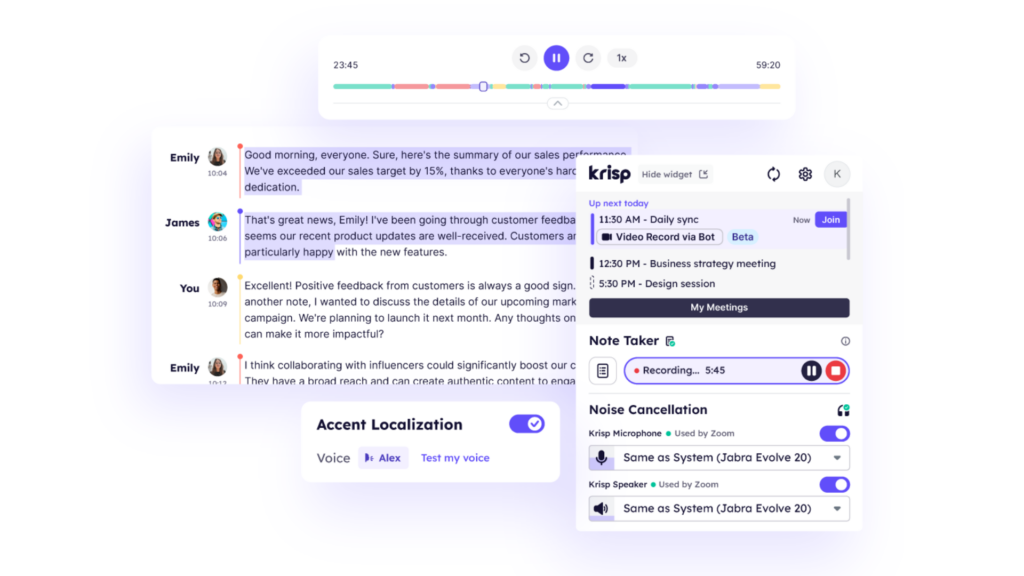
Reviewers also single out Krisp’s AI-powered features, such as background voice cancellation, noise elimination, echo cancellation, and accent localization, on both Mac and Windows platforms.
Conclusion: The Future of Noise-Canceling Apps
Krisp changes the way we communicate with its AI-powered noise-cancellation technology. Users praise the app for its ability to create distraction-free environments during professional video calls and meetings.
Used by global brands and recognized with awards, the platform stays ahead in the noise-canceling app market. As more people look for clear communication in a noisy world, Krisp’s updates point to a strong future for online meetings and calls.
With free access to its main features, the platform stays among the top options in noise-cancellation technology for all kinds of communication needs.
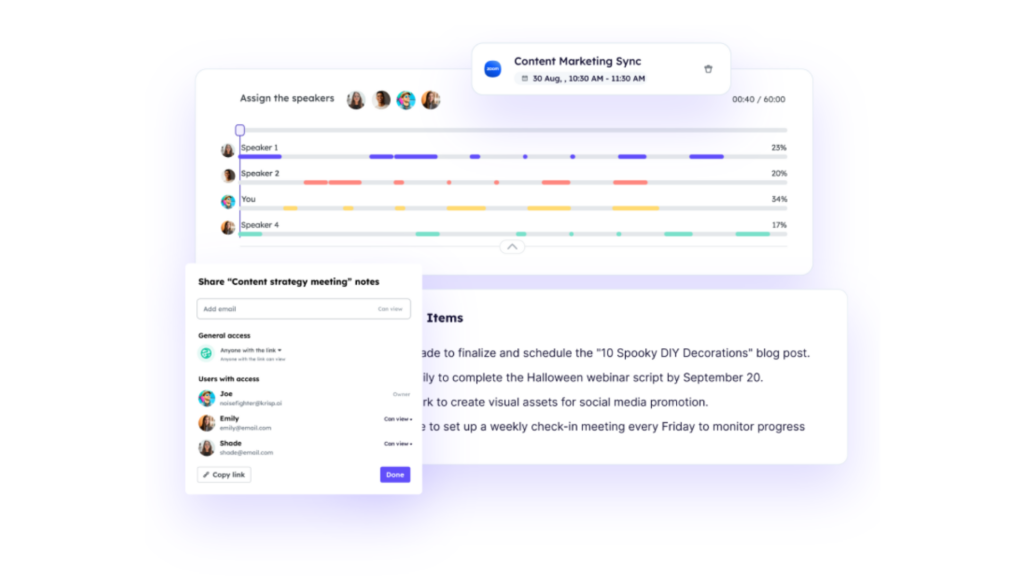
Krisp offers award-winning noise cancellation, transcription services, and meeting notes for free, and no credit card is required to use them. Customers have rated Krisp 4.9 out of 5 stars for its ease of use, quality support, and simple setup process.
Organizations such as Atlassian have adopted Krisp’s noise-canceling service for remote and hybrid work settings.
(Image Credit: Krisp)
Frequently Asked Questions
How does Krisp Technology work for noise cancellation?
Krisp uses AI to analyze and suppress background noise during calls from both ends, ensuring clear communication.
Can I use Krisp with any communication app?
Yes, the platform is compatible with many communication apps such as Zoom, Microsoft Teams, and more.
Does using Krisp technology consume a lot of battery or system resources on my device?
No, the platform is optimized to minimize battery usage and reduce the strain on your device’s system resources while providing noise cancellation.
Is there a free version available for individuals to try out before purchasing?
Yes, there is a free version of Krisp available for individual users that offers limited but sufficient functionality for trying out the technology.
Can I adjust the level of noise cancellation provided by Krisp Technology?
Yes, users have the option to adjust the level of noise suppression according to their preferences within the settings of the app or software incorporating Krisp Technology.
Related Articles
AI Software
How Can SaaS Companies Use Legal AI to Move Enterprise Deals Forward?
Continue reading →
AI Software
Fireflies vs Otter 2026: Pricing, Limits and Which to Pick
Continue reading →
AI Software
AI in Finance: 12 Use Cases for Corporate Finance Teams in 2026
Continue reading →
AI Software
Copilot vs ChatGPT for Business (2026): Price, Security and Use Cases
Continue reading →