
6 Ninja Moves That Will Make Any DDoS Attack Surrender to Your Router’s Superior Protection


A DDoS attack on your router is a real threat to your cybersecurity, and it can strike with little warning. A DDoS, or Distributed Denial of Service attack, can cripple online services and severely impact internet connectivity, leaving both your business and your customers cut off.
This article offers practical strategies to identify, prevent, and stop a DDoS attack in its tracks, so you can safeguard your router, protect your network, and keep your systems running when an attack hits.
Key Takeaways
- Change the server IP or contact the ISP immediately to minimize the impact of a DDoS attack.
- Set up redundant network architecture to distribute traffic and improve resilience.
- Use a Web Application Firewall (WAF) to filter out malicious requests in real time.
- Configure firewalls and routers with strong rules and updates to block malicious traffic.
Understanding DDoS Attacks on Routers
A DDoS attack, short for Distributed Denial of Service attack, floods a router with an overwhelming amount of malicious traffic to disrupt its normal functioning and render it inaccessible.
What is a DDoS attack?
A DDoS attack, or Distributed Denial of Service attack, is a cyber threat that floods a network with excess traffic. Criminals use many compromised computers together to create this overwhelming flood of data.
These attacks aim to make an online service unavailable by overloading it with traffic from multiple sources. Websites, internet services, and servers can all be targeted, resulting in downtime and potential loss of revenue or sensitive information.
How does a DDoS attack work?
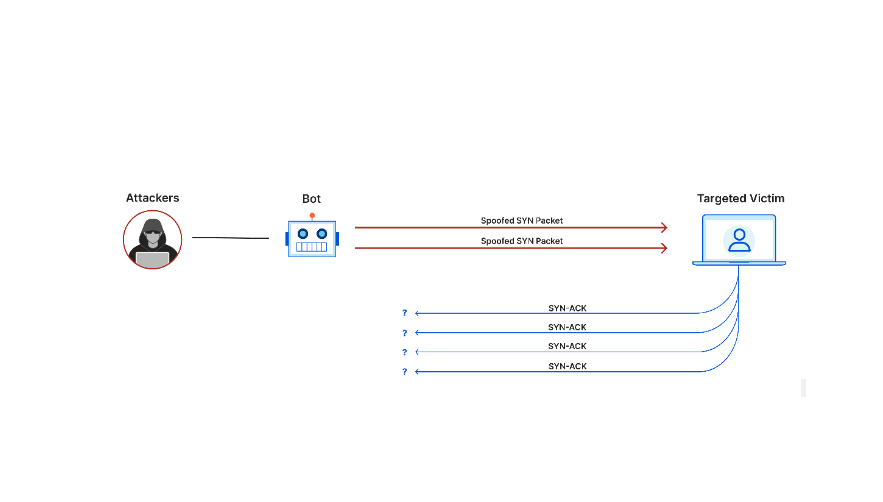
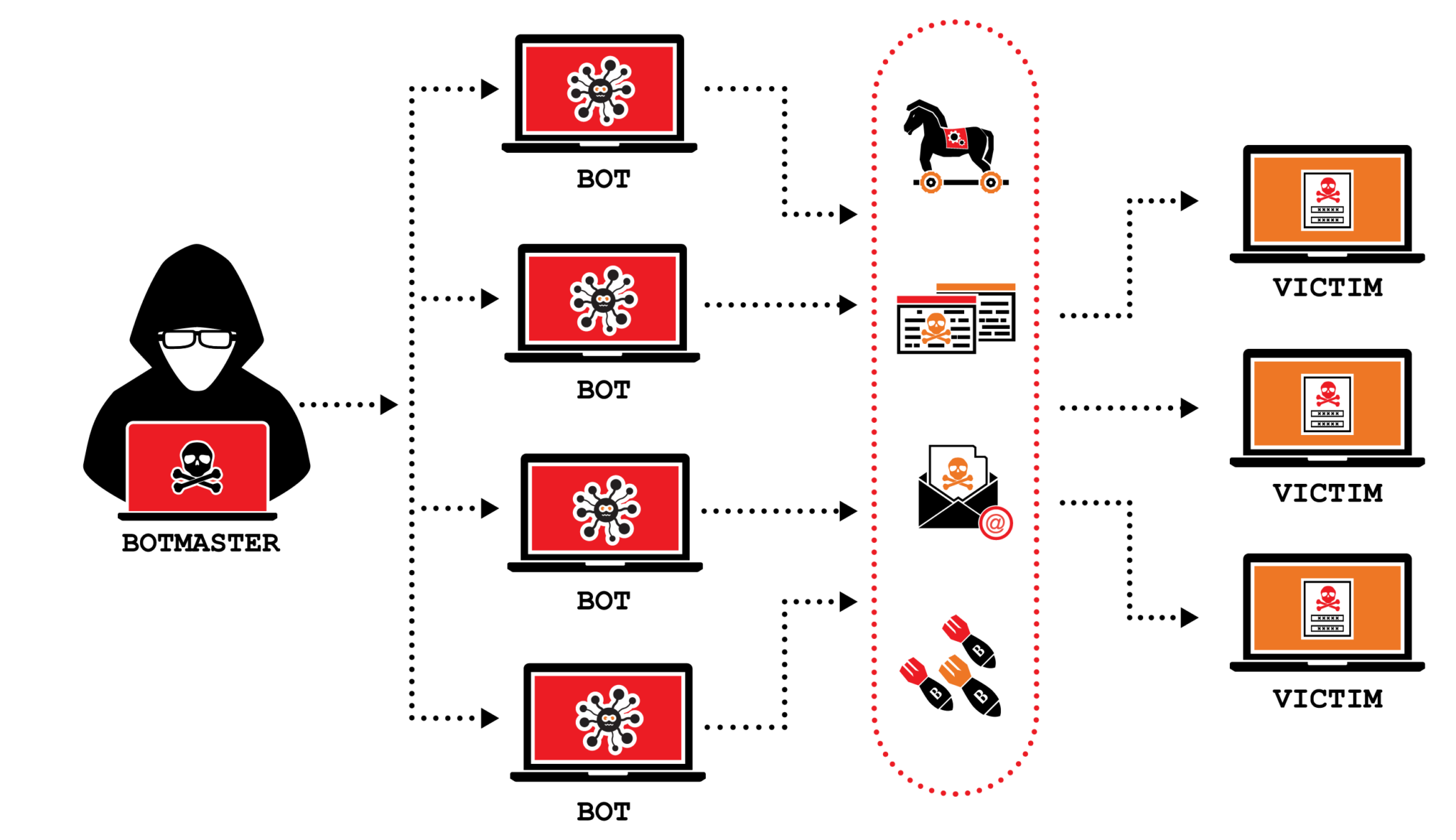
A DDoS (Distributed Denial of Service) attack works by overwhelming a target network or server with a huge amount of traffic, leaving it unable to function properly. The attacker does this by using multiple compromised devices, often forming what’s called a botnet.
These devices flood the target with fake requests and data, exhausting the network’s resources and denying access to legitimate users. DDoS attacks can use various methods, including UDP floods, TCP SYN floods, and ICMP floods.
Understanding how these attacks work is essential for organizations that want to effectively protect their routers and networks from this kind of malicious activity.
Common types of DDoS attacks
DDoS attacks come in various forms, each designed to overwhelm and disrupt network resources. One type is the volumetric attack, where attackers flood the target with a massive amount of traffic, consuming all available bandwidth.
Another type is the TCP/IP attack, which exploits flaws in the protocol to exhaust server resources and make them unresponsive. Application-layer attacks focus on exploiting vulnerabilities in specific applications or services.
There are also hybrid attacks that combine multiple methods for maximum impact. Understanding these common types helps organizations better prepare their routers against DDoS threats by putting appropriate protection measures in place, such as firewalls and traffic monitoring systems.
Find the Best Website Security Software in 2023.
Signs and Symptoms of a DDoS Attack on a Router
You can detect a DDoS attack on a router by monitoring network traffic and identifying sudden spikes or unusual patterns.
How to identify if you’re under a DDoS attack
DDoS attacks can disrupt your network and cause significant damage if they aren’t detected and addressed promptly. To identify if you’re under a DDoS attack, closely monitor your network traffic for unusual patterns or a sudden surge in incoming requests.
Watch for slow website loading times, server downtime, or an inability to access certain web pages. Analyzing your network logs and monitoring the number of connections to your server can also help you determine whether you’re experiencing a DDoS attack.
Monitoring network traffic
Monitoring network traffic is an essential step in identifying and mitigating DDoS attacks on routers. By keeping a close eye on the traffic flowing through your network, you can quickly detect abnormalities or sudden spikes that may signal a possible DDoS attack.
Regularly monitoring your network traffic allows you to identify the source of an attack, understand its nature, and take immediate action to prevent further damage. It also gives you insight into other potential security threats and patterns, which helps strengthen your overall network defenses.
Overall, proactive monitoring of network traffic plays a crucial role in protecting your router from DDoS attacks and maintaining the security of your entire network infrastructure.
Find the Best Network Monitoring Software and secure your network at office or at home.
Preventing and Stopping DDoS Attacks on Routers
To prevent and stop DDoS attacks on routers, it’s crucial to take proactive measures, such as changing the server’s IP address or contacting the ISP immediately. Setting up redundant network architecture, using a Web Application Firewall (WAF), configuring firewalls and routers, and enabling geo-blocking can also help minimize the impact of DDoS attacks.
Changing server IP or contacting ISP immediately
To minimize the impact of a DDoS attack on your router, one effective step is to change your server IP or contact your Internet Service Provider (ISP) immediately. Changing your server IP address helps prevent attackers from targeting the same address in future attacks.
Contacting your ISP allows them to monitor and block any malicious traffic heading toward your network, adding an extra layer of protection. Acting quickly in this way can help limit the effects of a DDoS attack and protect the security of your router and network.
Setting up redundant network architecture
Setting up redundant network architecture is an important step in preventing and mitigating DDoS attacks on routers. Implementing a redundant network creates multiple pathways for network traffic to flow, which helps distribute the load and improve overall resilience.
That means if one pathway becomes overloaded or compromised due to a DDoS attack, the other pathways can keep handling traffic effectively. Redundant network architecture improves the availability and performance of your network, reducing the impact of DDoS attacks and keeping access uninterrupted for users.
Using a Web Application Firewall (WAF)
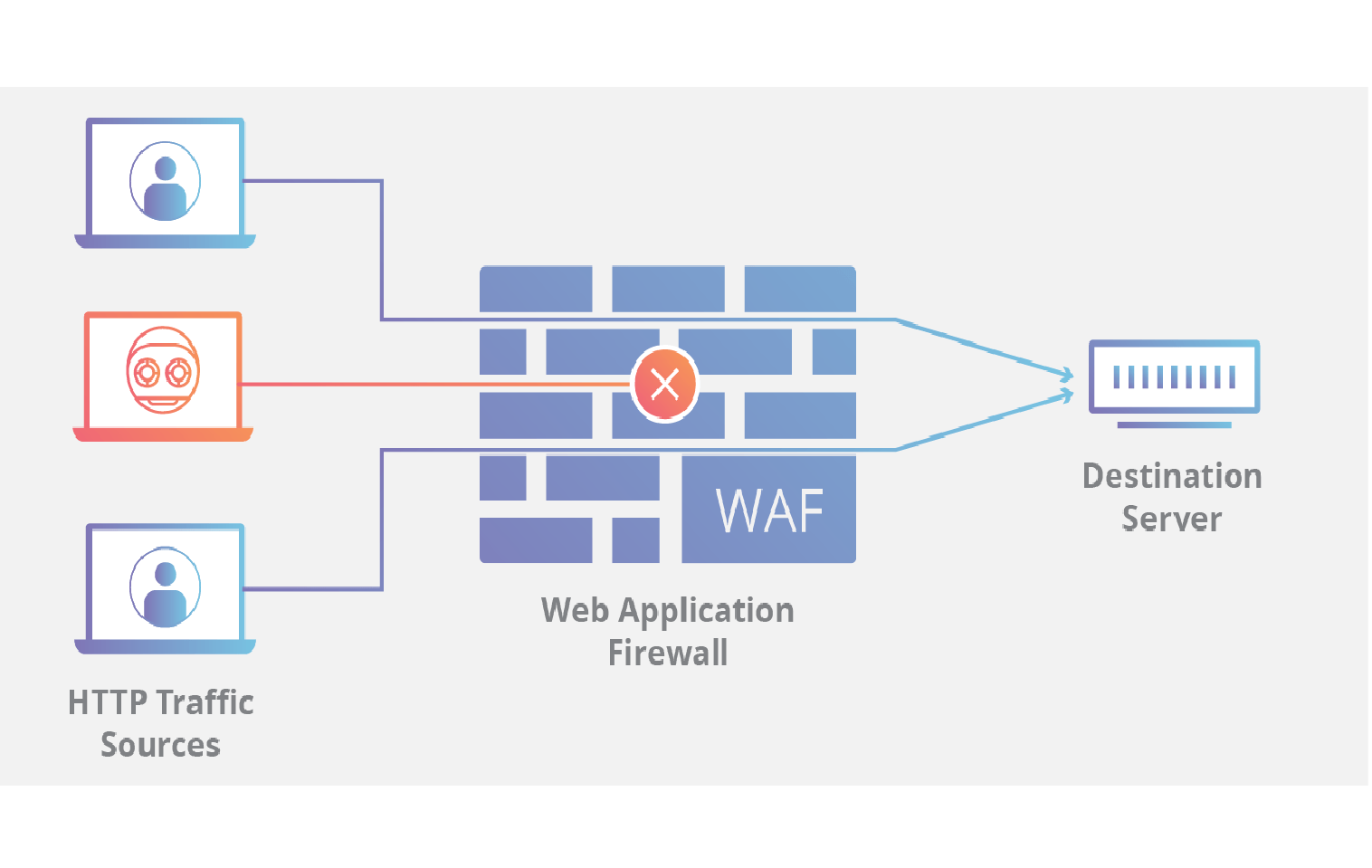
A highly effective measure for preventing and mitigating DDoS attacks on routers is using a Web Application Firewall (WAF). A WAF acts as a protective shield between your router and incoming traffic, filtering out malicious requests before they reach your network.
By analyzing traffic patterns and flagging suspicious or abnormal behavior, a WAF can block potential DDoS attacks in real time.
A WAF adds an extra layer of defense by examining all incoming HTTP/HTTPS traffic and identifying and blocking illegitimate requests that could otherwise overwhelm your router.
Configuring firewalls and routers
Configuring firewalls and routers is an essential step in preventing and stopping DDoS attacks on your network. Setting up strong firewall rules limits access to your network and blocks malicious traffic from reaching your router.
Keeping routers updated with the latest firmware also ensures known vulnerabilities are patched, making it harder for attackers to exploit them. With proper configuration, firewalls and routers act as a frontline defense against DDoS attacks, reducing their impact on your network’s performance and security.
Enabling geo-blocking (country blocking)
Enabling geo-blocking, also known as country blocking, is an effective way to prevent DDoS attacks on routers. This security feature lets you restrict access to your network from specific countries or regions where attack traffic may originate.
This helps minimize the impact of DDoS attacks by blocking malicious requests and connections from those particular locations. With geo-blocking in place, you strengthen your router’s defense against cyberattacks and protect your network infrastructure from being overwhelmed by malicious traffic.
Conclusion
To effectively stop a DDoS attack on your router, it’s crucial to be proactive and take the right precautions rather than waiting until traffic overwhelms your network. Changing your server IP or contacting your ISP immediately, setting up redundant network architecture, using a Web Application Firewall (WAF), configuring firewalls and routers, and enabling geo-blocking can all help minimize the impact of DDoS attacks on your router.
Protecting your router from these cyberattacks requires staying vigilant and using strong network security measures on an ongoing basis, not just after an attack has already started.
(Image Credit: Collection)
Frequently Asked Questions
What is a DDoS attack on a router and how can I prevent it?
A DDoS attack on a router is when multiple systems flood the bandwidth of your network, trying to make it unavailable. You can prevent this by using strong firewall protection, monitoring website traffic, and employing network security measures like securing your router from such cyberattacks.
How can I stop an ongoing DDoS attack on my router?
To stop an ongoing DDoS Attack, first identify the source of the attack then block or change your router’s IP address as part of your prevention strategy for dealing with cyberattacks.
Can changing my Router’s IP Address Protect against future DDoS attacks?
Yes! Changing and protecting your routers genuine IP address often helps in preventing detection which results in stopping further DDoS attacks.
Is there any specialized software that aids in preventing these types of attacks?
Yes! A method called “DDoS mitigation” uses specific software to minimize the impact of these attacks, while also hardening against future ones.
Are firewall settings important for defending against such attacks?
Absolutely! Firewall plays defense against most cyber threats and maintaining up-to-date firewall setting significantly adds to protecting routers from potential ddos onslaughts through IP address protection.
Related Articles

Cybersecurity
10 Best CrowdStrike Alternatives in 2026 (Ranked for Every Security Team)
Continue reading →

Cybersecurity
Best Cybersecurity Software in 2026: Complete Guide for Every Business Size
Continue reading →

Cybersecurity
Best Identity and Access Management Software (IAM) in 2026
Continue reading →

Buyers guide
How To Choose The Best Security Awareness Training Software For 2026
Continue reading →