
FormSwift (Acquired by Dropbox) Review: Pricing, Alternatives, and Legal Document Creation for Business
FormSwift is a cloud-based service for document and form creation, offering over 500 legal documents. It simplifies form editing and includes e-signatures. Built for businesses that need regular access to legal forms, FormSwift works well for ongoing use.
Look through its pricing, its features, side-by-side comparisons, and user testimonials to decide whether FormSwift fits your document management needs before you commit to it.
Key Takeaways
- FormSwift is a cloud-based tool that helps users create professional documents, with templates for legal forms, business plans, and more.
- Features include e-signatures for legally binding agreements and integration with other platforms to improve workflow.
- Some users have raised concerns about customer service response times and misleading advertising, along with possible limits on file types and collaboration tools.
- Alternatives such as Smartsheet, Vagaro, pdfFiller, BizCounsel, Rocket Lawyer, and LawDepot offer different features that may better suit specific document management and legal needs.
Exploring FormSwift: A Comprehensive Overview
What is FormSwift?
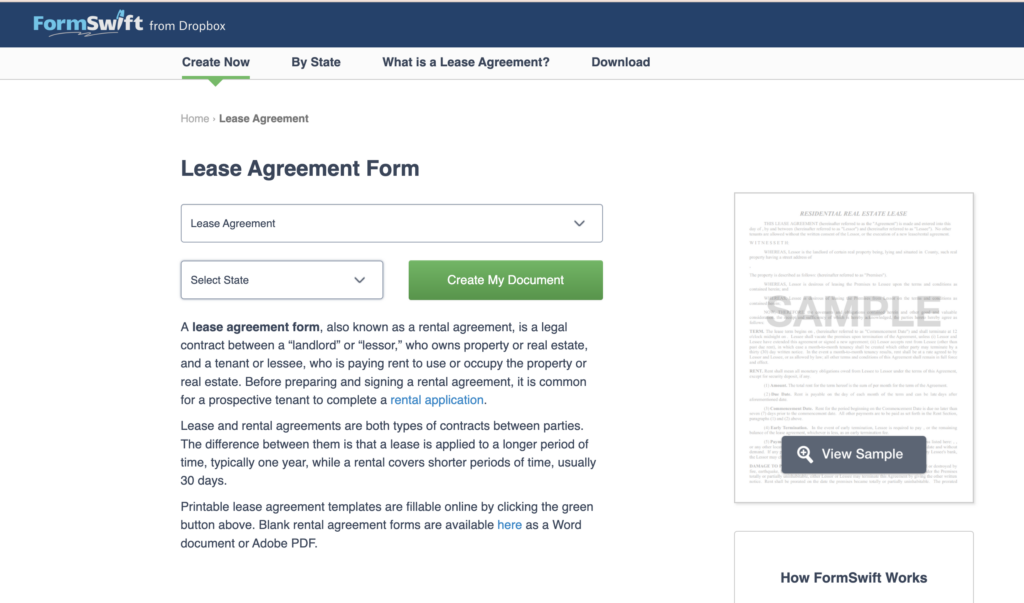
FormSwift, acquired by Dropbox, is a cloud-based platform designed to make creating and editing professional documents and online forms easier. With this tool, users can generate legal papers, business plans, or any other customized document that needs precision and a polished, professional look. It offers templates for a wide range of purposes, which cuts down on the tedious, repetitive formatting work.
The service has a straightforward interface that caters especially to small businesses looking for a cost-effective way to manage electronic signatures and document workflows without a steep learning curve.
Subscribers get access to a large library of forms that cover many industries, which makes FormSwift a useful resource for everyday digital paperwork where efficiency and legality both matter.
Formswift Features
FormSwift’s cloud-based platform makes creating and managing documents simple from start to finish. You can quickly build forms, contracts, and various other documents through a clear, intuitive interface that works for users at any skill level, whether they are new to the tool or use it every day.
With a large template library, you can find what you need for personal use or a small business. The tool gives you room to edit documents and adjust every detail to fit your requirements.
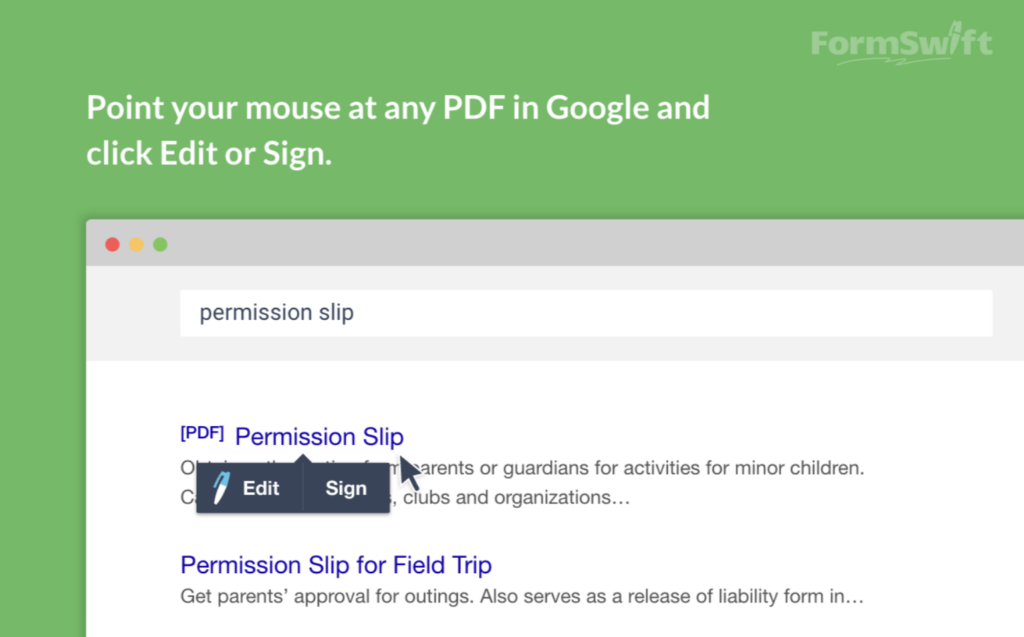
E-signatures change how deals close and how agreements get confirmed. With FormSwift, this feature adds secure, legally binding signatures on any device, whether you are at a desk or on the move. Its integration options connect with other platforms and help move work across different applications so nothing gets stuck in one place.
FormSwift Pricing Plans
Choosing a FormSwift plan means looking at both your short-term and long-term document management needs. Decide which pricing tier matches the volume of forms you expect to process, and weigh the extra features each plan adds to your workflow.
When you assess FormSwift’s cost structure, you will find a no-charge option built into its freemium model. The basic plan costs nothing, which makes it accessible for people who need document generation but do not want the commitment of a paid subscription right away.
This free membership lets individuals and businesses try the platform, use its core features, and generate select documents.
The availability of a trial period adds further appeal, since it lets users test drive the advanced features before deciding on any pay-as-you-go or subscription-based plan.
That way, everyone can see how FormSwift handles their documentation before paying for it.
Comparing FormSwift to Competitors
Seeing how FormSwift measures up against its rivals matters for discerning users who want the best document automation tools for the job. This comparison looks closely at functionality and value, and it offers insights to help you make an informed choice about form creation software.
How FormSwift Stacks Up Against Typeform
FormSwift competes well in document creation and management, especially for small businesses that want cloud-based software. With 79 distinct features, it supports form editing and gives users e-signatures and integrations that help their operations.
The platform stands out for its simple interface and its flexible pricing options, which cater to both monthly and annual needs depending on how often you plan to use it.
Typeform, by contrast, is often praised for its engaging form design and a smooth user experience. It puts a strong emphasis on interactive forms that capture more than just data, since they draw in user engagement through thoughtfully crafted questions set inside appealing layouts.
Both platforms do well in different areas, each geared toward business needs in its own way. FormSwift’s strength is broad document management, while Typeform centers on lively form interactions.
Popular Alternatives: Smartsheet, Vagaro, and pdfFiller
Smartsheet is a strong rival in the area of online forms and workflow automation. Users praise its interface, and its solid data management tools help businesses organize and run their operations more effectively.
With electronic signature support, Smartsheet enables digital document workflows and stands out with its solid project management features.
Vagaro, another FormSwift alternative, is good at appointment scheduling and business management for service industries. It suits small business owners who need to book appointments while managing client interactions.
On the other hand, pdfFiller offers an extensive set of form-filling and document creation tools built to handle PDFs with ease, including secure storage, sharing, and e-signatures for digital documents.
Looking into these alternatives shows how software can be tailored to meet different business demands while improving day-to-day efficiency. Moving on from the platforms themselves, here is what users have to say about FormSwift based on their own direct experience with it.
User Reviews, Ratings and Feedback on FormSwift
User feedback and firsthand experience are valuable when you evaluate what FormSwift can do. Looking into the reviews reveals the prevailing sentiment toward the platform and gives an authentic picture of how it performs in real-world use.
Positive Aspects Highlighted by Users
Users praise FormSwift’s interface, which makes it easy to navigate and create documents. Its tools support small businesses by handling paperwork with electronic signatures and clear document organization.
Together, these features add up to a smoother experience that saves users a good deal of time on routine paperwork.
Clients find FormSwift especially practical when they are handling multiple forms, since it offers a helpful way to keep all the documentation in one place. It brings several separate tasks into a single, effective workflow and improves overall productivity without overwhelming the people using it.
Common Criticisms and Concerns
Many users raise concerns about FormSwift’s customer service and say it is hard to get timely assistance when they run into problems. That can be frustrating for people who rely on the platform to manage critical documents on a deadline.
Beyond support, some users complain about advertising accuracy and feel misled by promotional materials that do not always match the actual service experience they get. These discrepancies raise fair questions about the company’s transparency and trustworthiness.
Issues with file format restrictions also come up in user feedback. Limited compatibility hampers users who work with a variety of document types and can disrupt their workflow when a needed format is not supported.
Collaboration features are also narrower than some prefer, which creates obstacles for teams that need more workspace options. These limits could push businesses toward other platforms better suited to collaborative work.
The next section, Weighing the Pros and Cons of FormSwift, looks more closely at how these criticisms compare with the service’s advantages.
Weighing the Pros and Cons of FormSwift
Evaluating FormSwift takes a balanced approach that weighs its benefits for document creation and automation against any limits that could affect how well it fits your business.
This honest look will help you decide whether FormSwift delivers on its promises and matches your needs for managing electronic documents.
Advantages of Using FormSwift
FormSwift makes document creation and management easy for users at every skill level, from beginners to regular users. On this cloud-based platform, creating legal forms, business documents, or personal paperwork is straightforward and does not require any special training.
The user-friendly interface guides you smoothly through the process of editing forms and adjusting templates to fit your own specific needs.
One standout feature that draws wide praise is FormSwift’s e-signature capability, which simplifies the signing process and removes the need for physical printouts. Users can gather digital signatures from any location, which adds convenience while saving both time and resources.
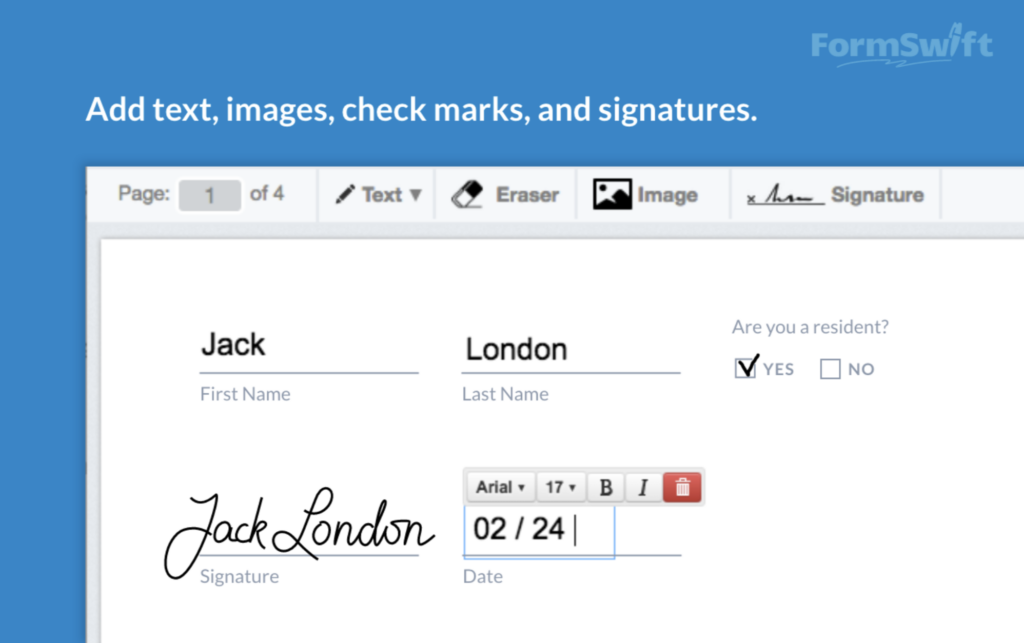
Besides making document execution easy, FormSwift helps keep all your important, critical files neatly organized with its document storage system, so every contract or form is just a few clicks away the next time you need it.
With these advantages in mind, the next step is to consider potential drawbacks in this balanced look at what FormSwift offers.
Potential Drawbacks to Consider
As you look at FormSwift, note that some users report customer support challenges and concerns about misleading advertising. These factors could affect your satisfaction with the service.
You might also run into limitations on the kinds of files you can work with and on the features available for team collaboration. It is worth considering whether these constraints fit your specific workflow requirements before you settle on the tool.
Alternatives may offer solutions better suited to your needs. Platforms like SmartSheet, Vagaro, and PDFFiller carry higher average ratings and a lot of positive feedback from their users.
Evaluate each option carefully to see which service provides the functionality that best matches your project demands or business operations.
Top Alternatives to FormSwift
Looking beyond FormSwift helps users find the best fit for their document automation needs. Options like BizCounsel, Rocket Lawyer, and LawDepot each offer features for different business requirements and legal aid.
BizCounsel, Rocket Lawyer, and LawDepot
BizCounsel serves those who need legal forms with an added benefit: access to experienced, seasoned attorneys. It can be a real help for technology professionals who often face complex legal questions as they start new ventures or manage intellectual property.
It covers both the right documents and sound legal advice that helps you avoid potential pitfalls.
Rocket Lawyer and LawDepot also compete strongly, offering large libraries of document templates that cover a vast array of needs, from everyday contracts to confidentiality agreements.
Their pricing structures differ, but both provide comprehensive solutions for creating essential legal documents without much hassle. Users who want more than plain templates will find Rocket Lawyer’s legal consultation options particularly valuable for handling unexpected challenges as they come up.
Conclusion: Is FormSwift the Right Choice for You?
Whether FormSwift is the best fit for your document creation and management depends on how its features, pricing, and user feedback compare with your requirements. Look at the templates and forms automation it offers.
Keep the subscription options in mind, since they can match business sizes from solo entrepreneurs to larger enterprises. Weigh user experiences, both positive and critical, since they show real-world usage.
In the end, choosing FormSwift means picking a service that prioritizes ease of use and broad, comprehensive document solutions, while staying realistic and aware of its known limitations.
FormSwift gives small businesses a cloud-based platform that simplifies document creation and management. Its interface helps users produce legal forms and business documents without deep technical knowledge.
The tool lets entrepreneurs spend less time on administrative tasks and put more of their attention toward growing their ventures.
Key features cover quick form editing and secure e-signatures for daily operations. The software comes with several subscription pricing options, so users can choose based on their budget and needs.
Through integration options with other services, FormSwift supports workflow automation and further boosts productivity for small business users who are looking for reliable, dependable tools.
(Image Credit: FormSwift, all screenshots shown above)
Frequently Asked Questions
What does FormSwift do?
FormSwift provides online tools to create, edit, sign, and store documents for personal and business use.
Can I try FormSwift before buying it?
Yes, you can start with a free trial to test out FormSwift’s features before purchasing a subscription.
Does FormSwift have templates for different types of forms?
FormSwift offers a wide variety of template forms including legal documents, business plans, and personal agreements.
Are there any alternatives to using FormSwift?
There are several alternatives available that offer similar services such as DocuSign, Adobe Sign, and Rocket Lawyer.

- Independent picks for exactly what you just read about
- Matched to your team size & needs
- Vendors don't pay for placement
Step 1 of 4
How big is your team?
We tailor recommendations to companies your size.















Related Articles
AI Software
How Can SaaS Companies Use Legal AI to Move Enterprise Deals Forward?
Continue reading →
AI Software
AI for Legal Teams in 2026: Use Cases, Tools, Ethics Rules and How to Choose
Continue reading →
AI Software
AI Contract Review Tools in 2026: How They Work, What to Check and 7 Tools Compared
Continue reading →

Buyers guide
How to Choose the Best Legal Case Management Software for 2026
Continue reading →