

CATIA is a multi-discipline CAD/CAM/CAE software developed by Dassault Systèmes. Engineers and designers in aerospace, automotive, and industrial sectors use it to move from a 2D concept sketch to a fully validated 3D product—covering modeling, simulation, manufacturing preparation, and technical documentation within one environment.
This article covers what CATIA does, how it originated, its core functional workbenches, and how those workbenches fit together across the product development lifecycle.
Key Takeaways
- CATIA stands for Computer-Aided Three-Dimensional Interactive Application—a tool used across industries to convert 2D sketches into complex 3D models.
- The software originated in aircraft design at Dassault Systèmes in 1977 and has since grown into a full product lifecycle management (PLM) platform, now available as CATIA V5 and the cloud-connected 3DEXPERIENCE platform.
- Core workbenches include part modeling, assembly modeling, surface modeling, finite element analysis (FEA), sheetmetal design, rendering, and engineering drawing creation.
- Generative Design in CATIA applies computational design and parametric modeling to find optimized geometries—Interstellar Lab is one example of a company using this capability.
- Integration with PLM tools such as ENOVIA connects engineering data to the broader organization, supporting cross-team collaboration throughout the product lifecycle.
Understanding CATIA: Multi-Platform Software Suite for Product Design and Development
CATIA is a CAD/CAM/CAE platform developed by Dassault Systèmes that covers the full product development cycle. Its workbenches handle part and assembly modeling, surface design, structural analysis, and manufacturing documentation. Understanding where it came from and how it has evolved explains why it remains a reference tool in engineering-intensive industries.
Definition and Purpose of CATIA Software
CATIA—Computer-Aided Three-Dimensional Interactive Application—is used by engineers and designers in industries such as aerospace and automotive to build detailed 3D models from initial sketches. Its role extends beyond geometry creation: CATIA is structured around product lifecycle management, connecting the earliest concept work to final production documentation.
A central goal of the CATIA solution is virtual team collaboration. Engineers in different locations can work on the same model concurrently, with changes propagating across linked assemblies and drawings. CATIA backs this up with immersive user experiences, support services that cover software certification, and a broad user community that shares best practices across industries. The combination of real-time co-design capability and reliable support infrastructure makes CATIA central to organizations that need to coordinate large engineering teams across sites.
Check more ALLDATA Reviews – OEM Automotive Repair Information
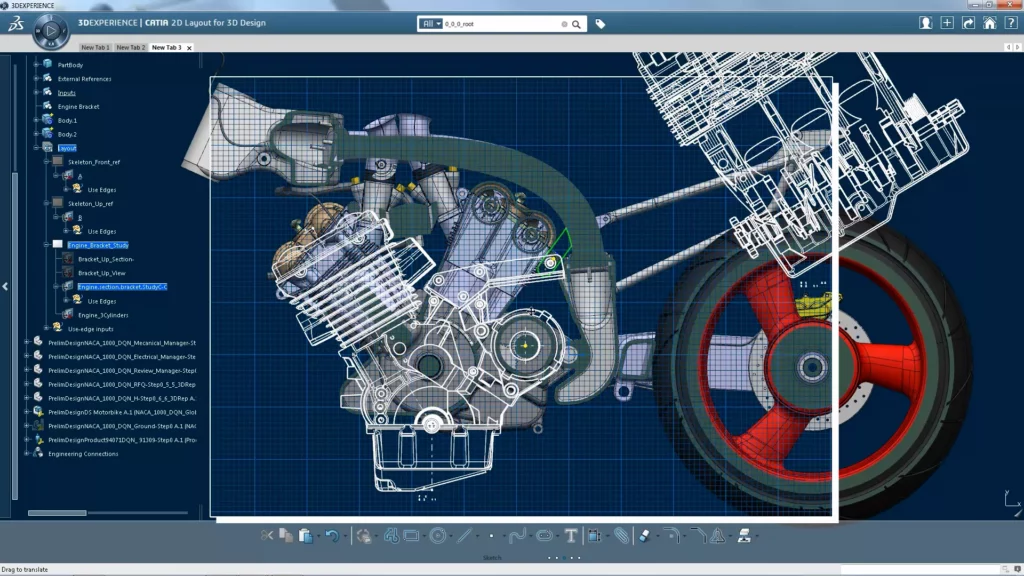
(Image Credit: goengineer)
History and Current Version of CATIA Software
CATIA started as an in-house development at the French aircraft manufacturer Avions Marcel Dassault in 1977. The original goal was 3D modeling for aircraft design—a capability that was novel at the time. Dassault Systèmes eventually commercialized the software, and it spread into aerospace, automotive, and industrial manufacturing.
The platform has passed through multiple major versions, each adding capabilities for virtual prototyping and systems integration. Current users work with CATIA V5, the established release widely adopted across industry, and newer offerings including 3DEXPERIENCE CATIA and CATIA Magic. The 3DEXPERIENCE platform adds digital mockup capabilities within a model-based systems engineering framework, connecting design data to a broader organizational context. An active user community and shared collaboration tools continue to drive adoption and best-practice sharing across the engineering community.
Key Functionalities of CATIA Software
CATIA is organized into specialized workbenches, each targeting a distinct stage of the design and manufacturing process. The sections below cover the major ones: part modeling, assembly modeling, surface modeling, finite element analysis, sheetmetal design, rendering, and engineering drawing creation. All of these workbenches share the same underlying model data, so work done in one area carries directly into the others without manual file transfers or format conversions.
Part Modeling
The Part Modeling workbench is where designers build solid 3D geometry. CATIA supports both parametric and direct modeling techniques, giving teams flexibility to work in the style that fits their process. Parametric modeling stores design intent as a history tree of operations, so changing a dimension upstream propagates automatically through downstream features.
Within the workbench, engineers sketch profiles, create pads and pockets, and build the intricate features that mechanical components require. The same environment handles the full range from small consumer product parts to large aerospace structural components, and the geometry created is directly usable in CATIA V5, V6, and the 3DEXPERIENCE platform. Because the part model is associative, every derived drawing, assembly position, and FEA mesh updates automatically when the base geometry changes—preserving design intent across the entire downstream workflow.
Assembly Modeling
The Assembly Modeling workbench handles multi-part products by letting engineers create and manage complex assemblies and subassemblies. Components are brought together, assembly constraints are applied to define how parts interact, and the resulting structure can be checked for interference or motion.
CATIA’s assembly environment also supports simulation of assembly processes and motion sequences, which helps identify manufacturing or maintenance issues before a physical prototype is built. Integration with ENOVIA keeps all assembly data under version control and accessible to the wider product team. The web-based CATIA 3DEXPERIENCE extends this further, connecting engineering data to teams across the organization beyond the core design group.
Surface Modeling
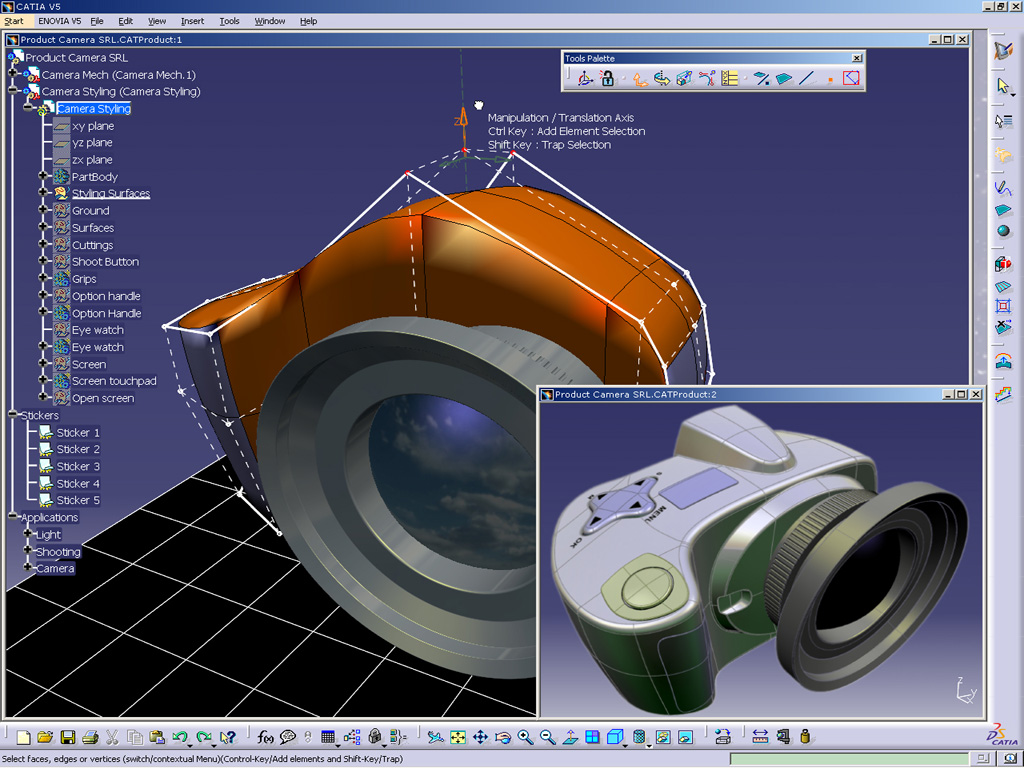
Surface modeling in CATIA handles the creation of complex, free-form geometry that solid modeling alone cannot produce. It is used across a wide range of applications: styling and exterior design, electrical and fluid routing systems, and engineering structures where precise surface continuity is critical. Interstellar Lab’s work on sustainable living systems is one example of an organization applying this capability.
The toolset is carried through CATIA V5, V6, and 3DEXPERIENCE, and its outputs feed directly into CAD/CAM/CAE workflows. CATIA 3DEXPERIENCE incorporates surface modeling into industry solutions for model-based systems engineering, enterprise architecture, and concept development. The result is precise surface geometry that satisfies both functional and aesthetic design requirements simultaneously.
Finite Element Analysis
CATIA’s Finite Element Analysis (FEA) capability lets mechanical engineers evaluate structural behavior without building a physical prototype. Engineers set up load cases and boundary conditions, then run analyses that return stress distribution, deformation, and performance data for components or full assemblies.
This information feeds back into the design loop: engineers can adjust geometry, material selection, or wall thickness in response to FEA results before committing to manufacturing. The process improves structural reliability and reduces unnecessary material. Critically, validating a design virtually before physical prototyping begins means that engineering teams can run more design iterations in less time—each iteration costs computational time rather than fabrication and testing cost—directly improving product quality and reducing time-to-market.
Sheetmetal Part Design
CATIA’s Generative Sheetmetal Design workbench creates associative, feature-based models for sheet metal parts. Because the sheetmetal model is associative, changes to the 3D part update the flat pattern automatically—important for concurrent engineering where the part and its assembly context are being developed in parallel.
The companion Generative Drafting workbench converts these 3D definitions into detailed manufacturing drawings, covering flat developments and bend tables needed for fabrication. Manufacturers benefit from the direct link between design intent and fabrication data: when a part geometry changes, the flat pattern and the associated drawing update automatically rather than requiring a manual redraw. This associativity is especially useful during concurrent engineering phases, where the part and assembly are both being iterated at the same time.
Rendering
CATIA’s rendering tools produce photorealistic visualizations of 3D models by applying textures, lighting, and shadow effects to the geometry. These visualizations serve two practical purposes: design review—letting teams evaluate proportions, surface finishes, and color variants before a prototype is made—and stakeholder communication, where a high-quality render conveys design intent more clearly than a wireframe or neutral 3D view.
Because rendering operates on the same model used for analysis and drawing creation, there is no need to export geometry to a separate visualization tool. The visual output stays synchronized with engineering changes throughout the development cycle. For presentations to clients or non-engineering stakeholders, realistic renders also aid in evaluating whether a design meets both functional requirements and the aesthetic expectations established at the concept stage.
Engineering Drawing Creation
CATIA’s Drafting workbench translates 3D models into the technical drawings that manufacturing teams use on the shop floor. It generates views, sections, and details automatically from the 3D geometry, then allows engineers to add geometric dimensioning and tolerancing (GD&T) annotations in line with drafting standards.
CATIA V5, V6, and 3DEXPERIENCE all include drafting capability, maintaining consistency across organizations that use different versions. Companies like Interstellar Lab apply this workbench to document design intent for structures used in sustainable life solutions. The associative link between the 3D model and the drawing means that when geometry changes, drawing views update rather than requiring a manual redraw, keeping documentation current throughout the product development cycle.
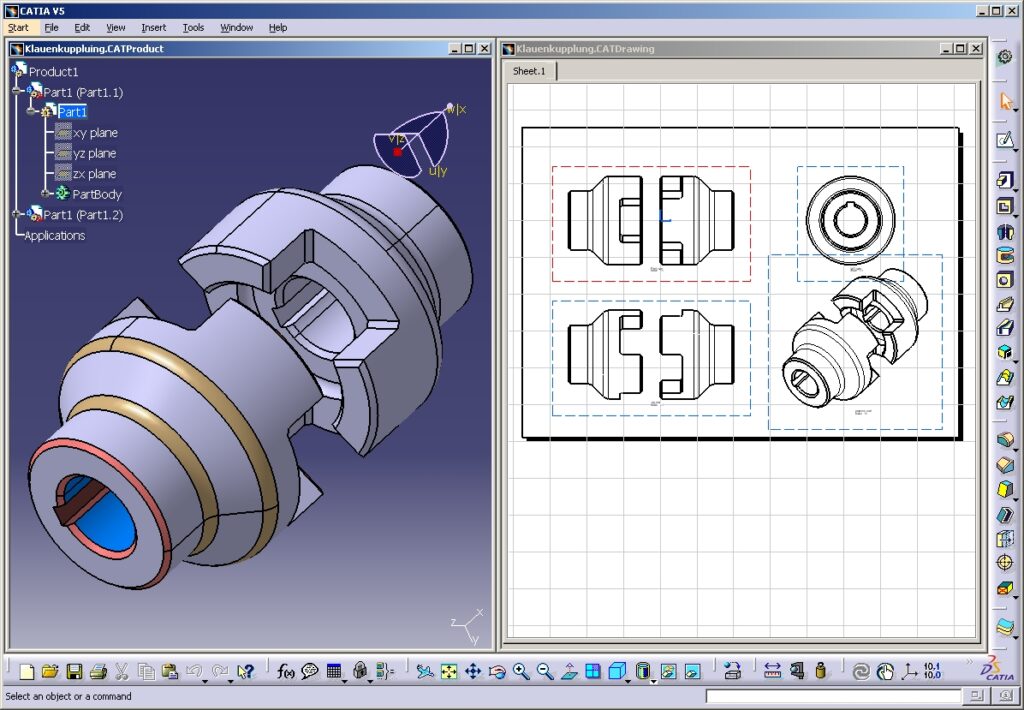
(Image Credit: Wikipedia)
Use CATIA Software in Product Development and Design
CATIA’s workbenches do not operate in isolation—they form a connected workflow that covers 3D modeling, CAD/CAM transitions, generative design, mechanical engineering, simulation, and systems integration. From concept sketching and digital prototyping through to finished manufacturing documentation, the same model data travels the entire chain. The sections below describe how each capability contributes to a product development process.
3D Modeling
CATIA’s parametric 3D modeling is the starting point for most product development work. Engineers build precise three-dimensional representations of parts and assemblies, using these digital models as the source of truth for prototyping decisions and design reviews.
The 3D model connects directly to downstream workbenches: the same geometry used in part modeling feeds into rendering for visualization, into drafting for manufacturing drawings, and into FEA for structural analysis. This associativity eliminates redundant data entry and keeps all deliverables synchronized when design changes occur.
CAD / CAM
CATIA bridges computer-aided design (CAD) and computer-aided manufacturing (CAM) within a single environment. CAD functions handle precise modeling, prototyping, and visualization—the complete process of developing and verifying digital geometry. The CAM side takes that same geometry and generates the toolpaths and manufacturing instructions needed to produce the physical part.
Keeping CAD and CAM in one platform reduces the translation errors that occur when designs move between separate systems. Engineers can iterate on geometry and immediately regenerate manufacturing outputs, cutting the lead time between a design change and updated production documentation. This tight coupling between design and manufacturing is a key reason CATIA is used in industries—such as aerospace and automotive—where design changes late in a program carry high costs.
Check more Mastering 3D Design with Tinkercad: A Beginner’s Guide to Online CAD Modeling
(Image Credit: Wikipedia)
Generative Design
Generative design uses computational algorithms and parametric modeling to produce optimized geometries that a designer working manually would be unlikely to discover. The engineer defines the performance requirements—load cases, spatial constraints, material—and the algorithm generates candidate forms that satisfy those constraints while minimizing weight or material use.
CATIA integrates generative design with its model-based systems engineering framework, so the outputs feed into the same PLM environment as conventional designs. Interstellar Lab uses CATIA’s generative design tools as part of its engineering work on sustainable life solutions—an example of the capability applied to a novel, complex domain.
Mechanical Design
CATIA covers the full breadth of mechanical design disciplines—from initial part geometry through assembly validation, structural analysis, and manufacturing documentation. The platform’s integration of CAD, CAE, and CAM functions means that mechanical engineers work within a single framework rather than moving data between separate specialist tools.
Beyond conventional mechanical design, CATIA’s mechanical workbenches connect to generative design and virtual prototyping. Industrial designers can generate detailed 3D models, run rendering to evaluate appearance, and hand the same geometry off to simulation—all without exporting or converting file formats between steps.
Simulation & Analysis
CATIA’s simulation and analysis capabilities validate designs digitally before any physical part is made. The platform supports virtual prototyping and digital simulation, giving engineers a way to perform design validation against real-world operating conditions. Every aspect of the design can be thoroughly evaluated in this environment before the project moves toward physical production—an important step for engineering analysis that spans structural, dynamic, and thermal behavior.
The finite element analysis tools are central to this environment, enabling virtual structural and thermal testing on components or full assemblies. Engineers use the simulation results to refine models iteratively, confirm that components meet performance targets, and build documentation that supports the product sign-off process before committing to physical production.
Systems Engineering
Systems engineering in CATIA takes a product-level view, connecting the individual disciplines—mechanical design, simulation, manufacturing—into a coherent whole. Rather than treating engineering as a series of isolated steps, systems engineering within CATIA structures the process so that requirements flow into design decisions and then into validation evidence. It supports cross-functional collaboration across all teams involved in a product, not just the core design group, and ties into product lifecycle management processes that span the full product lifespan.
CATIA provides a suite of tools for digital engineering and model-based systems engineering, allowing organizations to manage complex products where mechanical, electrical, and software subsystems interact. Integration with PLM products like ENOVIA keeps all teams—engineering, procurement, production, and others—working from a common, version-controlled data set, ensuring that everyone operates on the same definition of the product at any point in its development.

Conclusion
CATIA’s value comes from its breadth and integration: part modeling, assembly management, surface design, structural analysis, manufacturing documentation, and systems engineering all reside within one PLM-connected environment. That coverage extends to construction, electrical and fluid systems, industrial engineering, and sustainable design work—areas as different as Interstellar Lab’s projects illustrate.
An active user community, training resources including blogs and e-seminars, and formal courses through academic and professional channels mean that students, independent professionals, and enterprise teams all have structured paths to building CATIA competency. Whether you are entering product design or expanding an existing engineering practice, the depth of the platform supports work at any level of complexity.
Frequently Asked Questions
What is CATIA software used for in product development and design?
CATIA is used to create 3D models, perform simulations, analyze designs, and generate technical documentation for various products.
How does CATIA software contribute to streamlining the product development process?
CATIA software facilitates collaborative work among design teams and enables efficient visualization of concepts, leading to faster iterations and reduced time-to-market.
Can CATIA be integrated with other software commonly used in product development?
Yes, CATIA can be integrated with various CAD/CAM/CAE systems as well as enterprise solutions for effective data exchange and interoperability.
What are the practical advantages of utilizing CATIA’s surfacing capabilities in design?
Utilizing CATIA’s surfacing capabilities allows for creating complex shapes, ergonomic designs, and aesthetically appealing product surfaces with precision and efficiency.
How does understanding CATIA software benefit professionals involved in industrial or mechanical design?
Understanding CATIA software equips professionals with advanced tools to optimize designs, reduce errors during manufacturing stages, improve overall quality control processes, and achieve innovative outcomes.

- Independent picks for exactly what you just read about
- Matched to your team size & needs
- Vendors don't pay for placement
Step 1 of 4
How big is your team?
We tailor recommendations to companies your size.















Related Articles
Accounting Software
Xero vs QuickBooks 2026: Pricing, Payroll and Who Each Suits
Continue reading →
Accounting Software
FreshBooks vs QuickBooks 2026: Pricing, Clients, Users and Payroll Compared
Continue reading →
Accounting Software
AI for Accounting in 2026: 8 Use Cases, Tools and Controls for Finance Teams
Continue reading →

Accounting Software
Best QuickBooks Alternatives in 2026: 5 Competitors Compared on Price (Including Free)
Continue reading →