
Doodly vs Vyond vs Create Studio Comparison

Doodly
Starting at $20 /Month
- Medium Business
- Small Business
Doodly is a software package that combines 3D animation, and stop-motion into a versatile animation studio. Animators can manipulate both 2-D and 3-D characters in real time, allowing them to produce quality cartoon anim…

Vyond
Starting at $58 /month
- Free Trial
- Individuals
- Freelancers / Consultants
Vyond is an AI-powered video creation platform designed to help businesses produce high-quality animated videos quickly and easily. Built for L&D professionals, HR teams, marketers, agencies, and enterprise teams, Vyond…

Create Studio
Starting at $99 /Year
- Large Enterprises
- Medium Business
Create Studio is the animation software used by professionals to create quality 3d and 2d shorts, TV series and feature films. Informed by over ten years experience of creating animation software, Create Studio marries t…
Doodly leads on user satisfaction with a 4.1-star rating across 2,250 reviews.
Doodly vs Vyond vs Create Studio — at a glance
| Feature | Doodly | Vyond | Create Studio |
|---|---|---|---|
| Rating | 4.1 / 5 | 3.9 / 5 | 4.9 / 5 |
| Reviews | 2,250 | 153 | 8 |
| Starting price | $20 /Month | $58 /month | $99 /Year |
| Free trial | No | Yes | No |
| Free version | No | No | No |
| Best for | Medium Business, Small Business | Individuals, Freelancers / Consultants, Large Enterprises | Large Enterprises, Medium Business, Small Business |
| Category | Animation Software | Animation Software | Animation Software |
| Platforms | SaaS/Web/Cloud, Mobile - Android, Mobile - iOS | SaaS/Web/Cloud | SaaS/Web/Cloud, Installed - Windows, Installed - Mac |
| API | — | Available | — |
| Support modes | Online | 24/7 (Live rep), Business Hours, Online | 24/7 (Live rep), Online |
| Certifications | — | GDPR | — |
| Data residency | US | Global | US |
Key differences between Doodly and Vyond
- Pricing: Doodly starts at $20 /Month, while Vyond starts at $58 /month.
- Free trial: Vyond offers a free trial; Doodly does not.
- Target audience: Doodly is built for Medium Business and Small Business, while Vyond targets Individuals and Freelancers / Consultants.
- User satisfaction: Doodly scores higher with a 4.1-star average.
- Deployment: Doodly supports SaaS/Web/Cloud, Mobile - Android, Mobile - iOS; Vyond supports SaaS/Web/Cloud.
Compare Doodly vs Vyond vs Create Studio — and walk away knowing which one fits.
Which tool fits your team best
Which is actually cheaper for your team size
Where each product wins, per real buyers
Most Animation Software tools look identical on paper. This comparison cuts to the differences that matter — pricing structure, team fit, and what real buyers found after signing up.
Biggest differences
Features
Pricing
Buying details
Security
Buyer feedback
Integrations
Product tour
Other options
Biggest differences
Start here before you go deeper into features.
Best for easy, quick 2D/3D animated marketing and educational videos.
- You need a simple drag-and-drop tool for fast video creation.
- You want access to a large library of pre-rigged characters.
- You are a small to mid-sized team focused on marketing or education content.
- You require advanced animation customization and professional studio features.
- You want all features included without additional paywalls or extra costs.
Best for creating customizable animated videos for corporate training and marketing.
- You need quick, AI-powered text-to-video creation with rich templates and assets.
- Your team includes instructional designers or marketing managers requiring flexible video tools.
- You want to save branded templates for consistent, repeatable content production.
- You require extensive third-party app integrations for complex workflows.
- Your team consists mainly of beginners without access to onboarding support.
Best for small to medium teams creating professional 2D/3D animated videos quickly.
- You need a powerful yet intuitive animation tool with professional-grade features.
- You want access to a large library of pre-made templates and 3D characters.
- You value regular updates adding new creative assets like characters and backgrounds.
- You require extensive third-party integrations and marketplace connectors.
- You are a beginner needing comprehensive onboarding and simplified setup.
Doodly: Best for easy, quick 2D/3D animated marketing and educational videos. Vyond: Best for creating customizable animated videos for corporate training and marketing.
Description | Doodly is a software package that combines 3D animation, and stop-motion into a versatile animation studio. Animators can manipulate both 2-D and 3-D characters in real time, allowing them ... Read More about Doodly | Vyond is an AI-powered video creation platform designed to help businesses produce high-quality animated videos quickly and easily. Built for L&D professionals, HR teams, marketers, ... Read More about Vyond | Create Studio is the animation software used by professionals to create quality 3d and 2d shorts, TV series and feature films. Informed by over ten years experience of creating animation ... Read More about Create Studio |
|---|---|---|---|
Entry Level Pricing |
|
|
|
Free Trial Availability |
|
| |
Spotsaas ScoreWhat's this? ↗ | 8.4/10 | 9.8/10 | 9.0/10 |
User RatingsBased on verified Spotsaas reviews | |||
Best Company Size | 1-50 employees51-500 employees | 51-500 employees1001+ employees | Small BusinessMedium Business |
Get pricing help | Get pricing help | Get pricing help |
Where each option fits best
See where each product is strongest, which teams it fits, and what causes buyers to keep looking — before you commit.
Based on buyer reviews and verified product data collected by Spotsaas.
Key strengths
No key benefits available yet.
- Rapid video creation: Drag-and-drop interface and robust asset library let users produce polished animations within minutes
- Brand consistency: Users can save branded backdrops, fonts, and characters as templates, enabling cohesive and efficient content reuse
- Integrated AI capabilities: Tools like lip-sync, AI avatars, and text-to-video generators accelerate production and reduce dependency on external voice actors
No key benefits available yet.
Best fit
No best-fit guidance available yet.
- 10–1,000+ Employee.
- E‑learning, corporate training, marketing, HR, sales, consultants
- eLearning Specialists, Training Managers, Marketing Managers, HR Directors, Instructional Designers.
No best-fit guidance available yet.
Reasons buyers look elsewhere
No alternatives guidance available yet.
- Despite a large library, some users find animations become repetitive over time, prompting switches to platforms offering more varied visual styles
- Vyond’s subscription cost can be prohibitive for freelancers and small teams compared to more affordable or one-time purchase options
- Lack of real-time multi-user editing makes teamwork cumbersome; users often export and share outside the platform
No alternatives guidance available yet.
Software Demo
Demo |
|---|
Need a second opinion?
Get shortlist help from a software advisor
Share your priorities, budget, and team needs, and we’ll help you narrow the options and understand the tradeoffs before you talk to vendors.
How do Doodly, Vyond and Create Studio Compare on Features?
Total Features | 5 Features | 11 Features | 10 Features |
|---|---|---|---|
Unique Features | No unique features | No unique features | No unique features |
Get Quote | Get Quote | Get Quote |
Compare Doodly, Vyond and Create Studio on pricing
Review starting price, plan structure, and free-trial access side by side so you can see which option fits your budget and buying process.
Pricing Option | |||
|---|---|---|---|
Starting From |
|
|
|
Pricing Plans |
|
|
|
Pricing Page |  | 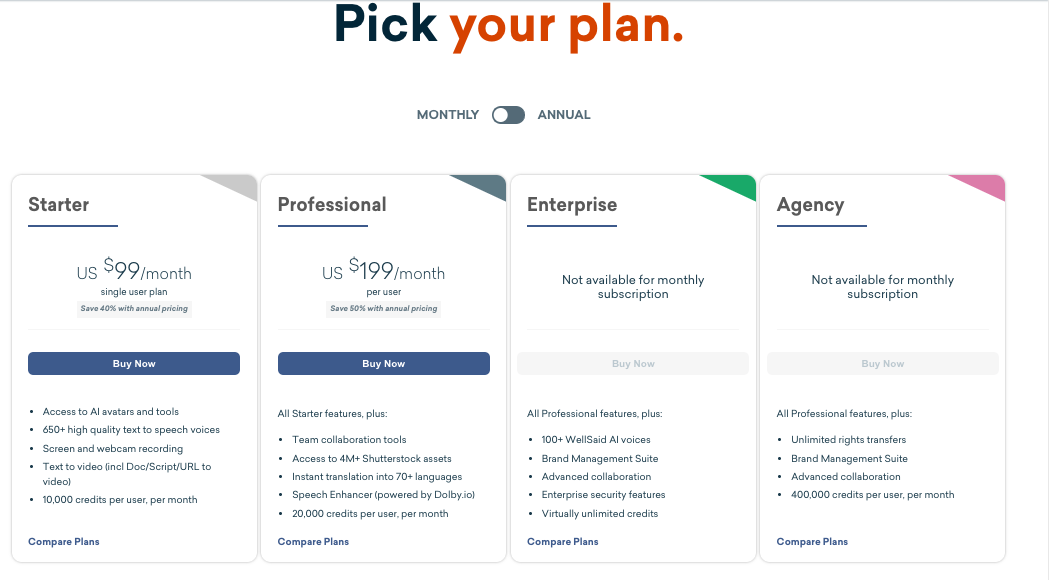 |  |
Other Details
Organization Types supported |
|
|
|
|---|---|---|---|
Platforms Supported |
|
|
|
Modes of support |
|
|
|
API Support |
|
|
|
Get help choosing | Get help choosing | Get help choosing |
Security & Compliance
Certifications, data handling, and security controls for IT and compliance evaluators.
HIPAA | ✗ No | ✗ No | ✗ No |
|---|---|---|---|
GDPR | — | ✓ Yes | — |
Data Residency | 🇺🇸 US | 🌐 Global | 🇺🇸 US |
Doodly vs Vyond User Reviews & Rating Comparison
User Ratings | |||
|---|---|---|---|
Rating Distribution | |||
Spotsaas Editor’s POV generated by AI | Buyer sentiment Users generally praise Doodly for its ease of use and effective drag-and-drop animation capabilities, though some express concerns about feature limitations and additional costs. What buyers like
Common complaints
| Buyer sentiment Buyers generally appreciate Vyond’s ease of use and customization but note a learning curve and some limitations in integrations. What buyers like
Common complaints
| Buyer sentiment Users overwhelmingly praise Create Studio for its ease of use, powerful animation features, and continuous content updates, though some find the feature set overwhelming and desire more marketplace options. What buyers like
Common complaints
|
Pros and Cons |
|
|
|
Positive Reviews | No reviews available for the product | No reviews available for the product | No reviews available for the product |
List of Customers
Customers | No Customers information available. |  Amazon  Microsoft  | No Customers information available. |
|---|
Media and Screenshots
Screenshots |  1 Screenshots |  1 Screenshots | No screenshots available. |
|---|---|---|---|
Videos |  2 Videos |  4 Videos |  2 Videos |
Alternatives
Alternatives |
|---|


Add another option to compare side by side
Search by product name to compare pricing, fit, and buyer feedback in one view.Compare similar software options


Related Blogs and Articles for Animation Software

Disclaimer: This research has been collated from a variety of authoritative sources. We welcome your feedback at [email protected].
Frequently asked questions
- Which is better, Doodly or Vyond?
- Doodly edges out the other on user ratings (4.1 vs 3.9). That said, the best pick depends on your use case — use the comparison tables above to evaluate each dimension.
- Do Doodly and Vyond offer a free trial?
- Vyond offers a free trial. Doodly does not.
- What is the starting price of Doodly vs Vyond?
- Doodly starts at $20 /Month. Vyond starts at $58 /month.
- What are the top alternatives to Doodly?
- Top alternatives to Doodly include Animoto, Animatron Studio, Animaker, Vyond, Explee.
- What are the top alternatives to Vyond?
- Top alternatives to Vyond include Renderforest, Camtasia, Animatron Studio, Animaker, Doodly.